As organizations continue their digital transformation journeys, Salesforce has become a critical platform for managing customer relationships, automating processes, and driving business growth. However, many businesses face a common challenge: how to connect Salesforce with existing systems or move entirely from legacy platforms to Salesforce.
This often leads to an important question:
Should your business choose Salesforce integration or Salesforce migration?
While both approaches aim to improve business operations and data accessibility, they serve different purposes and deliver different outcomes. Choosing the wrong strategy can result in increased costs, operational disruptions, and missed opportunities.
This guide explores Salesforce integration vs. migration, their benefits, challenges, use cases, and how to determine the best approach for your business.
Defining the Terms: What Integration and Migration Actually Mean
What is Salesforce Integration?
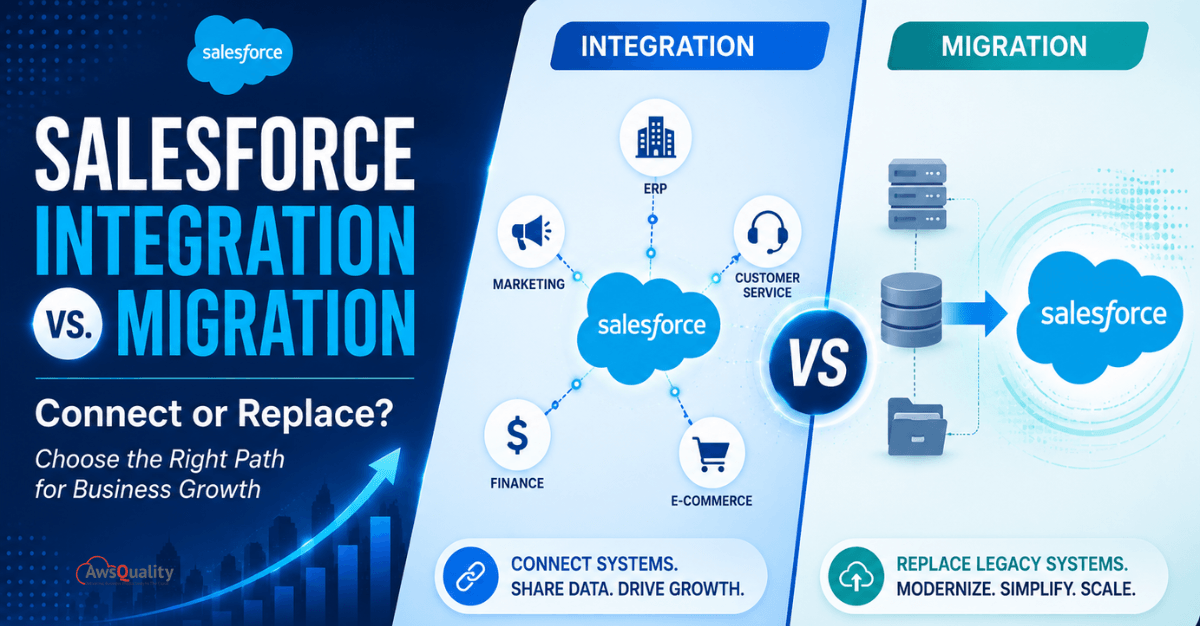
Salesforce integration is the process of connecting Salesforce with other business systems — ERP, accounting, marketing automation, customer service, e-commerce, HR, and more — so that data flows automatically between systems in real time or near-real time.
Integration is ideal for enhancing and extending the capabilities of existing systems without replacing them. The existing system stays in place. Salesforce stays in place. A connection is built between them — through native connectors, middleware platforms like MuleSoft, or prebuilt AppExchange solutions — so that each system has access to the other’s data without manual re-entry.
What integration does:
- Synchronizes records between Salesforce and external systems (bidirectional or unidirectional)
- Triggers automated workflows across systems when events occur (deal closes → invoice generated)
- Creates a unified customer view in Salesforce from data living in multiple external systems
- Eliminates manual data entry at system handoff points
What integration does not do:
- Replace an external system or retire a legacy platform
- Move historical data permanently from one system to another
- Consolidate duplicate capabilities across multiple platforms into one
- Resolve the cost of maintaining multiple system licenses and teams
What is Salesforce Migration?
Salesforce migration entails transferring data and processes from a legacy system to Salesforce. This strategy is suitable for organizations aiming to replace outdated systems with Salesforce’s advanced functionalities, ensuring data accuracy, accessibility and modernization.
Migration moves historical records, process configurations, and user workflows from a legacy or competing CRM — or any other system being decommissioned — into Salesforce. After migration, the source system is typically retired. Salesforce becomes the system of record for all data and processes that previously lived in the migrated platform.
What migration does:
- Transfers historical records (contacts, accounts, opportunities, cases, transactions) into Salesforce
- Configures Salesforce to replicate or improve upon the processes the legacy system supported
- Enables decommissioning of the legacy system, eliminating its maintenance costs and licensing
- Creates a single authoritative system for data that previously lived in the retired platform
What migration does not do:
- Connect Salesforce to other operational systems that remain in use
- Eliminate the need for integration with surrounding systems (ERP, accounting, e-commerce remain)
- Guarantee that migrated data is clean — data quality problems in the source migrate with the records
- Automatically replicate complex business logic from the legacy system in Salesforce
Read: Salesforce Health Check: Why Your CRM Might Be Underperforming
Salesforce Integration vs. Migration: Key Differences
| Dimension | Salesforce Integration | Salesforce Migration |
|---|---|---|
| Purpose | Connect systems | Replace systems |
| Existing Software | Retained | Replaced |
| Data Flow | Continuous synchronization | One-time or phased transfer |
| Complexity | Medium to High | High |
| Business Disruption | Minimal | Moderate to High |
| Time to Value | Faster | Longer |
| Long-Term Maintenance | Ongoing integrations | Simplified environment |
| Cost Structure | Integration costs | Migration and implementation costs |
Benefits of Salesforce Integration
Preserve Existing Investments
Many organizations have already invested heavily in ERP, accounting, or operational systems.
Integration allows businesses to leverage those investments while adding Salesforce capabilities.
Improve Data Visibility
Integrated systems provide real-time access to information across departments.
Benefits include:
- Better reporting
- Improved forecasting
- Faster decision-making
Automate Workflows
Salesforce integrations can automate:
- Lead routing
- Invoice creation
- Customer onboarding
- Order processing
reducing manual effort.
Faster Implementation
Compared to full migration projects, integration often delivers value more quickly.
Organizations can enhance existing systems without major operational disruptions.
Also read: Salesforce Sales Cloud vs Service Cloud – Key Differences and Benefits
Benefits of Salesforce Migration
Eliminate Legacy Systems
Migration removes dependence on outdated software that may:
- Be costly to maintain
- Lack modern capabilities
- Create security risks
Create a Unified Platform
Salesforce migration enables organizations to consolidate:
- Customer data
- Sales processes
- Service operations
- Reporting
into a single environment.
Improve User Experience
Employees no longer need to switch between multiple platforms.
This increases:
- Productivity
- Adoption
- Operational efficiency
Reduce Long-Term Complexity
Maintaining multiple disconnected systems often creates technical debt.
Migration simplifies technology ecosystems.
When Salesforce Integration is the Better Choice
Integration is typically the right approach when:
Existing Systems Still Deliver Value
If your ERP, accounting platform, or specialized software works well, replacing it may not make financial sense.
Integration allows those systems to continue operating while sharing data with Salesforce.
Multiple Teams Depend on Different Platforms
Some departments require specialized software.
Examples:
- Finance uses ERP systems
- Marketing uses automation platforms
- Sales uses Salesforce
Integration keeps these systems connected.
You Need Faster Results
Integration projects often provide quicker returns than full migrations.
Organizations can automate workflows and improve visibility without large-scale system replacements.
Regulatory or Operational Constraints Exist
Certain industries depend on highly specialized systems that cannot easily be replaced.
Integration provides flexibility while maintaining compliance.
Check: Customizing and Branding Salesforce for a Better Customer Experience
When Salesforce Migration is the Better Choice
Migration is often the preferred strategy when:
Legacy Systems Are Obsolete
Older systems may:
- Lack support
- Create security vulnerabilities
- Limit innovation
Migration enables modernization.
Data is Fragmented Across Multiple Systems
Organizations using several disconnected tools may benefit from consolidation.
Migration helps establish a single source of truth.
User Adoption Is Poor
Complex or outdated platforms often reduce productivity.
Migrating to Salesforce can improve user experiences and operational efficiency.
Scalability is a Priority
As businesses grow, maintaining multiple disconnected systems becomes increasingly difficult.
Migration supports long-term scalability.
The Hybrid Approach: When You Need Both
Many organizations discover that the integration vs. migration framing is a false binary. The reality of most enterprise technology decisions is that some systems should be migrated into Salesforce and others should be integrated with it simultaneously.
A typical hybrid scenario:
- Migrate: The legacy CRM that duplicates Salesforce contact and opportunity management — consolidate into Salesforce and decommission the legacy system
- Integrate: The ERP that manages inventory, manufacturing, and complex financials — connect to Salesforce but keep in place
- Integrate: The accounting platform that generates invoices and tracks payments — connect for finance visibility but keep as the financial system of record
- Migrate (via Data Cloud): Large historical datasets in a data warehouse — federate through Data Cloud rather than migrating into Salesforce objects
Post-migration synchronization architecture should be designed during the scoping phase, not after go-live, with clear rules defining which system is authoritative for each data domain and how conflicts are resolved when records are updated from multiple sources.
The hybrid approach requires careful architectural planning — defining for each data element which system is the source of truth, which direction data flows, and how conflicts between systems are resolved. This architectural clarity, established before implementation, is what separates hybrid projects that work from those that create more complexity than they resolve.
Also check: How Salesforce Helps SaaS Companies Scale Faster
Salesforce Integration Use Cases
Sales and ERP Integration
Synchronize:
- Orders
- Inventory
- Pricing
- Customer records
Benefits:
- Real-time visibility
- Faster fulfillment
Salesforce and Marketing Automation
Connect:
- Campaign data
- Lead scoring
- Engagement metrics
Benefits:
- Better lead management
- Improved conversion rates
Salesforce and E-Commerce Integration
Synchronize:
- Customers
- Products
- Orders
- Purchase history
Benefits:
- Personalized experiences
- Enhanced customer insights
Salesforce Migration Use Cases
Legacy CRM Replacement
Organizations replace outdated CRM platforms with Salesforce.
Benefits:
- Modern capabilities
- Improved reporting
- Enhanced automation
Spreadsheet-Based Operations
Many growing businesses initially manage customer data through spreadsheets.
Migration centralizes information within Salesforce.
Multi-System Consolidation
Businesses operating multiple CRMs often migrate to Salesforce to standardize processes.
Read: WhatsApp for Salesforce – Transform Customer Conversations Without Leaving Your CRM
Challenges of Salesforce Integration
Data Mapping Complexity
Different systems often use different data structures.
Solution
Establish clear mapping and transformation rules.
API Limitations
Some applications have usage restrictions.
Solution
Optimize synchronization frequency and architecture.
Security Considerations
Sensitive information must be protected.
Solution
Implement secure authentication and encryption.
Challenges of Salesforce Migration
Data Quality Issues
Migrating poor-quality data creates future problems.
Solution
Clean and validate data before migration.
User Resistance
Employees may resist platform changes.
Solution
Provide training and change management programs.
Downtime Risks
Poorly planned migrations can disrupt operations.
Solution
Use phased migration strategies.
Common Mistakes in Both Strategies
Mistakes in Integration Projects
Over-integrating: Connecting every system to every other system creates a fragile web of dependencies where a change in any system can break multiple integrations. Connect strategically — integrate where data sharing creates measurable business value.
Ignoring data quality: Real-time integration propagates bad data in real time. A contact with a malformed email address in your marketing platform syncs that bad address into Salesforce immediately. Data quality standards must be established in both systems before integration goes live.
Not monitoring the integration post-launch: Integrations fail silently — a token expires, an API version is deprecated, a field mapping breaks. Every production integration needs active monitoring with alerting when sync fails or produces unexpected data volumes.
Building point-to-point instead of hub-and-spoke: Direct point-to-point integrations between each pair of systems create exponential maintenance complexity as the number of systems grows. A centralized integration platform (MuleSoft, Boomi, Workato) with Salesforce as the hub is more sustainable.
Mistakes in Migration Projects
Migrating dirty data: While data integration and migration to Salesforce can pave the way for more informed decision-making and increased business profitability, only adopters with robust data management strategies and practices fully realize these benefits. The most common migration failure mode is migrating without adequate data cleansing — duplicate records, invalid field values, and incomplete data migrate with the records and contaminate the new system.
Underestimating change management: Users moving from a legacy system to Salesforce face workflow changes that require training, communication, and support. Projects that focus entirely on technical migration and underinvest in user adoption consistently see lower post-migration utilization.
Not testing restore procedures: Every migration needs a validated rollback plan — a tested procedure for reverting to the source system if the migration fails at cutover. The rollback plan should be tested in staging before go-live, not designed reactively during a live failure.
Missing post-migration integration requirements: A successfully migrated CRM still needs to integrate with the ERP, accounting, and marketing systems that surround it. Post-migration integration architecture should be designed during the scoping phase, not after go-live.
Also read: Salesforce Goes Multi-Framework — And React is Just the Beginning
How to Decide: Integration or Migration?
Ask the following questions:
Is the current system still valuable?
If yes, integration may be the better option.
Is the system outdated or difficult to maintain?
If yes, migration is likely the better solution.
Do you need specialized functionality?
If yes, integration often makes more sense.
Are you trying to simplify your technology stack?
If yes, migration may provide greater long-term benefits.
What is your budget and timeline?
Integration often delivers faster results.
Migration may require larger investments but generate long-term efficiencies.
Future Trends in Salesforce Modernization
Several trends are influencing integration and migration strategies:
AI-Powered Data Mapping
Artificial intelligence is simplifying migration and integration processes.
Real-Time Connectivity
Organizations increasingly expect instant synchronization across systems.
Low-Code Integration Platforms
Tools like MuleSoft, Workato, and Boomi accelerate implementation.
Composable Architectures
Businesses are building flexible ecosystems that combine migration and integration approaches.
Frequently Asked Questions
What is the difference between Salesforce integration and migration?
Integration connects Salesforce with other systems, while migration moves data and operations into Salesforce and often replaces existing platforms.
Is integration cheaper than migration?
Integration often requires lower upfront investment, but ongoing maintenance costs may apply.
Can businesses use both integration and migration?
Yes. Many organizations adopt a hybrid approach that combines migration and integration.
How long does Salesforce migration take?
Timelines vary depending on data volume, complexity, and business requirements.
When should a company migrate instead of integrate?
Migration is generally preferable when legacy systems are outdated, costly, or no longer support business growth.
Conclusion
There is no one-size-fits-all answer to the Salesforce integration vs. migration debate.
Integration is ideal for organizations that want to preserve valuable systems while improving connectivity and automation. Migration is best suited for businesses looking to modernize operations, eliminate legacy technology, and create a unified platform.
For many growing businesses, the most effective strategy is often a combination of both—migrating where necessary and integrating where valuable.
By carefully evaluating your business goals, existing technology investments, operational requirements, and future growth plans, you can choose a Salesforce strategy that delivers long-term success and maximizes your CRM investment.
 Bio
Bio