
12 Artificial Intelligence (AI) Solutions Every CTO Should Explore
 Mohammad Usman 26 min read
Artificial intelligence (AI) is becoming an important part of how businesses build software, manage data, serve customers, and improve operational efficiency. From predictive analytics and intelligent automation to generative AI assistants and AI agents, organizations have more opportunities than ever to integrate AI into their technology strategies.
For a Chief Technology Officer (CTO), however, adopting AI involves more than selecting a model or launching a chatbot. It requires identifying valuable business use cases, evaluating technical feasibility, protecting sensitive data, integrating AI with existing systems, and measuring outcomes after deployment.
The right AI solution can help development teams work more efficiently, improve customer experiences, accelerate decision-making, and reduce repetitive manual work. The wrong implementation can introduce unnecessary costs, security risks, unreliable outputs, and additional complexity.
The best AI strategy starts with a business problem, not the technology itself. CTOs should evaluate AI solutions based on measurable value, data readiness, integration requirements, scalability, security, and long-term maintenance.
In this guide, we explore 12 artificial intelligence solutions every CTO should consider, their practical business applications, and the factors to evaluate before implementing them.
What are AI Solutions?
AI solutions are software applications, platforms, models, or integrated systems that use artificial intelligence techniques to perform tasks that typically require human intelligence. These tasks can include understanding language, recognizing patterns, generating content, predicting outcomes, interpreting images, and supporting decisions.
AI solutions can use different technologies depending on the problem they address.
- Machine learning (ML): Identifies patterns in data and uses them to make predictions or classifications.
- Generative AI: Produces new content, including text, code, images, and summaries.
- Natural language processing (NLP): Helps systems interpret and process human language.
- Computer vision: Enables systems to analyze images and video.
- Intelligent automation: Combines AI with workflows to reduce manual tasks.
- AI agents: Use models, tools, and defined permissions to complete multistep tasks with varying degrees of autonomy.
These technologies can work independently or together. For example, an enterprise customer support platform might use NLP to understand a question, retrieval-augmented generation (RAG) to find relevant company information, and a workflow engine to create a support ticket.
For CTOs, understanding these distinctions helps determine which technology is appropriate for a particular business requirement.
Read: How AI-powered customer service automation reduces costs without hurting CX
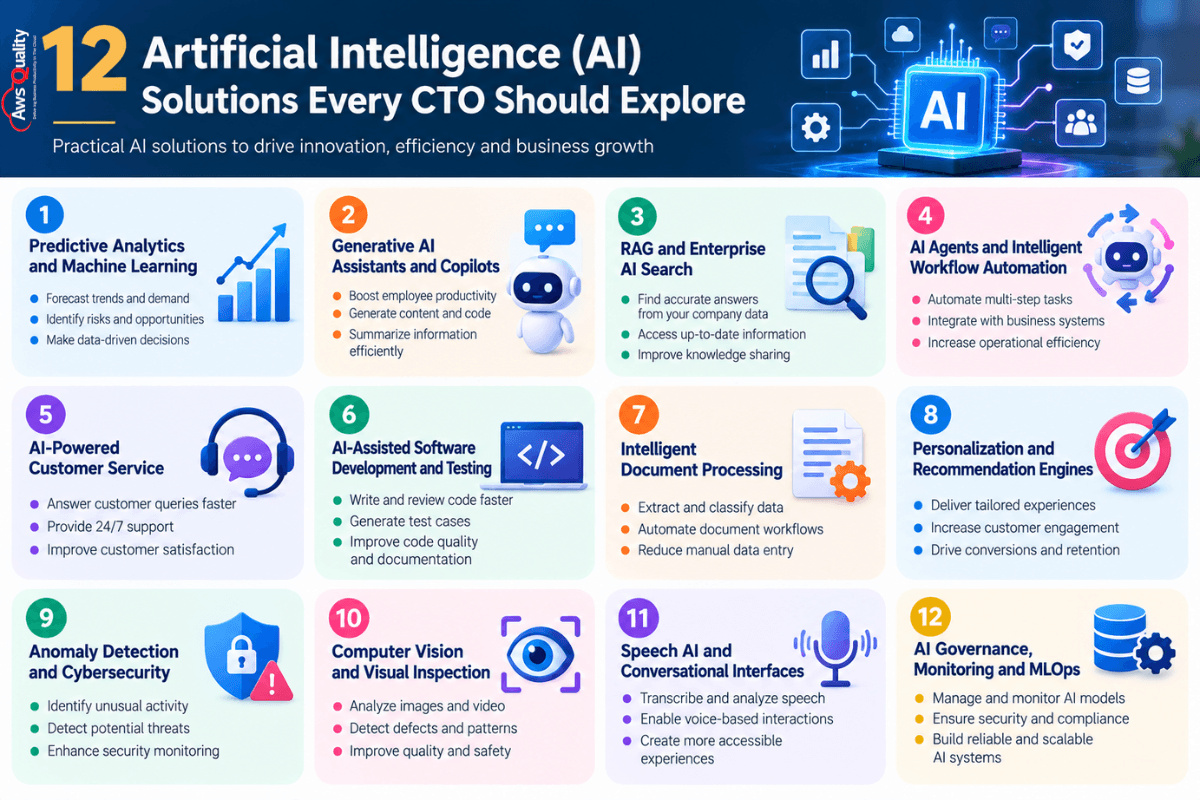
12 AI Solutions Every CTO Should Explore
1. Predictive Analytics and Machine Learning
Predictive analytics uses historical and current data to estimate future outcomes. Machine learning models can identify patterns that help organizations anticipate customer behavior, operational risks, demand fluctuations, and business performance.
Unlike traditional reporting, which explains what has already happened, predictive analytics can help businesses estimate what may happen next.
Common use cases
- Sales forecasting and revenue predictions.
- Customer churn prediction.
- Demand and inventory forecasting.
- Predictive maintenance.
- Risk scoring and fraud detection.
- Capacity planning and resource allocation.
Example: A software company can analyze customer usage patterns, support tickets, renewal history, and subscription changes to identify accounts that may be at risk of cancellation. Customer success teams can then prioritize outreach before renewal.
What CTOs should evaluate
Predictive models depend on relevant, representative, and sufficiently reliable data. CTOs should assess data availability, model performance, bias, explainability, and how frequently predictions need to be refreshed.
They should also establish a process for monitoring whether model performance deteriorates as customer behavior or market conditions change.
Business value: Better forecasting, more informed decisions, and earlier identification of potential business risks.
2. Generative AI Assistants and Copilots
Generative AI assistants help employees perform tasks using natural-language instructions. Depending on their design, these tools can draft content, summarize information, explain code, answer questions, and support everyday work.
A copilot typically assists a person within an existing workflow rather than independently managing the entire process.
Common use cases
- Summarizing lengthy documents and meetings.
- Drafting emails, reports, and proposals.
- Generating SQL queries or code suggestions.
- Helping employees find internal information.
- Preparing project updates and technical documentation.
- Supporting product, sales, and customer success teams.
Example: A CTO can introduce an internal engineering copilot that helps developers understand documentation, summarize pull requests, and draft test cases. Developers remain responsible for reviewing the output and approving changes.
What CTOs should evaluate
Before deployment, assess data privacy, access controls, model quality, usage costs, and integration with existing applications. Employees should understand that AI-generated content can contain errors and may require human verification.
For enterprise applications, the assistant should respect existing permissions so users cannot retrieve information they are not authorized to access.
Business value: Faster information processing, reduced repetitive work, and improved employee productivity.
3. Retrieval-Augmented Generation (RAG) and Enterprise AI Search
Retrieval-augmented generation, commonly known as RAG, combines a generative AI model with a retrieval system that searches relevant information before generating an answer.
Instead of relying only on information learned during training, a RAG application can retrieve relevant content from approved company documents, knowledge bases, product manuals, policies, and other data sources.
This makes RAG particularly useful for businesses that need answers grounded in their own information.
Common use cases
- Internal knowledge assistants.
- Customer support knowledge systems.
- Technical documentation search.
- Employee onboarding assistants.
- Policy and procedure lookup.
- Search across large collections of business documents.
Example: An IT services company can build an internal assistant that searches approved architecture documents, troubleshooting guides, and project documentation. An engineer can ask a question in plain English and receive an answer with references to the relevant sources.
What CTOs should evaluate
Important considerations include document quality, indexing, retrieval accuracy, data freshness, permission-aware search, source citations, and resistance to prompt injection. The system should also be tested for incorrect answers and inappropriate disclosure of retrieved information.
AWS Prescriptive Guidance describes RAG assistants as a practical enterprise pattern for applications such as internal knowledge management and customer support. Its guidance also highlights the importance of data freshness and retrieval costs as deployments scale. Read the AWS enterprise generative AI guidance.
Business value: Faster access to organizational knowledge, less time spent searching documents, and more consistent information retrieval.
4. AI Agents and Intelligent Workflow Automation
AI agents can use models, tools, APIs, and defined instructions to complete multistep tasks. Depending on their configuration, they may gather information, decide which action to take, call an approved system, and return a result for review.
Unlike a simple chatbot, an agent may interact with business applications to advance a workflow. However, the level of autonomy should be determined by the risk and complexity of the task.
Common use cases
- IT service request triage.
- Customer support case routing.
- Lead qualification and CRM updates.
- Document review and information extraction.
- Multi-step research and report preparation.
- Workflow orchestration across connected applications.
Example: An IT support agent could classify an incoming request, search the internal knowledge base, suggest troubleshooting steps, and prepare a ticket with the relevant details. A human technician can review the recommendation before the system takes a sensitive or disruptive action.
What CTOs should evaluate
AI agents require careful controls around permissions, tool access, authentication, action approval, error handling, and audit logs. CTOs should also consider what happens when an agent encounters ambiguous instructions, unavailable systems, or unexpected outputs.
Begin with a narrow workflow and limited permissions. Require human approval for high-impact actions such as deleting data, changing production infrastructure, or approving financial transactions.
Business value: Reduced manual coordination, faster task completion, and improved workflow efficiency.
Also read: How AI Agents and Salesforce are Redefining Customer Service
5. AI-Powered Customer Service and Virtual Assistants
AI-powered customer service solutions can understand customer questions, retrieve relevant information, classify requests, suggest responses, and assist human support representatives.
They can be deployed through websites, mobile applications, messaging channels, and contact center platforms.
Common use cases
- Answering frequently asked questions.
- Providing product and account guidance.
- Routing requests to the right team.
- Summarizing customer conversations.
- Suggesting responses to support agents.
- Identifying recurring customer complaints.
Example: A SaaS company can use a virtual assistant to answer questions about account setup, billing procedures, and common technical issues. When the request requires account-specific investigation or human judgment, the assistant can transfer the conversation to a support representative with a summary of the interaction.
What CTOs should evaluate
The system should be assessed for answer accuracy, response time, escalation quality, customer privacy, integration with ticketing or CRM platforms, and performance under peak demand.
CTOs should avoid measuring success only by the number of conversations handled by AI. Customer satisfaction, resolution quality, repeat contact rates, and successful human handoffs are equally important.
Business value: Faster responses, improved support capacity, and more consistent customer service when the solution is appropriately designed.
6. AI-Assisted Software Development and Testing
AI development tools can support software engineers throughout the development lifecycle. Depending on the tool, they may suggest code, explain unfamiliar functions, generate unit tests, summarize code changes, or help investigate defects.
These capabilities can reduce repetitive coding tasks, but they do not eliminate the need for software engineering judgment.
Common use cases
- Code completion and generation.
- Unit test generation.
- Code explanation and documentation.
- Refactoring suggestions.
- Bug investigation.
- Test case creation.
- Pull request summaries and code review assistance.
Example: A development team can use an AI coding assistant to draft unit tests for a new API endpoint. Engineers then review the tests, add missing edge cases, run them in the existing pipeline, and verify that the implementation meets security and performance requirements.
What CTOs should evaluate
Review code quality, test coverage, developer experience, licensing requirements, source code handling, and the risk of introducing vulnerable or incorrect code.
AI-generated code should follow the same security scanning, code review, testing, and release requirements as manually written code. Teams should measure whether the tools improve delivery outcomes rather than relying solely on code volume or perceived speed.
Business value: Potentially faster development cycles, improved documentation, and reduced time spent on repetitive engineering tasks.
Check: Chatbots vs AI Agents – Which One Does Your Business Actually Need?
7. Intelligent Document Processing
Intelligent document processing uses AI to extract, classify, summarize, and validate information from documents. It can combine optical character recognition (OCR), machine learning, language models, and business rules.
This is useful when employees need to process large volumes of semi-structured or unstructured information.
Common use cases
- Invoice and purchase order processing.
- Contract data extraction.
- Insurance claim document review.
- Customer onboarding documentation.
- Expense receipt processing.
- Forms and application processing.
Example: A finance team receives invoices in different formats. An AI document-processing solution can extract vendor names, invoice numbers, dates, line items, and totals, then pass the extracted information to an accounting system for validation.
What CTOs should evaluate
Assess extraction accuracy, document variability, exception handling, auditability, and integration with downstream systems. Sensitive documents should be processed using approved security and retention controls.
For financial or contractual workflows, uncertain results should be routed for human verification rather than automatically accepted.
Business value: Less manual data entry, faster document processing, and improved consistency in repetitive administrative work.
8. AI-Powered Personalization and Recommendation Engines
Personalization solutions use customer behavior, preferences, context, and other permitted data to tailor recommendations or experiences.
These systems can help businesses present more relevant content, products, services, or next steps. Depending on the use case, they may use collaborative filtering, content-based recommendations, predictive models, or generative AI.
Common use cases
- Product recommendations in e-commerce.
- Personalized content and offers.
- Relevant product suggestions in SaaS applications.
- Customer engagement campaigns.
- Personalized learning experiences.
- Next-best-action recommendations for sales teams.
Example: An online retailer can analyze browsing behavior and previous purchases to recommend products that are relevant to a shopper’s interests. The recommendation engine can be evaluated through controlled experiments rather than assuming that more personalization always improves results.
What CTOs should evaluate
Consider data consent, privacy, recommendation relevance, latency, scalability, bias, and the risk of repeatedly showing customers the same types of products. The solution should also be evaluated for its impact on conversion, retention, revenue, or another defined business metric.
Business value: More relevant customer experiences and potential improvements in engagement and conversion when recommendations are useful and appropriately targeted.
Also check: How AI Agents Can Reduce Operational Costs for Businesses
9. AI-Powered Anomaly Detection and Cybersecurity
Anomaly detection systems identify patterns that differ from expected behavior. In cybersecurity, AI can help analyze large volumes of activity and highlight unusual events that may warrant investigation.
These systems can support security teams, but an anomaly is not automatically evidence of an attack.
Common use cases
- Detecting unusual login behavior.
- Identifying suspicious account activity.
- Monitoring network and application events.
- Flagging abnormal transaction patterns.
- Identifying unexpected infrastructure usage.
- Prioritizing security alerts.
Example: A cloud operations team can use anomaly detection to identify an unexpected increase in API traffic or infrastructure consumption. Engineers can investigate whether the event is caused by a legitimate workload change, a software defect, misconfiguration, or potentially malicious activity.
What CTOs should evaluate
Review false-positive and false-negative rates, data visibility, alert prioritization, explainability, integration with security monitoring tools, and the process for escalating incidents.
AI should complement established security controls rather than replace identity management, access restrictions, secure development practices, and incident response procedures.
Business value: Earlier visibility into unusual activity and better prioritization of investigation efforts.
10. Computer Vision and Visual Inspection
Computer vision enables software to interpret images and video. Depending on the application, it can classify objects, identify visual defects, read text from images, or detect changes in visual patterns.
Its usefulness depends on the quality of the image data, the operating environment, and the consequences of an incorrect result.
Common use cases
- Manufacturing quality inspection.
- Defect detection in product images.
- Inventory and asset monitoring.
- Document and image classification.
- Visual inspection in logistics.
- Safety monitoring in controlled environments.
Example: A manufacturer can use computer vision to flag products with visible surface defects on a production line. The system can direct uncertain cases to a human inspector, while the organization monitors missed defects and incorrect alerts.
What CTOs should evaluate
Assess image quality, lighting conditions, model accuracy, inference speed, hardware requirements, privacy, and the consequences of classification errors.
Applications involving safety or regulated decisions may require more extensive validation, documented controls, and human review.
Business value: Faster visual inspection, more consistent screening, and potential reductions in manual inspection effort.
Check out: Why Agentic AI is the Next Big Enterprise Challenge for CTOs
11. Speech AI and Conversational Voice Interfaces
Speech AI enables systems to process spoken language or generate audio responses. Depending on the application, it may include speech recognition, transcription, speaker-related analysis, language understanding, or text-to-speech capabilities.
These tools can improve accessibility and support voice-based workflows.
Common use cases
- Call transcription and summarization.
- Voice-enabled customer support.
- Meeting transcription and action-item extraction.
- Voice interfaces for enterprise applications.
- Search across recorded conversations.
- Real-time assistance for contact center agents.
Example: A customer service team can use speech recognition to transcribe support calls and generate a summary of the customer’s issue. A representative can review the summary, correct mistakes, and add it to the appropriate customer record.
What CTOs should evaluate
Consider transcription accuracy across accents and languages, latency, noise handling, consent requirements, recording retention, and access to sensitive conversation data.
If calls are recorded or analyzed, organizations should follow applicable laws and their own privacy policies, including requirements for notification and consent where relevant.
Business value: Faster documentation, improved access to conversation insights, and more efficient customer interaction workflows.
12. AI Governance, Monitoring, and MLOps
AI governance and MLOps are essential capabilities for organizations that want to operate AI reliably beyond a small proof of concept.
MLOps brings engineering practices to the development, deployment, monitoring, and maintenance of machine learning systems. AI governance defines the policies, responsibilities, controls, and review processes that guide AI use.
Together, these capabilities help organizations manage model versions, data changes, performance, security, costs, and accountability.
Common use cases
- Tracking model versions and deployments.
- Monitoring prediction quality and model drift.
- Evaluating generative AI output quality.
- Logging AI-related actions and errors.
- Managing access to models and datasets.
- Testing for bias and unsafe outputs.
- Controlling model usage and inference costs.
- Documenting approval and review processes.
Example: A company deploying an AI assistant for internal employees can establish a testing process that evaluates answer accuracy, retrieval quality, unauthorized data disclosure, and response time before each major release. After deployment, it can monitor usage, errors, feedback, and costs to identify areas that need improvement.
What CTOs should evaluate
Define who owns each AI system, who approves changes, how performance is measured, how incidents are escalated, and when a model or application must be reviewed or retired.
The NIST AI Risk Management Framework and its Generative AI Profile provide structured guidance for identifying and managing AI-related risks throughout the lifecycle of a system. Explore the NIST AI Risk Management Framework.
Business value: More reliable AI operations, better visibility into risks and costs, and a repeatable path from experimentation to production.
Quick Comparison: Which AI Solution Should a CTO Prioritize?
The right priority depends on the organization’s objectives, available data, technical maturity, and risk tolerance. This comparison can help CTOs identify a suitable starting point.
| AI solution | Primary business objective | Key prerequisite |
|---|---|---|
| Predictive analytics | Forecasting and decision support | Reliable historical data |
| Generative AI assistants | Employee productivity | Clear usage policies and approved data access |
| RAG and enterprise search | Access to company knowledge | Organized, permission-aware information sources |
| AI agents and automation | Multistep workflow execution | Stable processes and controlled system access |
| Customer service AI | Faster customer support | Quality knowledge sources and escalation paths |
| AI-assisted development | Engineering productivity | Code review and secure development practices |
| Document processing | Reduce manual data entry | Representative documents and validation rules |
| Personalization engines | Improve customer relevance | Appropriate customer data and measurable objectives |
| Anomaly detection | Identify unusual activity | Relevant telemetry and investigation workflows |
| Computer vision | Visual inspection and classification | Suitable image data and accuracy testing |
| Speech AI | Conversation processing and voice interaction | Audio quality and privacy controls |
| AI governance and MLOps | Reliable, controlled AI operations | Clear ownership and monitoring practices |
The table is a starting point, not a universal ranking. A company with large volumes of repetitive document work may benefit more from document processing than from a customer-facing chatbot. An organization with strict security requirements may need governance and monitoring capabilities before expanding its AI portfolio.
How CTOs Can Choose the Right AI Solution
Selecting an AI solution requires a balance between business value and technical feasibility. The following steps help teams make a more informed decision.
Step 1: Identify a Specific Business Problem
Start with a measurable problem rather than a general goal to “use AI.”
Examples include reducing the time required to process invoices, helping developers locate technical documentation, improving the accuracy of demand forecasts, or reducing the effort required to summarize customer interactions.
A clearly defined problem makes it easier to determine whether AI is necessary and whether the proposed solution is successful.
Step 2: Establish a Baseline and Success Metrics
Measure the existing process before introducing AI.
Depending on the use case, useful metrics may include:
- Average task completion time.
- Cost per transaction.
- Error or rework rate.
- Customer satisfaction.
- Forecast accuracy.
- Developer task completion time.
- Support resolution time.
- AI response accuracy.
- Cost per successful AI task.
Avoid measuring success only through usage statistics. High adoption does not necessarily mean that a solution produces meaningful business value.
Step 3: Assess Data Readiness
AI applications often depend on data that is accurate, relevant, accessible, and legally appropriate to use.
Review the available data sources, quality, ownership, permissions, retention policies, and integration requirements. Determine whether the data needs to be cleaned, labeled, consolidated, or indexed before implementation.
For generative AI applications, also evaluate how the system will retrieve current information and respect existing access permissions.
Step 4: Select the Appropriate Technical Approach
Not every problem requires a custom AI model.
A CTO may choose among:
- An existing AI feature within a business application.
- A third-party AI service or API.
- A managed AI platform.
- An open-source model hosted in a controlled environment.
- A retrieval-augmented generation application.
- A custom machine learning model.
- A hybrid solution combining several approaches.
Compare options based on accuracy, latency, security, customization, portability, integration effort, operational complexity, and total cost of ownership.
Step 5: Run a Focused Proof of Concept
Test the proposed solution with a limited use case and representative data.
A proof of concept should validate more than whether the model can produce an output. It should also examine reliability, edge cases, permissions, integration behavior, user experience, and the effort required to operate the system.
Define success criteria before the test begins so that the team can make a clear go, revise, or stop decision.
Step 6: Build Security and Governance Into the Design
Security and governance should be considered from the beginning, not added after deployment.
Depending on the use case, controls may include identity and access management, encryption, data minimization, audit logs, output validation, human approval, and restrictions on tool access.
Organizations should also define how they will handle inaccurate outputs, unexpected behavior, misuse, and incidents involving sensitive data.
Step 7: Deploy Gradually and Monitor Results
Begin with a controlled rollout, collect user feedback, and monitor performance against the original baseline.
Track operating costs, response quality, failure rates, user adoption, and the business outcomes that matter most. Expand the deployment only when the evidence supports doing so.
This approach reduces the risk of investing heavily in an AI solution before its value and reliability are understood.
Key Challenges CTOs Should Consider Before Implementing AI
AI can introduce new risks alongside its potential benefits. CTOs should account for these challenges when planning deployments.
Data Privacy and Security
AI systems may process confidential business information, customer records, source code, or other sensitive data. Organizations need to understand where data is processed, how it is retained, who can access it, and whether it may be used for model training.
Security reviews should cover the complete application, including connected data sources, APIs, tools, and third-party services.
Accuracy and Hallucinations
Generative AI systems can produce plausible but incorrect information. Predictive models can also make errors when data is incomplete or conditions change.
Applications should be evaluated against representative test cases. Where accuracy is critical, use appropriate validation, source grounding, confidence thresholds, and human review.
Integration With Existing Systems
AI solutions often need to interact with CRMs, ERPs, databases, software development tools, and other enterprise applications.
CTOs should assess API availability, identity management, data mapping, error handling, rate limits, and the impact of integration failures on business operations.
Cost and Scalability
AI costs can include model usage, infrastructure, data preparation, storage, monitoring, development, and ongoing support.
Estimate costs using realistic usage patterns and expected growth. Monitor cost per successful task and consider whether a smaller model, caching, batching, or a simpler non-AI solution could meet the requirement.
Skills and Change Management
Successful implementation requires more than model expertise. Teams may need skills in data engineering, software development, security, evaluation, product design, and operations.
Employees also need to understand the new workflow, the limitations of the AI system, and when they should verify its output or escalate a problem.
Responsible AI and Compliance
AI systems can create concerns involving fairness, transparency, accountability, privacy, and safety. The relevant risks depend on the intended use, the people affected, and the operating environment.
Organizations should define clear ownership, evaluate potential harms, document important decisions, and apply controls proportionate to the risk. The NIST Generative AI Profile offers additional guidance for managing risks associated with generative AI.
Building Your AI Strategy: A Framework for CTOs
Across these 12 solutions, a consistent pattern emerges: the organizations that extract measurable AI value share certain structural characteristics that distinguish them from those still cycling through pilots.
Data readiness precedes model deployment. Every AI solution on this list is bounded by data quality. The investment sequence that generates the highest return is: data architecture and governance → AI model development → scale. Organizations that invert this sequence — building impressive models on poor data foundations — discover the problem at production, not at pilot.
Business problem ownership, not technology selection. The highest-ROI AI implementations begin with a specific, measurable business problem: reduce fraud losses by X%, cut supply chain carrying costs by Y%, decrease customer support cost-per-ticket by Z%. The AI technology is selected to solve that problem. Implementations that begin with the technology (“we should use LLMs”) and search for problems to apply it to consistently underperform.
Governance and trust as competitive advantages. Only 37% of enterprises have AI governance policies(Source). As AI systems make or influence consequential decisions — credit approvals, medical diagnostics, fraud classifications, hiring recommendations — the organizations with mature governance frameworks avoid the regulatory exposure, reputational damage, and trust erosion that poorly governed AI creates. For CTOs in regulated industries, governance is not overhead. It is risk management.
Talent and culture alongside technology. 46% of organizations cite skill gaps as a significant AI adoption barrier(Source). 56% of the global workforce has had no recent AI training(Source). Technology investment without corresponding upskilling investment produces AI systems that teams do not trust, do not understand, and gradually stop using.
The Future of AI Adoption: From Individual Tools to Connected Systems
As AI adoption matures, organizations may move from isolated tools toward connected systems that combine models, enterprise data, applications, and controlled workflows.
For example, a business process could use an AI assistant to interpret a request, retrieve relevant company information, invoke an approved workflow, and prepare a result for human review.
This approach can create value, but it also increases the importance of clear system boundaries, identity controls, monitoring, and error recovery. A connected AI workflow should not receive unrestricted access to enterprise systems simply because it can perform multiple tasks.
CTOs should focus on building an architecture that allows AI capabilities to be introduced, evaluated, monitored, and replaced without unnecessary disruption to the broader technology environment.
The most useful long-term strategy is not to adopt every new AI capability. It is to build the technical and organizational foundation needed to select the right capabilities as business needs evolve.
How AwsQuality Helps CTOs Navigate AI Adoption
AwsQuality brings enterprise AI expertise across the full implementation lifecycle — from strategy and architecture through development, integration, and deployment. Whether the immediate need is building a generative AI application on Salesforce Einstein or Agentforce, deploying an AI-powered automation workflow, integrating predictive analytics into existing business intelligence infrastructure, or designing the MLOps foundation that makes AI scale reliably, AwsQuality provides the technical depth and strategic clarity that moves AI from vision to production value.
As a certified Salesforce consulting and AI development firm, AwsQuality specializes in connecting enterprise AI capabilities with the CRM, ERP, and cloud infrastructure that business processes already run on — ensuring that AI enhancements improve actual workflows, not just standalone demos.
Conclusion
Artificial intelligence offers CTOs multiple ways to improve software development, automate workflows, strengthen decision-making, and create more useful customer experiences. The 12 solutions covered in this guide demonstrate that AI is not one technology or one implementation pattern. It is a collection of capabilities that can address different business and technical challenges.
The key is to match the solution to the problem. Predictive analytics may be appropriate for forecasting, RAG for enterprise knowledge access, AI agents for controlled multistep workflows, and MLOps for managing AI systems reliably in production.
Before investing, CTOs should evaluate data readiness, security, integration requirements, operational costs, and measurable business outcomes. They should begin with a focused use case, validate results, and expand only when the solution demonstrates value.
For organizations exploring AI adoption, a structured assessment of business processes, existing systems, data assets, and technical requirements can help identify practical opportunities and avoid unnecessary complexity.
The most effective AI strategy is not the one that deploys the most AI. It is the one that solves meaningful business problems reliably, securely, and at a sustainable cost.
FAQs
Frequently Asked Questions
What are the most useful AI solutions for CTOs?
Useful AI solutions include predictive analytics, generative AI assistants, enterprise AI search, AI agents, customer service automation, AI-assisted software development, document processing, personalization, anomaly detection, computer vision, speech AI, and AI governance tools.
The right choice depends on the organization’s business goals, available data, technical environment, and risk requirements.
How can AI help CTOs reduce technology costs?
AI may help reduce costs by automating repetitive tasks, improving resource forecasting, assisting developers, identifying unusual infrastructure usage, and streamlining document or support workflows.
However, AI introduces its own infrastructure, licensing, integration, and maintenance costs. CTOs should compare total costs with measurable improvements rather than assuming that AI will automatically reduce spending.
Should businesses build custom AI solutions or use existing platforms?
Existing platforms can be a good starting point when they meet the business requirement with acceptable security, accuracy, and integration capabilities. Custom development may be appropriate when a business needs specialized functionality, greater control, or integration with unique systems.
A proof of concept and total-cost comparison can help determine the most suitable approach.
What is the difference between generative AI and traditional machine learning?
Traditional machine learning often identifies patterns in data to make predictions, classifications, or recommendations. Generative AI produces new content, such as text, code, images, or summaries.
Both can be valuable, and some applications combine them. For example, a customer analytics platform may use machine learning to predict churn and generative AI to summarize the factors that customer success teams should investigate.
Is retrieval-augmented generation suitable for enterprise applications?
RAG can be useful when an application needs to answer questions using current, organization-specific information. It is commonly considered for internal knowledge search, support assistants, and document-based applications.
Its effectiveness depends on retrieval quality, source data, access controls, evaluation, and how the application handles missing or conflicting information.
Are AI agents safe for enterprise automation?
AI agents can support enterprise workflows, but their safety depends on design, permissions, testing, and oversight. Organizations should limit access to necessary tools, log actions, define failure handling, and require human approval for high-impact operations where appropriate.
Start with a narrow, low-risk workflow before expanding the agent’s responsibilities.
How should CTOs measure the ROI of an AI solution?
Start by defining the current cost and performance of the process. Then measure the change after implementation, including operating costs, development and integration expenses, maintenance, error rates, and the relevant business outcome.
A basic ROI calculation is:
ROI (%) = (Net Benefit ÷ Total Investment) × 100
Net benefit should account for the measurable value created after relevant operating costs are deducted. The measurement period and assumptions should be documented.
What data is required to implement AI successfully?
The requirements vary by solution. Predictive analytics often needs relevant historical data, while a RAG application needs useful documents or knowledge sources. Computer vision requires representative images, and speech AI needs suitable audio data.
In every case, data quality, access permissions, privacy, and fitness for the intended task matter.
How can CTOs protect confidential data when using generative AI?
CTOs should review the provider’s data handling terms, configure appropriate access controls, minimize sensitive information, apply encryption and retention policies, and evaluate whether the deployment model meets the organization’s requirements.
They should also prevent unauthorized retrieval from internal knowledge sources and establish clear rules for employees using external AI tools.
What is the first AI project a CTO should implement?
There is no single best first project for every organization. A strong candidate is a repetitive, measurable, relatively low-risk process with accessible data and a clear way to verify results.
Examples include internal knowledge search, document summarization, support ticket classification, or developer documentation assistance. The team should validate value and reliability before expanding the scope.
Artificial Intelligence
Related Articles
The Hidden Risks of Agentic AI in Enterprise Workflows and How to Manage Them
Artificial intelligence is changing how enterprises manage business operations, customer interactions, and decision-making. While traditional AI applications primarily analyze information and generate…
How AI-powered customer service automation reduces costs without hurting CX
Customer service teams are under constant pressure to do two things at the same time: reduce operating costs and deliver better customer…
Generative AI in Mobile Apps: Use Cases, Benefits, and Challenges
Generative AI is changing how people interact with mobile applications. Instead of relying only on predefined menus, forms, and workflows, users can…