
CI/CD for Mobile Apps: Benefits, Tools, and Best Practices
 Mohammad Nabi 31 min read
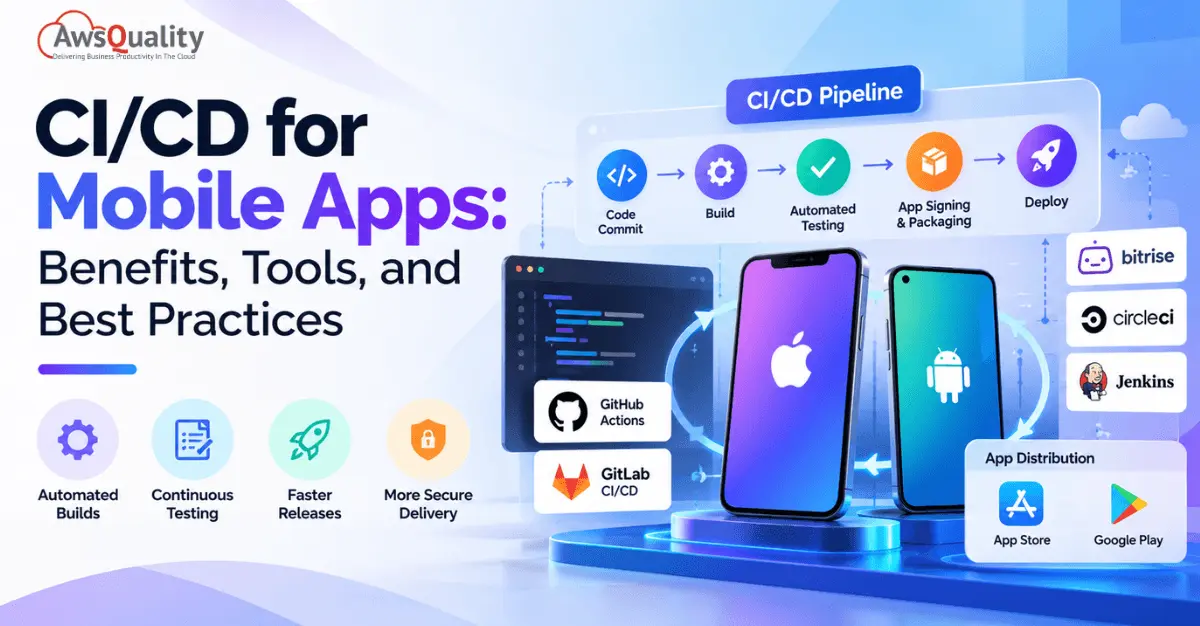
Releasing a mobile app update involves more than writing code. Development teams must build applications, run tests, manage signing credentials, check device compatibility, and prepare releases for distribution through the appropriate channels.
When these activities rely heavily on manual work, releases can become slower, testing can be inconsistent, and small mistakes can create avoidable problems.
Continuous Integration and Continuous Delivery (CI/CD) help mobile development teams automate these workflows, identify defects earlier, and establish a more reliable release process.
Whether you are developing an Android app, an iOS app, or a cross-platform application, a well-designed CI/CD pipeline can improve consistency while giving your team better control over testing, security, and releases.
In this guide, you will learn how mobile CI/CD works, which tools to consider, how to implement a pipeline, and which best practices can help your team deliver reliable app updates.
Key Takeaways
- CI/CD automates mobile app delivery: It connects code changes with automated builds, testing, and release workflows.
- Continuous Integration catches issues early: Developers integrate code frequently and use automated checks to identify problems before they become harder to fix.
- Continuous Delivery makes releases more predictable: Teams can keep applications in a release-ready state, while Continuous Deployment can automate releases further where appropriate.
- Mobile CI/CD requires platform-specific planning: iOS signing, Android build configurations, device compatibility, and app store review processes introduce requirements that differ from web applications.
- The right tools depend on the project: GitHub Actions, GitLab CI/CD, Bitrise, CircleCI, and other platforms can support different mobile development workflows.
- Automation should include security: Secret management, dependency checks, access controls, and secure signing practices help protect the software delivery process.
What is CI/CD for Mobile Apps?
CI/CD for mobile apps is a software development approach that automates the process of integrating code, building applications, running tests, and preparing or delivering releases for platforms such as iOS and Android.
Instead of relying on developers to perform every step manually, teams configure a pipeline that executes predefined tasks whenever code is committed, merged, or approved for release.
A typical mobile CI/CD pipeline may include:
- Code changes committed to a version control system.
- Automated checks and code analysis.
- Application compilation and build generation.
- Unit tests and other automated tests.
- Security and dependency checks.
- Application signing and packaging.
- Distribution to internal testers or beta users.
- Submission to an app store or deployment through an approved release process.
Not every pipeline needs to automate all these stages immediately. Teams can start with builds and unit tests, then introduce additional checks as their development process matures.
Understanding Continuous Integration, Continuous Delivery, and Continuous Deployment
Although these terms are often grouped together, they describe different stages of the software delivery process.
Continuous Integration (CI)
Continuous Integration involves integrating code changes into a shared repository frequently. Each change triggers automated checks, such as compilation, code analysis, and unit tests.
The goal is to identify integration problems early rather than discovering them shortly before a release.
Continuous Delivery (CD)
Continuous Delivery extends CI by automating additional steps required to prepare an application for release. The application can remain in a release-ready state, with production release approval typically retained as a separate step.
For mobile apps, this might include generating a signed build and distributing it to an internal testing group or preparing it for submission to the Apple App Store or Google Play.
Continuous Deployment
Continuous Deployment goes a step further by automatically releasing changes that pass the required pipeline checks, without a separate manual release approval.
For mobile apps, however, automated submission does not mean an update becomes publicly available immediately. App store review, platform policies, phased rollouts, and other release controls may still affect when users receive an update.
In simple terms: CI checks code changes, Continuous Delivery prepares software for release, and Continuous Deployment automates release execution when the configured conditions are satisfied.
How Does a Mobile App CI/CD Pipeline Work?
A mobile CI/CD pipeline connects development, testing, and release activities into a repeatable workflow.
Consider a team developing an Android and iOS application for an online retail business. A developer adds a new checkout feature and pushes the changes to the shared repository.
A well-configured pipeline can handle the following stages.
1. Code Commit and Version Control
Developers store source code in a version control system such as Git. Platforms such as GitHub, GitLab, and Bitbucket help teams manage repositories, review changes, and collaborate.
When a developer opens a pull request or merges code into a designated branch, the pipeline starts automatically.
2. Code Quality and Static Analysis
The pipeline checks the code for potential defects, style violations, and other problems.
Depending on the language and technology stack, teams may use linters, static analysis tools, and code quality checks to detect issues before building the application.
3. Automated Application Builds
The pipeline compiles the source code and generates the required application artifacts.
For example:
- Android builds may produce APK or Android App Bundle (AAB) artifacts.
- iOS builds may produce an app archive and, where appropriate, an IPA package for distribution.
Build configurations can differ by environment, such as development, testing, staging, and production.
4. Automated Testing
The pipeline runs appropriate tests to verify application behavior.
These may include:
- Unit tests for individual functions or components.
- Integration tests for interactions between application components or services.
- UI tests for important user journeys.
- Device or emulator tests for selected operating system versions and screen configurations.
If a critical test fails, the pipeline can stop the release workflow and notify the development team.
5. Security and Dependency Checks
Mobile applications often rely on third-party libraries, SDKs, APIs, and external services. Automated checks can help identify vulnerable dependencies, exposed secrets, and other security concerns.
Sensitive credentials, signing keys, and certificates should be stored in secure secret-management systems rather than committed to source code.
6. Signing and Packaging
Before distribution, mobile applications must satisfy the relevant platform’s signing and packaging requirements.
For Android, this includes managing the signing process for release artifacts and protecting signing credentials.
For iOS, teams must configure the appropriate signing certificates, provisioning profiles, and distribution method.
Signing should be performed only through controlled workflows with appropriate access restrictions.
7. Distribution and Release
After the required checks pass, the pipeline can distribute the build to internal testers, beta users, or an approved release channel.
Teams may use TestFlight for iOS testing or Google Play testing tracks for Android distribution. Other distribution services can also be used depending on the project.
A production release may require manual approval, a phased rollout, or additional validation.
The result: A repeatable process that reduces manual work and gives teams better visibility into the quality and readiness of each build.
Example: A CI/CD Pipeline for an E-Commerce Mobile App
Consider an e-commerce business that regularly updates its Android and iOS applications. Its developers introduce new features, fix bugs, and improve the checkout experience.
Without an automated pipeline, the team may need to build applications manually, coordinate testing, prepare release packages, and distribute builds to testers. A CI/CD pipeline can automate many of these activities.
Here is how a typical workflow operates:
1. Code Submission
A developer submits code changes through a pull request. The team reviews the changes before merging them into the appropriate branch.
2. Automated Validation
The pipeline checks the code and runs static analysis and unit tests. If a required check fails, the pipeline can stop the workflow and notify the developer.
3. Application Build
The system builds the relevant Android or iOS application using the configured build environment and dependencies.
4. Quality and Security Checks
Automated tests and applicable security checks run against the changes. Depending on the application, these checks may include integration tests, dependency scanning, and other quality controls.
5. Signing and Packaging
The pipeline prepares the application artifacts and handles signing through an authorized, secure process. Signing credentials and certificates must be protected and made available only to authorized workflows.
6. Test Distribution
Once the required checks pass, the build can be distributed to internal testers or a beta testing channel. This allows the team to validate the application before a production release.
7. Release Approval
The team reviews the build and test results before approving production deployment when required. The release process may include additional manual approvals or staged rollout controls.
8. Release Monitoring
After distribution, the team monitors relevant application and delivery metrics to identify crashes, performance problems, and other release issues.
The precise workflow depends on the mobile framework, CI/CD platform, security requirements, and release strategy. App store review and approval may also affect when an update becomes publicly available.
The key takeaway: A well-designed mobile CI/CD pipeline creates a repeatable process for building, testing, and distributing applications while helping teams identify problems earlier.
Read: Best CI/CD Tools – What the Data Actually Shows
Key Benefits of CI/CD for Mobile App Development
Implementing CI/CD can improve both the technical quality of a mobile application and the efficiency of the development team.
1. Faster Development and Release Cycles
Manual builds, repetitive testing, and release preparation can consume significant development time.
CI/CD automates many of these tasks, allowing developers to focus more on feature development, bug fixing, and improving the user experience.
For example, a team that previously prepared each testing build manually can configure a pipeline to generate and distribute builds automatically after approved code changes.
The actual time savings depend on the application’s complexity, test coverage, and pipeline configuration.
2. Earlier Bug Detection
When developers integrate changes frequently, automated tests can identify defects closer to the time they are introduced.
This makes it easier to investigate failures because the team can focus on a smaller set of recent changes.
Early detection is particularly useful when several developers are working on shared application components, APIs, or authentication workflows.
3. More Consistent Builds
Manual build processes can introduce inconsistencies in dependencies, configuration settings, environment variables, and packaging steps.
A CI/CD pipeline defines these steps in a repeatable workflow.
This helps ensure that development, testing, and release builds follow documented procedures. It also makes failed builds easier to investigate and reproduce.
4. Improved App Quality
Automated testing allows teams to validate critical functionality regularly rather than waiting until the end of a development cycle.
For example, an e-commerce app can automatically test login, product search, cart updates, and checkout-related workflows.
Automation does not eliminate the need for manual testing. Instead, it allows teams to combine repeatable automated checks with exploratory testing, usability reviews, and other forms of validation.
5. Reduced Manual Errors
Manual release processes often involve repetitive tasks, including changing configuration values, generating builds, signing packages, and uploading artifacts.
Every manual step creates an opportunity for error.
CI/CD reduces this risk by automating routine tasks and defining clear release conditions. Human review remains important for high-risk changes, production approvals, and exceptional cases.
6. Better Collaboration Across Teams
CI/CD gives developers, QA engineers, release managers, and other stakeholders a shared view of build status, test results, and release readiness.
When a pipeline fails, the team can review logs and identify the stage that needs attention.
This reduces uncertainty and helps teams resolve integration problems more efficiently.
7. Safer and More Controlled Releases
A release pipeline can enforce security checks, required approvals, signing procedures, and environment-specific configuration rules.
For example, a production build can require successful tests and approval from an authorized team member before distribution.
These controls help reduce the likelihood of accidentally releasing an untested build or exposing sensitive credentials.
8. Better Support for Frequent Updates
Mobile applications evolve continuously. Teams release new features, fix bugs, update dependencies, and respond to operating system changes.
A reliable CI/CD process makes it easier to prepare updates consistently and respond to problems without rebuilding the release process from scratch each time.
Frequent delivery does not mean every change must be released immediately. Teams should choose a release cadence that reflects business priorities, testing requirements, and app store constraints.
Popular CI/CD Tools for Mobile App Development
The best CI/CD tool depends on your development framework, team size, hosting preferences, security requirements, and release workflow.
Some tools provide general-purpose automation, while others offer features designed specifically for mobile app development.
1. GitHub Actions
Best for: Teams that manage source code on GitHub and want flexible workflow automation.
GitHub Actions allows developers to define automated workflows that run in response to repository events, such as pull requests, pushes, or releases.
Mobile development teams can use it to:
- Build Android and iOS applications.
- Run unit tests and code quality checks.
- Automate selected release tasks.
- Manage workflow approvals.
- Integrate with third-party testing and distribution services.
Key consideration: iOS builds require a suitable macOS environment. Teams should also carefully configure signing credentials, runner permissions, and access to secrets.
Official resource: GitHub Actions documentation.
2. Bitrise
Best for: Mobile-focused teams that want CI/CD capabilities tailored to app development.
Bitrise is a CI/CD platform designed for mobile application workflows. It supports common mobile development tasks, including building, testing, code signing, and distributing applications.
Potential uses include:
- Automating Android and iOS builds.
- Managing workflow steps for mobile projects.
- Integrating automated testing.
- Preparing builds for beta distribution.
- Supporting repeatable release processes.
Key consideration: Evaluate supported integrations, workflow flexibility, usage limits, and pricing against your team’s requirements.
Official resource: Bitrise documentation.
3. GitLab CI/CD
Best for: Teams that want repository management and CI/CD workflows within the GitLab ecosystem.
GitLab CI/CD uses pipeline configuration files to define automated stages and jobs.
Mobile teams can configure pipelines to build applications, execute tests, run security checks, and manage release workflows.
Useful capabilities include:
- Pipeline stages and job dependencies.
- Automated testing.
- Integration with source control and code review.
- Security scanning options.
- Self-managed runner configurations, where appropriate.
Key consideration: Mobile teams must provide or configure suitable build environments, including macOS runners for iOS builds.
Official resource: GitLab CI/CD documentation.
4. CircleCI
Best for: Teams that want configurable CI/CD pipelines and integrations with their development tools.
CircleCI supports automated workflows for building, testing, and delivering software. Mobile development teams can configure jobs for Android and iOS projects.
Potential use cases include:
- Running tests on code changes.
- Building mobile applications.
- Separating jobs by platform or environment.
- Managing workflow dependencies.
- Integrating with testing and distribution services.
Key consideration: Confirm the availability and cost of the execution environments your project requires, particularly for iOS builds.
Official resource: CircleCI documentation.
5. Fastlane
Best for: Automating common mobile build, signing, testing, and distribution tasks.
Fastlane is an open-source automation toolkit commonly used in iOS and Android development.
It can automate tasks such as:
- Managing build and release workflows.
- Coordinating code signing for supported configurations.
- Uploading builds to distribution services.
- Automating selected app store submission steps.
- Collecting screenshots and other release assets.
Fastlane is not, by itself, a complete CI/CD hosting platform. It is often used alongside GitHub Actions, Bitrise, GitLab CI/CD, CircleCI, or another automation service.
Key consideration: Teams must maintain the relevant configuration and securely manage credentials and signing assets.
Official resource: Fastlane documentation.
6. Jenkins
Best for: Organizations that need a highly configurable automation server and are prepared to manage its infrastructure.
Jenkins is an automation server that supports build and delivery pipelines through plugins and pipeline configuration.
Mobile teams can use Jenkins to automate builds, run tests, and coordinate release tasks.
Its flexibility can be useful for complex environments, custom integrations, or organizations with specific infrastructure requirements.
Key consideration: Teams are responsible for maintaining the Jenkins environment, managing plugins, securing credentials, and configuring suitable build agents. iOS builds still require an appropriate macOS environment.
Official resource: Jenkins documentation.
Mobile CI/CD Tools: Quick Comparison
| Tool | Best Fit | Key Strength | Important Consideration |
|---|---|---|---|
| GitHub Actions | GitHub-based development teams | Flexible repository-driven workflows | Runner configuration and signing setup |
| Bitrise | Mobile-focused teams | Mobile-oriented build and release workflows | Platform capabilities, usage, and pricing |
| GitLab CI/CD | GitLab users | Integrated source control and pipelines | Runner and build environment management |
| CircleCI | Teams needing configurable automation | Flexible jobs and workflows | Environment availability and cost |
| Fastlane | iOS and Android release automation | Automates common mobile release tasks | Usually paired with a CI/CD platform |
| Jenkins | Teams needing extensive customization | Flexible, self-managed automation | Infrastructure, maintenance, and security overhead |
How should you choose?
Start with your existing development ecosystem, then compare platform support, build performance, testing integrations, security controls, maintenance requirements, and total cost. Avoid selecting a tool solely because it offers the largest number of features.
CI/CD Best Practices for Mobile Apps
A successful CI/CD pipeline requires more than automating builds. It should make application changes easier to validate, release, and maintain safely.
The following practices can help teams build a reliable process.
1. Keep the Pipeline Configuration in Version Control
Store pipeline definitions alongside the application code whenever your tooling supports it.
Version-controlled configuration helps teams review workflow changes, track modifications, and reproduce pipeline behavior.
It also reduces reliance on undocumented settings that only one team member understands.
Practical tip: Require code review for important pipeline changes, especially those that affect production releases, permissions, or signing credentials.
2. Integrate Code Frequently
Encourage developers to commit and integrate small, focused changes regularly.
Large, infrequent merges can introduce multiple conflicts and make failures more difficult to diagnose.
Frequent integration allows automated checks to run earlier and helps teams identify incompatible changes before they affect the wider codebase.
Practical tip: Use pull requests and automated checks to validate changes before merging them into protected branches.
3. Automate the Most Valuable Tests First
Not every test needs to run at every pipeline stage.
Begin with fast, high-value checks such as compilation, linting, and unit tests. Add integration, UI, and device testing based on the application’s risk profile and critical user journeys.
For example, a banking app may need extensive validation around authentication, account access, and transaction workflows. A content-focused app may prioritize navigation, media playback, and offline behavior.
Practical tip: Run fast tests on every relevant code change and schedule broader or more resource-intensive tests at suitable stages.
4. Test Across Relevant Devices and Operating System Versions
Mobile applications operate in a fragmented environment. Users may have different screen sizes, operating system versions, hardware capabilities, and device configurations.
A pipeline that tests only one emulator or simulator may miss issues affecting other users.
Build a test matrix based on your audience, supported operating systems, device usage data, and business requirements.
Use a combination of:
- Emulators and simulators.
- Physical devices for important scenarios.
- Cloud-based device testing, where appropriate.
- Targeted compatibility tests for supported OS versions.
Practical tip: Prioritize the configurations that matter most to your users instead of attempting to test every possible device combination on every build.
5. Protect Signing Keys, Certificates, and Secrets
Mobile release pipelines often require sensitive credentials, including API tokens, signing keys, certificates, and provisioning-related assets.
If exposed, these credentials can create serious security risks.
Follow these practices:
- Store secrets in an approved secret manager or CI/CD platform’s protected secret storage.
- Never commit credentials to source control.
- Restrict access to authorized users and workflows.
- Rotate credentials when required.
- Avoid printing secret values in pipeline logs.
- Separate development and production credentials where appropriate.
Practical tip: Review which workflows can access production signing credentials and limit access to the minimum necessary.
6. Separate Development, Testing, Staging, and Production Configurations
Applications often use different API endpoints, feature flags, service credentials, and settings across environments.
Mixing these values can cause a build to connect to the wrong backend or expose test functionality in production.
Use controlled configuration management and clearly define the settings associated with each build type.
Practical tip: Make the target environment visible in build metadata and ensure production builds cannot accidentally inherit development-only settings.
7. Make Builds Reproducible
A reproducible build process makes it easier to investigate failures and understand how a release artifact was created.
Pin or otherwise control dependency versions where appropriate, document toolchain requirements, and use consistent build environments.
Teams should also record useful build metadata, including:
- Source commit or release identifier.
- Build number.
- Target platform and environment.
- Test results.
- Dependency and toolchain versions, where relevant.
Practical tip: When a build fails, retain sufficient logs and metadata to identify the source revision, environment, and pipeline stage involved.
8. Add Security Checks to the Pipeline
Security should be part of the development and release process rather than a final review performed immediately before launch.
Depending on the project, pipeline checks may include:
- Static code analysis.
- Dependency vulnerability scanning.
- Secret detection.
- License or dependency policy checks.
- Validation of application configuration.
- Checks for insecure storage or network communication.
The appropriate checks depend on the programming languages, frameworks, third-party libraries, and architecture used by the app.
Practical tip: Define which findings should block a build, which require review, and how exceptions are documented. Avoid creating so many low-value alerts that developers begin ignoring them.
9. Use Quality Gates and Clear Failure Notifications
A pipeline should have explicit conditions that determine whether a build can proceed.
For example, a release build might require successful compilation, passing critical tests, and completion of required security checks.
If a required stage fails, the pipeline should stop the affected workflow and notify the responsible team.
Practical tip: Make failure messages actionable. A developer should be able to identify the failed stage, access relevant logs, and understand the next step.
10. Automate Beta Distribution and Release Preparation
Manual distribution can slow feedback and introduce unnecessary work.
Where suitable, configure successful builds to be distributed to internal testers or approved beta channels.
For iOS, this may involve TestFlight. Android teams can use appropriate Google Play testing tracks or other controlled distribution methods.
Automated distribution helps testers access the correct build and provides a more consistent feedback process.
Important: Automated distribution to testers is not the same as automatic public release. Keep production release controls appropriate to your business and platform requirements.
11. Monitor Pipeline Performance and Reliability
A pipeline that takes too long or fails frequently can slow down the entire development team.
Track useful metrics such as:
- Build duration.
- Test execution time.
- Pipeline failure rate.
- Time required to identify and fix failures.
- Frequency of successful releases.
- Release-related defects.
Use these metrics to identify bottlenecks and determine which improvements are worth prioritizing.
Practical tip: If UI tests are consistently slowing down every code change, review test selection, parallelization options, and opportunities to separate fast checks from broader regression testing.
12. Plan for App Store Requirements and Release Constraints
Mobile app delivery includes platform-specific considerations that do not apply in the same way to every web application.
Teams should account for:
- Signing and packaging requirements.
- App store submission requirements.
- Review and approval processes.
- Privacy disclosures and permission requirements.
- Supported operating system versions.
- Release rollout strategies.
- Versioning and build numbering.
Practical tip: Treat store submission as a defined pipeline stage, but do not assume that successful submission guarantees immediate approval or public availability.
Also read: Mobile App Development Timeline – How Long Does It Take to Build an App?
Common Mobile CI/CD Challenges and How to Address Them
Even well-designed pipelines can face problems. Understanding common challenges helps teams plan more effectively.
| Challenge | Why It Happens | Recommended Approach |
|---|---|---|
| Slow pipeline execution | Large builds, lengthy tests, or inefficient workflows | Run fast checks early, optimize test selection, and parallelize suitable tasks |
| Flaky automated tests | Timing issues, unstable environments, or inconsistent test data | Improve test isolation, stabilize environments, and track recurring failures |
| iOS signing problems | Incorrect certificates, profiles, or access permissions | Standardize signing workflows and secure credential management |
| Device compatibility issues | Limited test coverage across devices and OS versions | Prioritize representative devices and supported OS configurations |
| Inconsistent builds | Uncontrolled dependencies or differing build environments | Control toolchain versions and document build configuration |
| Secret exposure | Credentials stored in code or accessible to too many workflows | Use secret management and least-privilege access controls |
| Release delays | Manual approvals or unclear release responsibilities | Define release ownership, approval rules, and escalation paths |
| High CI/CD costs | Excessive build frequency, inefficient jobs, or unnecessary device tests | Review pipeline usage and match testing depth to risk |
The objective is not to eliminate every challenge immediately. It is to make the delivery process measurable, predictable, and easier to improve.
Best practice: Do not treat every pipeline failure as an application code defect. Review build logs, test results, environment configuration, and infrastructure status to identify the actual cause before making changes.
Common CI/CD Implementation Mistakes
Even when a mobile CI/CD pipeline is technically sound, implementation decisions can affect its long-term reliability.
1. Treating CI/CD as a One-Time Setup
Pipelines need ongoing maintenance as dependencies, development tools, platform requirements, and security practices evolve. Review the workflow regularly instead of assuming that the initial configuration will remain effective.
2. Automating Everything Before Establishing a Foundation
Building a highly customized pipeline too early can make the workflow difficult to understand and maintain. Start with reliable builds, essential tests, and secure configuration before introducing more complex automation.
3. Ignoring Unreliable Tests
Tests that produce inconsistent results can reduce confidence in the pipeline. Investigate recurring failures, improve test isolation, and establish a process for resolving flaky tests.
4. Optimizing Speed at the Expense of Quality
Reducing test coverage simply to make pipelines faster can increase the risk of undetected defects. Instead, prioritize high-value tests, optimize inefficient tasks, and run broader testing at appropriate stages.
Key takeaway: A sustainable CI/CD process balances automation, maintainability, security, testing quality, and delivery speed.
How to Implement CI/CD for a Mobile App: A Step-by-Step Approach
Implementing CI/CD does not require automating every part of mobile development at once. A phased approach allows teams to establish a reliable foundation and introduce additional automation as their needs evolve.
Step 1: Evaluate Your Current Development Workflow
Review how your team currently manages code changes, builds, testing, signing, and releases.
Identify activities that consume significant time, depend heavily on manual intervention, or frequently cause errors.
Expected outcome: A clear understanding of the most valuable opportunities for automation.
Step 2: Select a Suitable CI/CD Tool
Choose a platform based on your mobile framework, development environment, repository, testing requirements, security needs, and budget.
For example, a team working on iOS applications should account for macOS build requirements, while a cross-platform team may need to support multiple build and testing workflows.
Expected outcome: A CI/CD platform that supports your application’s technical requirements and your team’s workflow.
Step 3: Automate Application Builds
Configure the pipeline to build the application automatically when relevant changes are submitted or merged.
Ensure that dependencies, build settings, and environment requirements are documented and managed consistently.
Expected outcome: Repeatable builds with less dependence on manual processes.
Step 4: Introduce Automated Testing
Start with essential automated tests, including unit tests, and expand to integration and UI tests where appropriate.
Configure the pipeline to report failures and prevent builds from progressing when critical checks do not pass.
Expected outcome: Earlier detection of defects and more consistent quality checks.
Step 5: Add Security and Quality Controls
Introduce relevant code analysis, dependency checks, secret management, access controls, and secure signing procedures.
Protect sensitive credentials and ensure that only authorized workflows can access the resources required for signing and releasing applications.
Expected outcome: Better control over security risks and release permissions.
Step 6: Automate Test Distribution
Configure successful builds to be distributed to internal testers or an appropriate beta testing channel.
Make sure testers can identify the build version and provide feedback on defects or unexpected behavior.
Expected outcome: A more consistent process for validating application changes before production release.
Step 7: Introduce Production Release Automation
Once the earlier stages are reliable, consider automating additional release activities.
Depending on your requirements, this may include release approvals, production deployment, staged rollouts, and automated release notifications.
App store requirements and review processes must still be considered.
Expected outcome: A more controlled and repeatable production release workflow.
Step 8: Monitor and Improve the Pipeline
Track build duration, pipeline success rates, test failures, release frequency, and post-release issues.
Use these measurements to identify bottlenecks and decide which improvements will provide the most value.
Expected outcome: A pipeline that can be improved continuously as the application and team grow.
Final Recommendation
Start with the activities that cause the most friction in your existing workflow. Establish reliable automated builds and tests before expanding into more advanced release automation.
A phased implementation helps teams manage complexity while building a stronger foundation for consistent mobile app delivery.
Check out: DevOps Implementation Cost – What Businesses Should Expect
How Much Does Mobile CI/CD Cost?
The cost of implementing CI/CD for mobile apps varies significantly. There is no single price that applies to every project.
The total cost may include:
- CI/CD platform fees: Subscription or usage-based charges for automation services.
- Build infrastructure: Compute resources and platform-specific runners, including macOS environments for iOS builds.
- Testing infrastructure: Device farms, emulators, simulators, and third-party testing services.
- Storage and artifact retention: Space for build artifacts, logs, and test reports.
- Tooling and integrations: Paid security, monitoring, or release-management tools.
- Implementation and maintenance: Engineering time needed to configure, secure, troubleshoot, and improve the pipeline.
A team can often start with a relatively simple pipeline and expand it as the application’s needs grow.
To manage costs, avoid running expensive test suites unnecessarily, review build usage, remove redundant jobs, and choose test coverage based on risk.
The goal is not to make the pipeline as inexpensive as possible at any cost. It is to balance delivery speed, application quality, security, and operating expenses.
CI/CD for Native vs. Cross-Platform Mobile Apps
The overall CI/CD principles are similar across mobile development approaches, but the build and testing requirements can differ.
Native iOS and Android Development
Native applications use platform-specific technologies, such as Swift or Objective-C for iOS and Kotlin or Java for Android.
Teams may maintain separate build and test workflows for each platform. iOS workflows require suitable Apple development tooling and macOS build environments, while Android workflows use the relevant Android build tools.
The pipeline must also account for platform-specific signing, packaging, and distribution requirements.
Cross-Platform Development
Cross-platform frameworks such as Flutter and React Native allow teams to share portions of the application code across platforms.
CI/CD can automate shared code checks alongside platform-specific builds and tests.
However, shared code does not remove all native requirements. Teams may still need separate iOS and Android configurations, signing processes, native dependency management, and platform-specific testing.
The key principle: Choose a pipeline that reflects the actual architecture of your application. Do not assume that one identical build configuration will satisfy every platform requirement.
Also check: Generative AI in Mobile Apps – Use Cases, Benefits, and Challenges
Key Metrics for Measuring Mobile CI/CD Performance
Measuring CI/CD performance helps teams understand whether their automation efforts are improving the software delivery process. The most useful metrics provide insight into build reliability, testing effectiveness, delivery speed, and production stability.
| Metric | What It Measures | Why It Matters |
|---|---|---|
| Build success rate | The proportion of builds that complete successfully. | Helps identify recurring build configuration or infrastructure problems. |
| Average build duration | The time required to complete a build. | Helps teams identify opportunities to reduce pipeline waiting time. |
| Automated test failure rate | The frequency of failed automated tests. | Helps reveal application defects, unstable tests, or test environment issues. |
| Lead time for changes | The time it takes for a code change to progress through the delivery process. | Helps teams understand how quickly changes move toward release. |
| Deployment frequency | How often the team deploys changes to the relevant environment. | Provides insight into the team’s delivery cadence. |
| Change failure rate | The proportion of deployments that require remediation or result in a failure, based on the team’s defined criteria. | Helps evaluate the stability of the release process. |
| Mean time to recovery | The average time required to recover from a production failure. | Helps teams evaluate their ability to respond to release-related incidents. |
How to Use These Metrics
Do not optimize every metric independently. For example, increasing deployment frequency is not necessarily an improvement if it also increases production failures.
Instead, establish a baseline, identify the most important bottlenecks, and set realistic improvement targets.
For mobile applications, teams should also consider app crash rates, user-reported defects, and platform-specific release issues when evaluating the overall effectiveness of their delivery process.
The goal is not simply to release more frequently. It is to deliver reliable changes with an appropriate balance of speed, quality, and risk.
Conclusion
CI/CD has become an important part of modern mobile app development because it helps teams establish a repeatable process for building, testing, and distributing applications.
With the right tools and practices, development teams can reduce repetitive manual work, identify defects earlier, improve build consistency, and gain better visibility into their release workflows.
However, successful implementation requires more than selecting a CI/CD platform. Teams must also consider automated testing, secure signing, dependency management, device compatibility, and ongoing pipeline maintenance.
The best approach is to start with a reliable foundation, automate the most time-consuming activities, and expand the pipeline as requirements evolve. Regularly measuring build performance, test reliability, and release outcomes can help teams identify opportunities for continuous improvement.
Whether you are building a native Android application, an iOS app, or a cross-platform product, a well-designed CI/CD workflow can help create a more consistent and controlled software delivery process.
FAQs
Frequently Asked Questions
What is CI/CD in mobile app development?
CI/CD in mobile app development is a process that automates code integration, application builds, testing, and release preparation. It helps teams identify defects earlier, reduce repetitive manual work, and deliver more consistent builds.
What are the main benefits of CI/CD for mobile apps?
The main benefits include faster feedback, earlier bug detection, more consistent builds, reduced manual errors, better collaboration, repeatable testing, and more controlled releases.
The actual benefits depend on how well the pipeline is designed and maintained.
Which CI/CD tools are best for mobile app development?
Popular options include GitHub Actions, Bitrise, GitLab CI/CD, CircleCI, Jenkins, and Fastlane. The best choice depends on the app’s framework, source control platform, build requirements, testing needs, security controls, and budget.
Fastlane is commonly used alongside a CI/CD platform rather than as a complete replacement for one.
Can CI/CD be used for both iOS and Android apps?
Yes. CI/CD can automate builds, tests, and release workflows for both iOS and Android. However, each platform has specific build, signing, packaging, and distribution requirements that must be handled appropriately.
Does CI/CD eliminate the need for manual testing?
No. Automated tests are effective for repeatable checks, but manual testing remains valuable for exploratory testing, usability evaluation, visual inspection, and scenarios that are difficult to automate reliably.
A strong testing strategy combines automation with appropriate human review.
How does CI/CD improve mobile app security?
CI/CD can integrate security checks into the development workflow, including static analysis, dependency scanning, secret detection, and controlled signing procedures. It can also enforce approval rules and restrict access to production credentials.
These measures help reduce risk but do not replace security reviews or a broader application security program.
Is CI/CD suitable for small mobile development teams?
Yes. Small teams can begin with a basic pipeline that automatically builds the app and runs unit tests. They can then add security checks, device testing, and release automation as the project grows.
Starting small often makes the process easier to understand and maintain.
How long does it take to implement CI/CD for a mobile app?
The timeline depends on the application’s architecture, existing automation, test coverage, signing requirements, infrastructure, and release process.
A basic build-and-test pipeline may be relatively quick to establish in a well-organized project. A complex application with multiple environments, extensive testing, strict security controls, and several release channels will require more planning and implementation.
Can mobile app releases be fully automated?
Many build, test, signing, and distribution tasks can be automated. However, public release timing may still depend on app store review, business approvals, rollout strategies, and platform requirements.
Teams should automate routine work while retaining appropriate controls over high-risk releases.
What is the difference between CI/CD for mobile apps and web applications?
Both use automated code integration, testing, and deployment workflows. Mobile CI/CD also needs to account for platform-specific builds, app signing, device and operating system compatibility, app store submission, and controlled distribution to testers or users.
These additional requirements make mobile release management different from many web deployment workflows.
DevOps
Related Articles

Salesforce DevSecOps Best Practices for Secure Development and Deployment
Salesforce has become an essential platform for managing customer relationships, automating business processes, and connecting enterprise applications. As businesses expand their Salesforce…
Enterprise DevOps: A Complete Guide to Scaling DevOps Across Large Organizations
As organizations grow, software delivery becomes more complicated. A small engineering team may be able to manage a handful of applications, deployment…

Why Most DevOps Transformations Fail (And How to Fix Them)
Organizations invest heavily in DevOps. New tools. New pipelines. New terminology. And yet, the results often fall short of expectations. Releases are…