
Generative AI is changing how people interact with mobile applications. Instead of relying only on predefined menus, forms, and workflows, users can increasingly communicate with apps using natural language, voice, images, and other forms of input.
For businesses, this creates an opportunity to move beyond traditional mobile experiences and build applications that can understand context, generate content, personalize interactions, automate tasks, and assist users in real time.
Generative AI can be integrated into mobile applications through cloud-based AI services, on-device models, or hybrid architectures that combine both approaches. Android, for example, supports on-device generative AI through Gemini Nano and ML Kit GenAI APIs, while Apple’s Foundation Models framework provides access to on-device models and supports intelligent app features such as text generation, summarization, structured output, and tool calling.
However, adding generative AI to a mobile app is not simply a matter of connecting an application to an AI model. Organizations also need to consider privacy, security, latency, cost, model accuracy, user experience, device compatibility, and responsible AI practices.
This article explores the major use cases, benefits, implementation approaches, challenges, and best practices for using generative AI in mobile apps.
Key takeaways
- Generative AI is now a top driver of mobile app revenue and engagement, not an experiment.
- Users increasingly expect AI features inside the apps they already use.
- The best results come from solving a specific user problem, not from adding a chatbot for its own sake.
- Apps can run AI on the device, in the cloud, or with a hybrid of both. Each choice affects privacy, speed, and cost.
- Privacy, accuracy, and cost control must be designed from day one.
What is generative AI in mobile apps?
Generative AI in mobile apps is a type of artificial intelligence that creates new content in response to a user’s input. Instead of only sorting or predicting, it writes, draws, summarizes, translates, or talks back in natural language.
For example, a banking app might answer “Why did I spend more this month?” in plain English. A shopping app might let you snap a photo and find similar products. A fitness app might write a weekly workout plan that adapts to your progress.
Generative AI vs. traditional AI in apps
Many apps already use “traditional” AI, also called predictive or analytical AI. The difference is in the output.
| Traditional (predictive) AI | Generative AI | |
|---|---|---|
| What it does | Classifies, ranks, or predicts | Creates new text, images, audio, or code |
| Typical output | A score, label, or ranked list | A written answer, image, summary, or conversation |
| App examples | Fraud alerts, “you may also like” lists, spam filters | Chat assistants, AI writing tools, photo editing, voice agents |
| How users interact | Mostly in the background | Often directly, through natural language |
The two work best together. A retail app can use predictive AI to pick the right products and generative AI to explain why they fit the shopper.
On-device vs. cloud generative AI
One of the first decisions in generative AI mobile app development is where the model runs.
- On-device AI runs a small model directly on the phone. Both Apple and Google now give developers access to built-in on-device models, such as Apple’s Foundation Models framework on iOS and Gemini Nano on supported Android devices. It works offline, keeps data on the phone, and has no per-request cloud cost. The trade-off is that smaller models handle simpler tasks.
Cloud AI sends the request to a large model hosted on a server, through an API. It is more powerful and flexible but needs a network connection and adds usage costs and privacy considerations.
Hybrid AI combines both. Quick, private tasks run on the device, and complex requests go to the cloud. For most business apps, hybrid is the most practical choice.
On-Device vs. Cloud vs. Hybrid Generative AI
Choosing where the model runs is one of the most important architectural decisions.
| Factor | On-Device AI | Cloud AI | Hybrid AI |
|---|---|---|---|
| Internet dependency | Low | High | Flexible |
| Privacy | Strong potential | Requires careful controls | Flexible |
| Latency | Usually low | Network-dependent | Optimizable |
| Model capability | Device-dependent | Generally broader | Broad |
| Cloud inference cost | Lower for local workloads | Higher | Optimizable |
| Offline support | Strong | Limited | Strong for selected tasks |
| Device compatibility | Limited | Broad | Broad |
| Best for | Lightweight/private tasks | Complex reasoning | Mixed workloads |
How generative AI works inside a mobile app
A generative AI feature is a short pipeline: the app prepares the user’s request, sends it to the right model, checks the answer, and shows it. Most well-built apps use a hybrid setup like the one below.
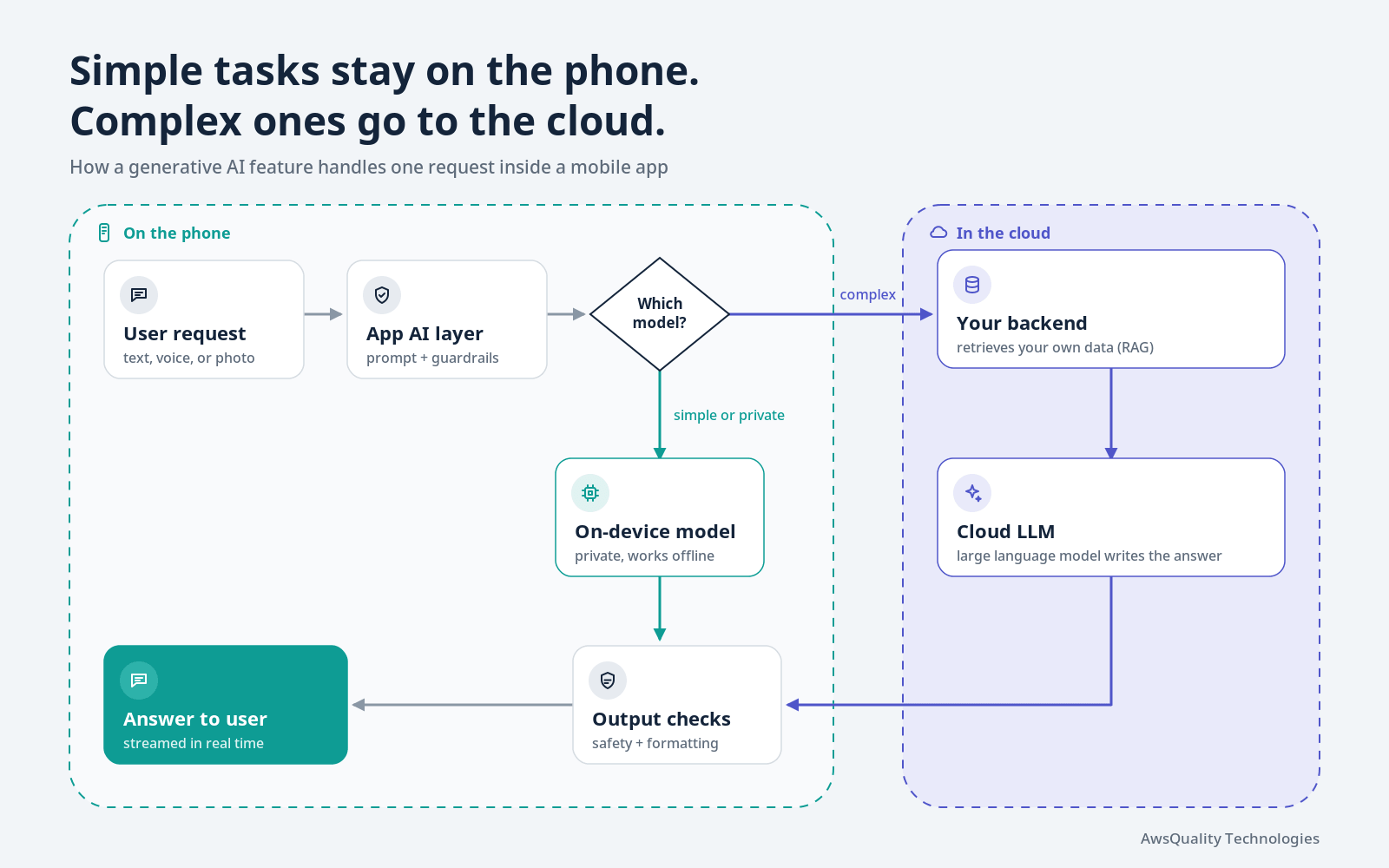
- The user makes a request by typing, speaking, or sharing a photo.
- The app’s AI layer prepares it. It adds helpful context (such as the user’s settings or the current screen), applies instructions, and blocks unsafe or off-topic input.
- A router picks the model. Simple or privacy-sensitive tasks run on the device. Complex tasks go to your backend.
- The backend grounds the answer. It retrieves relevant facts from your own content, such as product data or help articles, and sends them with the request to a cloud large language model. This technique is called retrieval-augmented generation (RAG), and it greatly reduces made-up answers.
- Output checks run to filter unsafe content and format the answer for a small screen.
- The answer appears to the user, usually streamed word by word so the app feels fast.
Best Practices for Generative AI Mobile App Development
Start Small
Begin with one clearly defined AI capability rather than attempting to redesign the entire application.
Keep Humans in Control
For high-impact decisions, AI should assist rather than operate without appropriate oversight.
Protect Sensitive Data
Minimize the data sent to AI services and use on-device processing when it makes sense.
Design for Failure
The AI will occasionally produce an incorrect response or become unavailable.
Provide useful fallback experiences.
Use Structured Outputs
When AI output feeds application logic, structured formats are generally safer than relying on unrestricted natural-language text.
Separate AI From Authorization
The model should not determine whether a user has permission to access or modify data.
Authorization should be enforced by application and backend systems.
Measure Business Outcomes
Do not measure success only by the number of AI interactions.
Measure whether the feature actually improves:
- Conversion
- Productivity
- Customer satisfaction
- Retention
- Resolution time
- Task completion
- Operational efficiency
Top use cases of generative AI in mobile apps
The most successful generative AI use cases solve a clear, everyday problem for the user. Here are the ones delivering the most value today.
1. In-app AI assistants and chatbots
An AI assistant can answer questions, guide users through features, and complete tasks in natural language. Unlike old rule-based chatbots, it understands follow-up questions and context. Example: “Rebook my flight to Friday morning and add a window seat.”
2. Smarter customer support
Generative AI can resolve common support questions instantly, 24/7, using your help center and policies as its source. It can also hand complex cases to a human agent with a short summary, so the customer doesn’t have to repeat themselves.
3. Conversational and visual search
Users can search the way they talk (“a waterproof jacket for hiking under $150”) or search with a photo. The app returns relevant results and can explain the differences between options.
4. Hyper-personalized recommendations
Generative AI turns user data into personal content: a custom meal plan, a study schedule, a travel itinerary, or a product bundle with a short explanation of why it fits.
5. Content creation and editing tools
Apps can help users write messages, posts, emails, and product listings, or edit photos and videos with simple prompts. Examples include removing an object from a photo, writing a caption, or generating a thumbnail.
6. Summarization
Long content becomes short and useful: meeting notes, chat threads, documents, reviews, or medical visit notes summarized into key points and action items.
7. Voice interfaces and real-time translation
Speech-to-text, natural-sounding voice replies, and live translation make apps easier to use hands-free and open them up to new languages and markets.
8. Accessibility features
Generative AI can describe images for users with low vision, simplify complex text, and convert content between formats. This improves the experience for everyone and supports accessibility goals.
9. Developer productivity and app testing
Behind the scenes, development teams use generative AI to write code, create test cases, generate test data, and explain bugs. This can shorten release cycles and improve app quality.
Key benefits of generative AI in mobile apps
The biggest benefit of generative AI is that it lets users get what they want faster, in their own words. That simple shift drives value for both users and businesses.
Benefits for users
- Faster answers and tasks. Users can ask instead of searching through menus, settings, or help pages.
- A more personal experience. Content, plans, and suggestions adapt to each user’s goals and history.
- Easier to use. Natural language and voice lower the learning curve for new and less tech-savvy users.
- Always-on help. AI support is available any time, in many languages.
Benefits for businesses
- Higher engagement and retention. Useful, personal features give users more reasons to come back. The rapid growth in time spent in AI apps shows how strongly people respond to this kind of help.
- New revenue opportunities. AI features can power premium tiers, add-ons, and smarter upselling. Sensor Tower credits generative AI services with helping non-game app spending pass mobile games for the first time in 2025 (Source: Sensor Tower).
- Lower support costs. AI can resolve routine questions automatically and free your team for complex cases.
- Faster content production. Product descriptions, notifications, onboarding copy, and translations can be drafted in minutes and reviewed by your team.
- Better insight into users. Conversations reveal what users actually want, in their own words, which helps guide your product roadmap.
- Competitive edge. As AI becomes expected, a well-designed AI experience helps your app stand out, while a missing one can make it feel outdated.
Challenges of generative AI in mobile apps (and how to solve them)
Generative AI brings real risks, but each one can be managed with the right design choices. Here are the main challenges and practical ways to address them.
| Challenge | Why it matters | How to address it |
|---|---|---|
| Data privacy and security | Users may share personal, financial, or health details in prompts | Collect only what you need, run sensitive tasks on-device, encrypt data, and choose AI providers with clear data-retention terms |
| Accuracy and “hallucinations” | Models can produce confident but wrong answers | Ground answers in your own verified content (retrieval-augmented generation, or RAG), show sources, and add human review for high-stakes topics |
| Cost control | Cloud AI is usually billed per request, so costs grow with usage | Cache common answers, use smaller models for simple tasks, set usage limits, and monitor spend per feature |
| Performance and battery | Slow replies or heavy processing hurt the mobile experience | Stream responses as they generate, use on-device models where possible, and optimize prompts |
| Offline and poor connectivity | Cloud features fail without a network | Use a hybrid approach with on-device fallbacks and clear offline messages |
| Bias and harmful content | Outputs can be unfair, offensive, or unsafe | Add content filters and guardrails, test with diverse users, and give users an easy way to report problems |
| Regulation and compliance | Laws such as HIPAA, COPPA, state privacy laws (for example, CCPA/CPRA in California), and the EU AI Act may apply | Involve legal and compliance early, document how AI is used, and disclose AI features clearly to users |
| App store policies | Apple and Google set rules for AI-generated content and user data | Review the latest App Store and Google Play guidelines before launch, including content moderation and reporting requirements |
| User trust | People may distrust AI or not understand what it does | Label AI features clearly, explain limits, and keep a human option available |
| Fast-changing technology | Models and APIs change quickly | Use a model-agnostic architecture so you can switch providers without rebuilding the app |
The common thread: treat generative AI as a product feature that needs testing, monitoring, and ongoing improvement, not a one-time integration.
How to add generative AI to your mobile app: step by step
The fastest path to value is to start with one high-impact feature, prove it works, and then expand. Here is a practical roadmap.
- Pick one clear user problem. Look at support tickets, app reviews, and drop-off points. Choose a task where AI can save users real time, such as answering policy questions or finding the right product.
- Define success metrics. Decide upfront how you will measure results, for example support tickets resolved, task completion time, conversion rate, or retention.
- Prepare your data. Gather the content the AI should rely on, such as FAQs, product catalogs, manuals, and policies. Clean it, keep it current, and remove anything sensitive.
- Choose your model and where it runs. Decide between on-device, cloud, or hybrid. Compare models on quality, speed, cost, and data-handling terms.
- Design the experience. Plan prompts, tone of voice, loading states, error messages, and how users can give feedback or reach a human. Label AI-generated content clearly.
- Build guardrails. Add input and output filters, limit the AI to approved topics, and ground answers in your verified content.
- Test thoroughly. Test for accuracy, safety, speed, battery use, and edge cases. Include real users from your target audience.
- Launch in phases. Start with a small group of users or a beta, collect feedback, and fix issues before a full rollout.
- Monitor and improve. Track quality, cost, and usage after launch. Update content and prompts regularly, and review new models as they are released.
What affects the cost of generative AI app development?
There is no single price, because cost depends on what you build. The main factors are:
- Feature scope: a simple Q&A assistant costs far less than a multi-step AI agent that takes actions for users.
- Model choice and usage: cloud models are billed by usage, so costs scale with your number of users and requests.
- On-device vs. cloud: on-device AI reduces running costs but may need more engineering work to optimize.
- Data preparation and integration: connecting AI to your databases, CRM, or internal systems adds effort.
- Security and compliance: regulated industries such as healthcare and finance need extra safeguards and reviews.
- Ongoing maintenance: monitoring, prompt updates, and model upgrades are continuing costs, not one-time ones.
A focused pilot is usually the most cost-effective way to validate the business case before investing in a larger rollout.
Future Trends in Generative AI Mobile Apps
1. More On-Device AI
As mobile hardware becomes more capable, more AI processing can happen locally.
This can improve:
- Privacy
- Latency
- Offline functionality
- Scalability
2. Hybrid AI Architectures
Mobile applications will increasingly combine local and cloud models based on task complexity.
Simple tasks can run locally, while more demanding tasks can use cloud models.
3. Agentic Mobile Applications
AI agents will increasingly move from answering questions to completing tasks.
A user may eventually describe an objective rather than navigate through a series of screens.
4. Multimodal Interaction
Mobile devices naturally support multiple forms of input:
- Text
- Voice
- Images
- Video
- Location
- Sensors
Generative AI can combine these inputs to create richer application experiences.
Apple’s current Foundation Models capabilities include multimodal prompts and Vision framework tools, while Android’s Gemini Nano supports text, image, and audio-related generative AI use cases.
5. AI-Native User Interfaces
Traditional interfaces are largely static.
AI-native applications can dynamically adapt the interface, content, and available actions based on the user’s goal.
This could move mobile UX from:
Navigate → Select → Submit
toward:
Describe goal → AI understands → AI assists → User confirms
6. More Personalized Experiences
AI can combine user preferences, application context, and real-time information to deliver more individualized experiences.
The challenge will be balancing personalization with privacy and transparency.
How to Measure the Success of Generative AI in a Mobile App
A generative AI feature should be measured using both technical and business metrics.
User Metrics
- Feature adoption
- Daily/Monthly active users
- Task completion rate
- Retention
- User satisfaction
AI Quality Metrics
- Response accuracy
- Relevance
- Hallucination rate
- Safety incidents
- Successful task completion
Technical Metrics
- Response latency
- Error rate
- Model availability
- Token usage
- Device performance
Business Metrics
- Conversion rate
- Revenue
- Support cost
- Customer service resolution time
- Employee productivity
- Operational cost
The most important question is:
Does the AI feature create measurable value for the user and the business?
The future of generative AI in mobile apps
Generative AI in mobile apps is moving from answering questions to getting things done. These are the trends to watch.
- AI agents that take action. Assistants will increasingly complete multi-step tasks for users, such as booking, ordering, filing a claim, or updating an account, with the user’s confirmation.
- More on-device intelligence. As phone chips get more powerful and Apple and Google expand their built-in models, more AI features will run privately and offline.
- Multimodal experiences. Users will mix text, voice, camera, and screen context in one conversation, for example pointing the camera at a product and asking questions about it.
- AI inside existing apps, not just AI apps. With most users already reaching AI through apps they know, brands that add useful AI to their own apps will win more attention than standalone tools.
- Stronger rules and transparency. Expect more regulation, clearer AI labeling, and higher user expectations about how data is used.
- Smarter cost and model routing. Apps will automatically send each request to the cheapest model that can handle it well, keeping quality high and costs under control.
How AwsQuality can help you build generative AI mobile apps
At AwsQuality Technologies, we help businesses turn generative AI ideas into secure, reliable mobile features that users actually use. We bring hands-on experience building enterprise AI products, including AQS Presence360 AI, our computer vision platform for attendance and workforce intelligence.
We can help you:
- Identify the AI use cases with the highest return for your app and users
- Choose the right model and architecture: on-device, cloud, or hybrid
- Design a clear, trustworthy AI experience with guardrails built in
- Integrate AI with your existing data and systems securely
- Test, launch, and continuously improve your AI features
Frequently asked questions
What is generative AI in mobile apps?
Generative AI in mobile apps is the use of AI models that create new content, such as text, images, audio, or summaries, inside an app. It powers features like AI chat assistants, smart search, content creation tools, and personalized recommendations.
What are the most common generative AI use cases in mobile apps?
The most common use cases are in-app AI assistants, automated customer support, conversational and visual search, personalized recommendations, content creation and photo editing, summarization, voice interfaces, and real-time translation.
What are the benefits of generative AI for mobile apps?
Generative AI helps users complete tasks faster and get personalized help in their own words. For businesses, it can increase engagement and retention, open new revenue streams, lower support costs, and speed up content production.
What are the main challenges of using generative AI in mobile apps?
The main challenges are data privacy, inaccurate answers (hallucinations), usage costs, performance and battery impact, offline limits, bias, and compliance with laws and app store policies. Each can be managed with careful design, guardrails, and testing.
Should generative AI run on the device or in the cloud?
It depends on the use case. On-device AI is useful when privacy, low latency, offline functionality, or reduced cloud inference costs are important. Cloud AI is generally better suited to workloads requiring larger models, more context, or greater reasoning capability. Hybrid architectures can combine both approaches.
Can generative AI run directly on a smartphone?
Yes. On-device models, such as Apple’s Foundation Models framework on iOS and Gemini Nano on supported Android devices, run directly on the phone. They work offline and keep data private but are best for simpler tasks. Complex tasks usually still use cloud models.
Can generative AI work offline in mobile apps?
Yes. Certain on-device models can process AI requests without a network connection. Google’s Gemini Nano and Apple’s on-device Foundation Models are examples of technologies designed to support local AI processing for appropriate workloads.
How can generative AI improve customer experience in mobile apps?
AI can provide conversational support, personalized recommendations, intelligent search, automated responses, summaries, and context-aware assistance. It can also help users complete tasks without navigating multiple screens.
How much does it cost to add generative AI to a mobile app?
Cost depends on feature scope, the AI model you use, how many requests your users make, whether AI runs on-device or in the cloud, data integration needs, and compliance requirements. Starting with a focused pilot is the most cost-effective way to prove value.
Is generative AI safe for apps that handle sensitive data?
It can be, with the right safeguards. Use data minimization, encryption, on-device processing for sensitive tasks, AI providers with strict data-retention policies, and compliance reviews for regulations such as HIPAA or state privacy laws.
How long does it take to add a generative AI feature to an app?
Timelines vary with complexity. A focused feature, such as an assistant that answers questions from your help content, can often be piloted much faster than a full AI agent that connects to many systems. A phased rollout lets you launch sooner and improve with real user feedback.
Conclusion
Generative AI is reshaping what users expect from mobile apps. It makes apps more helpful, more personal, and easier to use, and it is already a major driver of app engagement and revenue. The businesses that benefit most will start with a real user problem, choose the right on-device, cloud, or hybrid approach, and build privacy, accuracy, and cost control into the product from day one.
If you are planning your first generative AI feature, AwsQuality can help you move from idea to a secure, scalable launch.
 Bio
Bio