
Digital Insurance Benefits Application: Modernizing the Insurance Application Process
 Michelle Jones 13 min read
Insurance application processes can involve substantial amounts of information, multiple forms, legal declarations, medical details, and customer verification. When these processes rely heavily on paper forms, manual data entry, or fragmented workflows, they can create friction for both customers and insurance organizations.
A modern digital application can bring these steps into a structured, guided experience while making it easier for customers to provide information, review their responses, and complete the process.
At AwsQuality, we developed an Insurance Benefits Application for a client to demonstrate how technology can simplify and digitize the insurance benefits application journey.
The application takes users through a structured multi-step process covering personal information, medical history, employment details, legal and signature requirements, and final review and submission.
A particularly important capability is persistent application state. Users can save their progress and return later. If the application is accidentally closed or interrupted, previously entered information can be restored so the customer does not have to start the application from the beginning.
This article explores the application, its workflow, key capabilities, technical considerations, and the business value of digitizing insurance benefits processes.
What is a Digital Insurance Benefits Application?
A digital insurance benefits application is an online workflow that allows customers to provide the information required for insurance benefits processing through a structured digital interface.
Rather than presenting users with one long form containing dozens of fields, the application divides the process into logical stages.
The application we developed follows this general workflow:
Personal Information
 ↓
 Medical History
 ↓
 Employment Details
 ↓
 Legal & Signature
 ↓
 Review & Submit
Each stage focuses on a specific type of information while contributing to the overall application.
The result is a guided customer journey designed to make the process easier to understand and navigate.
Read: From Idea to Launch – How Mobile App Development Services Work
Insurance Benefits Application Demo
The following demo shows the application interface and its multi-step workflow.
Users can move through different stages of the application, while the interface provides controls for navigating between steps and saving progress.
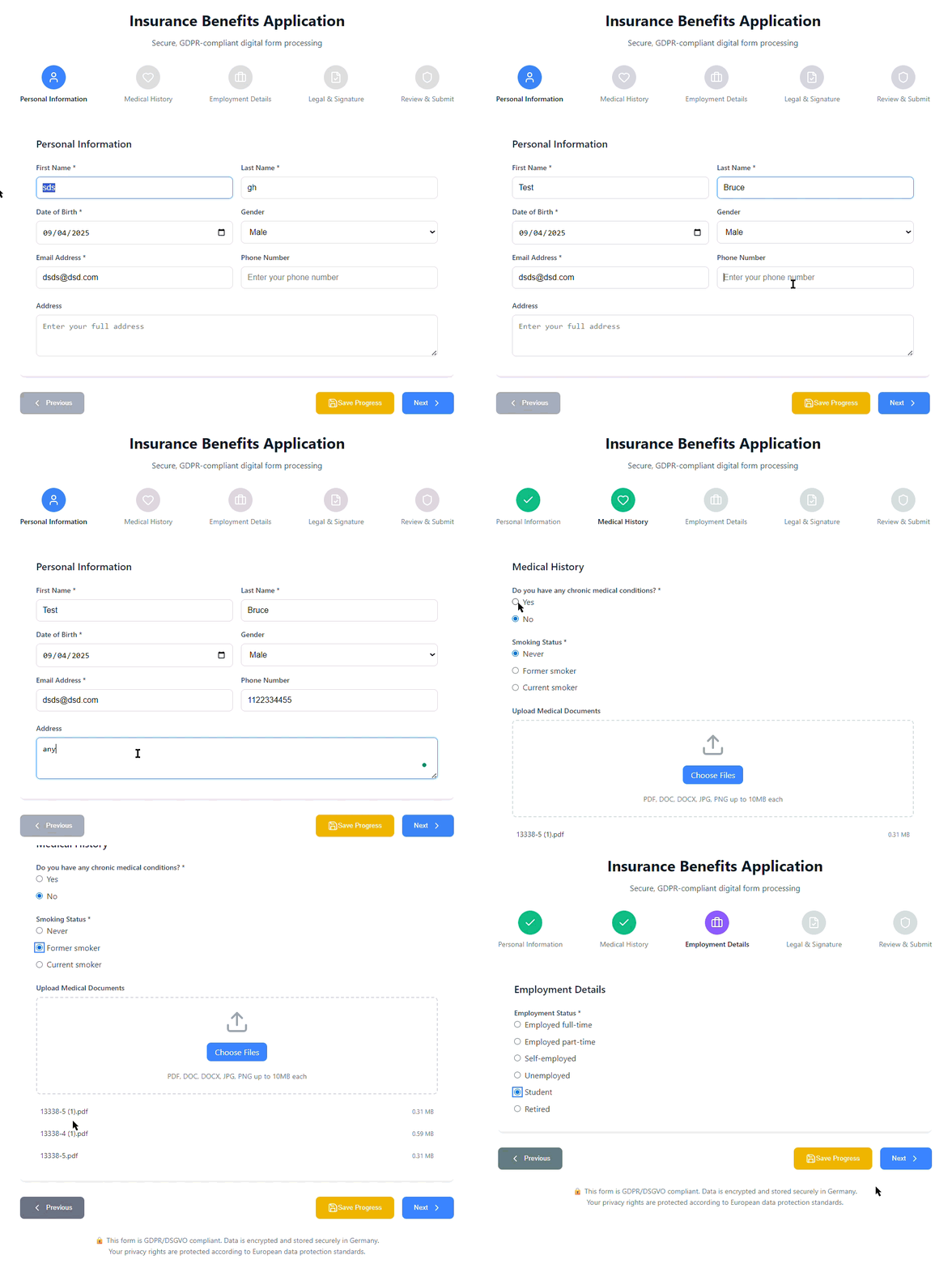
Demo of the Insurance Benefits Application showing the multi-step workflow and Save Progress functionality.
The interface separates the application into clearly defined stages, helping customers understand where they are in the process and what information they need to provide.
The Customer Journey
The application is designed around a structured customer journey rather than treating the experience as a single large form.
The overall flow is:
 START APPLICATION
 ↓
 PERSONAL INFORMATION
 ↓
 MEDICAL HISTORY
 ↓
 EMPLOYMENT DETAILS
 ↓
 LEGAL & SIGNATURE
 ↓
 REVIEW DETAILS
 ↓
 SUBMIT
This approach can make a lengthy application feel more manageable by breaking it into smaller sections.
Each stage can also have its own data fields and validation requirements.
1. Personal Information
The first stage collects essential information about the applicant.
The application includes fields for information such as:
- First name
- Last name
- Date of birth
- Gender
- Email address
- Phone number
- Address
Separating these details into a dedicated Personal Information step gives users a clear starting point and establishes the basic applicant information required for the rest of the workflow.
2. Medical History
The next stage collects relevant medical and health information required for the benefits application process.
Medical information can be sensitive, making security and privacy important considerations when designing this type of application.
The application therefore treats medical information as a dedicated stage rather than mixing it with unrelated personal or employment information.
For a production insurance application, organizations should evaluate applicable privacy, security, regulatory, retention, and access-control requirements based on their specific environment and jurisdictions.
3. Employment Details
Employment information is another component of the application workflow.
The Employment Details stage allows relevant employment information to be captured for eligibility and benefits assessment.
Keeping employment information separate from personal and medical information helps maintain a logical structure throughout the application.
It also allows organizations to evolve individual sections as business requirements change.
4. Legal & Signature
Insurance benefits applications may require customers to provide declarations, acknowledgments, and signatures.
The application includes a dedicated Legal & Signature stage for this part of the workflow.
The separation of legal requirements into their own step makes the process easier for users to understand and provides a clear stage before final review and submission.
The exact legal and electronic-signature requirements for a production implementation would depend on the organization’s business process and applicable regulations.
5. Review & Submit
Before submitting an application, users should have an opportunity to review the information they have provided.
The application therefore includes a Review & Submit stage.
The workflow can be represented as:
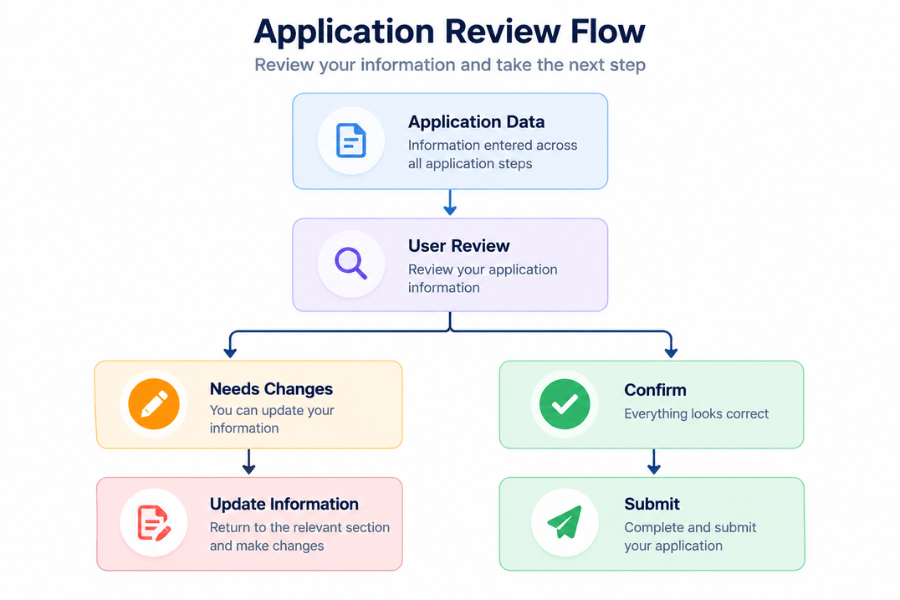
This gives users an opportunity to identify incorrect or incomplete information before final submission.
From an operational perspective, this can also help reduce avoidable errors entering downstream processes.
Also read: Mobile App Development Timeline – How Long Does It Take to Build an App?
Save and Resume: Preventing Users From Starting Over
One of the more important capabilities of the application is save progress.
Insurance applications can require substantial amounts of information. Customers may not always have the time or information available to complete the process in a single session.
If an application only supports a single uninterrupted session, an interruption can force the customer to start again.
That creates unnecessary friction.
The application instead maintains the state of the information entered by the user.
 User starts application
 ↓
 Enters information
 ↓
 Application state saved
 ↓
 User closes / leaves application
 ↓
 Returns later
 ↓
 Previously entered information restored
 ↓
 Continue application
This creates a save-and-resume experience.
What Happens if the Application Is Accidentally Closed?
The application is designed to retain the state of the user’s completed information.
For example:
 Step 1 ✓
 Step 2 ✓
 Step 3 ✓
 Step 4 → In Progress
 ↓
 Application closes
 ↓
 User returns
 ↓
 Saved application state restored
 ↓
 Continue from previous progress
Instead of forcing the customer to repeat information, the application can restore the previously completed state and allow the user to continue.
This is particularly valuable for long, multi-step forms where users may otherwise abandon the process after losing their progress.
Check out: Mobile App Development Guide – Trends, Technologies & Strategy
Why Persistent Application State Matters
Persistent state is more than a technical feature.
It directly affects the customer experience.
Consider two scenarios.
Without persistence
 Customer enters information
 ↓
 Browser closes
 ↓
 Data lost
 ↓
 Customer starts again
 ↓
 Frustration
 ↓
 Potential abandonment
With persistence
 Customer enters information
 ↓
 Application state saved
 ↓
 Application interrupted
 ↓
 Customer returns
 ↓
 Information restored
 ↓
 Customer continues
The second experience removes a significant source of friction from long-form digital applications.
A Modular Multi-Step Architecture
A multi-step application can also provide a cleaner development structure.
Conceptually, the application can be divided into components such as:
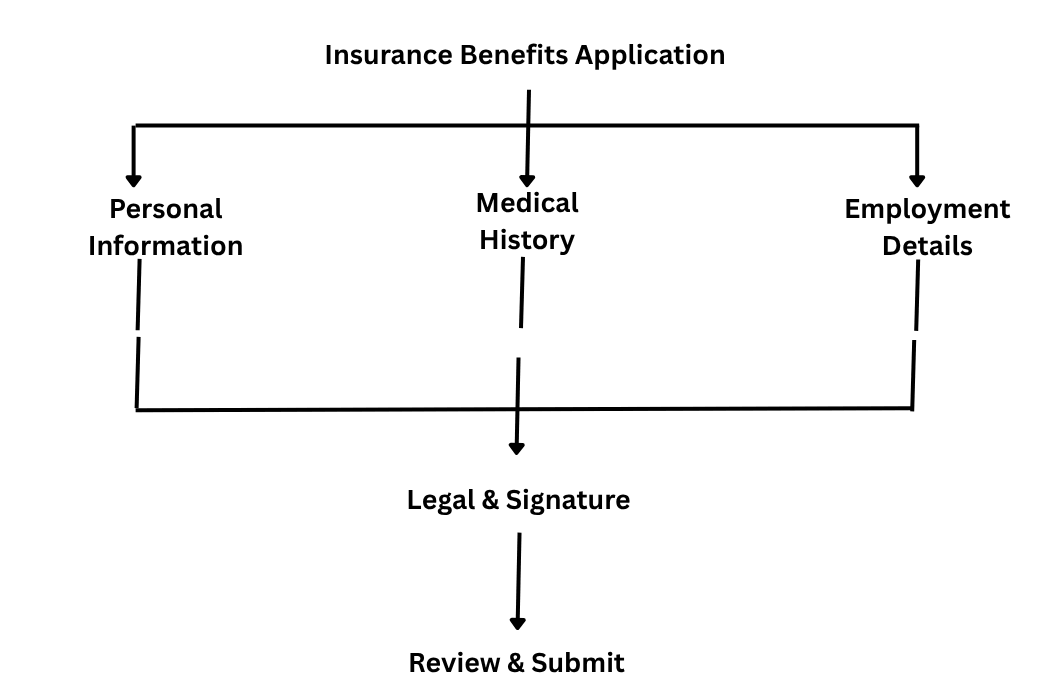
Each stage can have its own validation and user-interface requirements while contributing to the overall application state.
This approach can make it easier to maintain and evolve the application as requirements change.
Check out: Mobile App Development Trends Businesses Can’t Ignore
Data Validation at Each Stage
A multi-step form should not simply collect information.
Each stage can validate information before allowing the user to move forward.
For example:
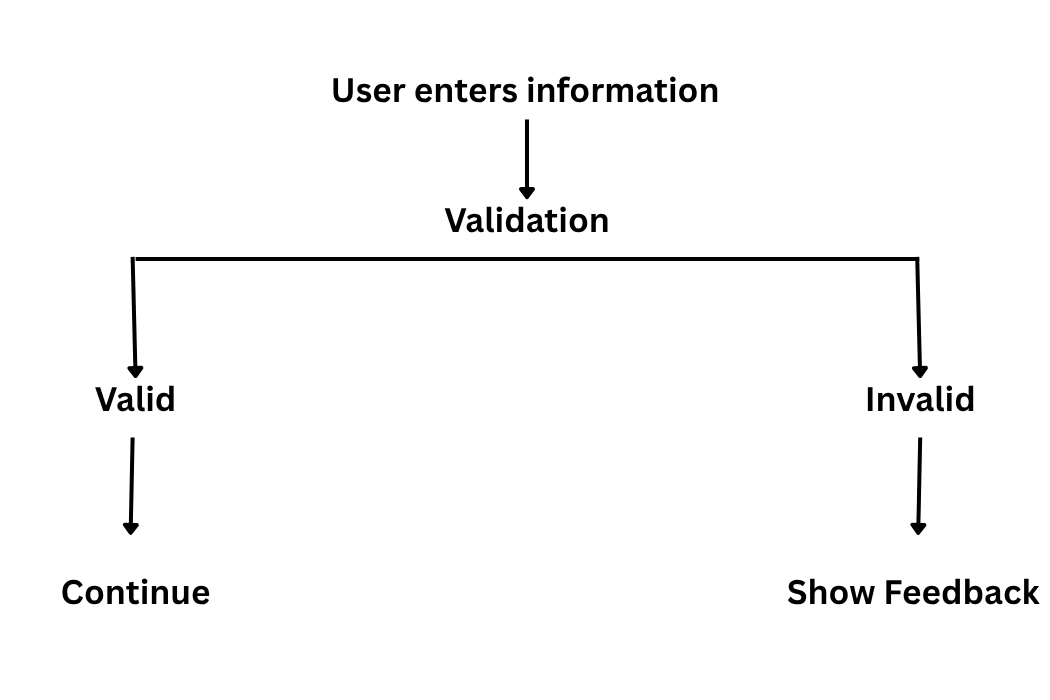
Validation can help identify missing or incorrectly formatted information earlier in the process.
This is generally preferable to allowing users to reach the final submission stage only to discover multiple issues.
Designing for the Insurance Customer Experience
Insurance applications can involve complex information, but the interface does not necessarily need to feel complex.
A customer-focused experience should aim to:
- Break complex forms into manageable steps
- Clearly communicate progress
- Provide understandable instructions
- Identify errors early
- Preserve completed information
- Allow users to review their answers
- Reduce unnecessary repetition
- Provide a clear submission process
The goal is to make the application process feel like a guided journey rather than a long administrative form.
Business Value for Insurance Organizations
From a business perspective, digitizing the application workflow can provide value beyond simply replacing paper.
Potential benefits include:
Improved customer experience
Customers can complete the application through a structured digital interface.
Reduced manual data entry
Digitally captured information can reduce the need for employees to manually transcribe information from paper forms.
Better data consistency
Structured fields and validation can encourage more consistent information collection.
Faster processing
Digital submission can create a more streamlined path from application completion to downstream processing.
Reduced administrative workload
Automating parts of the application workflow can reduce repetitive administrative activities.
Higher application completion potential
Save-and-resume functionality gives customers the ability to return to an incomplete application rather than losing their progress.
More modern customer experience
A digital workflow can provide a more convenient alternative to fragmented or paper-heavy processes.
Also check: Why Finance Mobile Apps Need AI-First Architecture
From Digital Form to Insurance Workflow
The application can also be viewed as the beginning of a broader digital insurance workflow.
A potential future architecture could look like:
 Customer
 ↓
 Digital Benefits Application
 ↓
 Validation
 ↓
 Application Submission
 ↓
 Insurance Systems
 ↓
 Eligibility / Benefits Processing
 ↓
 CRM / Customer Records
 ↓
 Operational Workflows
The current application provides a foundation that can potentially be integrated with existing insurance platforms, CRM systems, databases, APIs, or workflow systems.
The actual integration architecture would depend on the client’s technology environment and business requirements.
Designing for Secure Digital Processing
Security becomes particularly important when an application handles personal and medical information.
A production insurance application should consider areas such as:
- Authentication
- Authorization
- Encryption
- Secure data transmission
- Data storage
- Access controls
- Session management
- Input validation
- Auditability
- Data retention
- Privacy requirements
- Regulatory requirements
The application described in this article was designed with secure handling of customer information as a key consideration.
For an actual production deployment, security and compliance requirements should be evaluated against the organization’s specific regulatory environment and architecture.
Why Save-and-Resume Is Important for Enterprise Applications
The save-and-resume pattern is not limited to insurance.
It can be useful anywhere users need to complete a lengthy digital process.
Examples include:
- Insurance applications
- Loan applications
- Employee benefits enrollment
- Healthcare forms
- Government applications
- Financial onboarding
- Customer onboarding
- Compliance forms
- Enterprise workflows
The underlying principle is straightforward:
Don’t make users repeat work they have already completed.
Also check: MVP to Market – Realistic Cost, Timelines and Tech Stack for MVP App Development
Potential Integration Opportunities
Once a digital application workflow has been established, organizations can consider integrating it with their existing technology ecosystem.
Potential integrations could include:
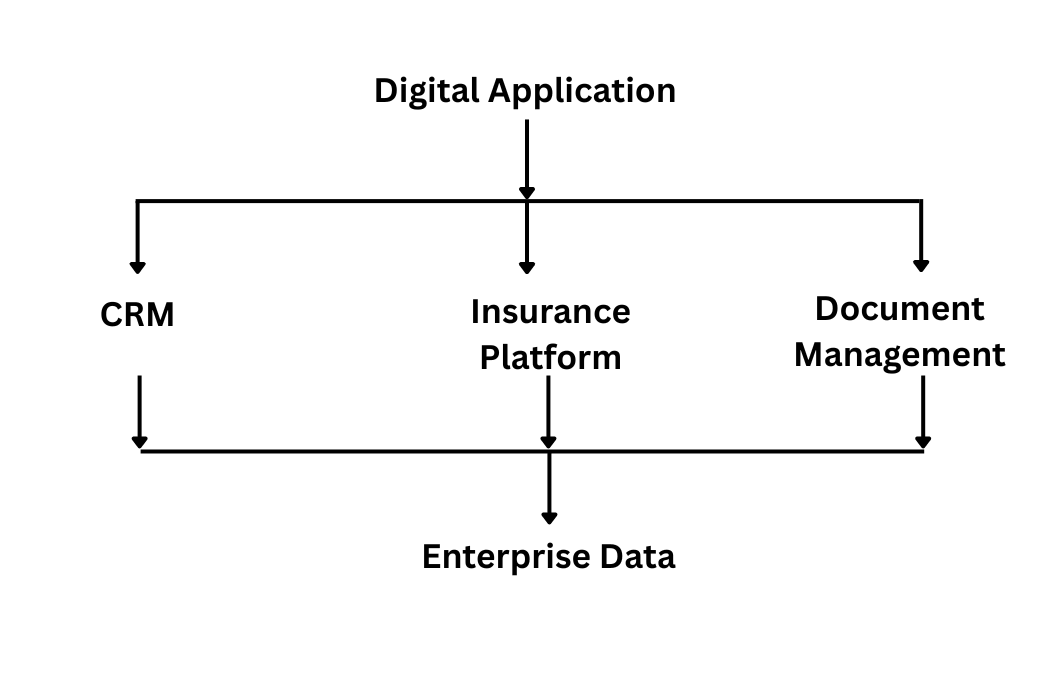
Depending on the environment, integrations could be implemented through APIs, middleware, event-driven architectures, or other enterprise integration patterns.
The important consideration is to design the application so that future integration requirements can be accommodated without unnecessarily coupling every component together.
A Practical Development Approach
Organizations considering a similar insurance application can approach development in several stages.
Step 1: Map the Existing Process
Document the current application journey.
Identify:
- Forms
- Required information
- Validation rules
- Approval requirements
- Signatures
- Manual processes
- Downstream systems
Step 2: Define the Digital Journey
Convert the existing process into logical digital steps.
For example:
 Personal Information
 ↓
 Medical Information
 ↓
 Employment
 ↓
 Legal
 ↓
 Review
 ↓
 Submit
Step 3: Define Application State
Determine what information must be saved and when it should be persisted.
This is particularly important for save-and-resume functionality.
Step 4: Design Validation
Define validation rules for each stage rather than waiting until final submission.
Step 5: Design Security
Identify sensitive information and establish appropriate security controls.
Step 6: Build the User Experience
Create a simple, accessible, responsive interface that guides users through the process.
Step 7: Test Interrupted Sessions
Testing should include scenarios such as:
- Browser closure
- Session interruption
- Returning later
- Partially completed forms
- Invalid data
- Network interruption
- Multiple sessions
The save-and-resume capability should be tested as a core workflow rather than as an optional feature.
What This Project Demonstrates
The Insurance Benefits Application demonstrates how an insurance process can be approached as a digital customer journey rather than simply an online form.
The important elements include:
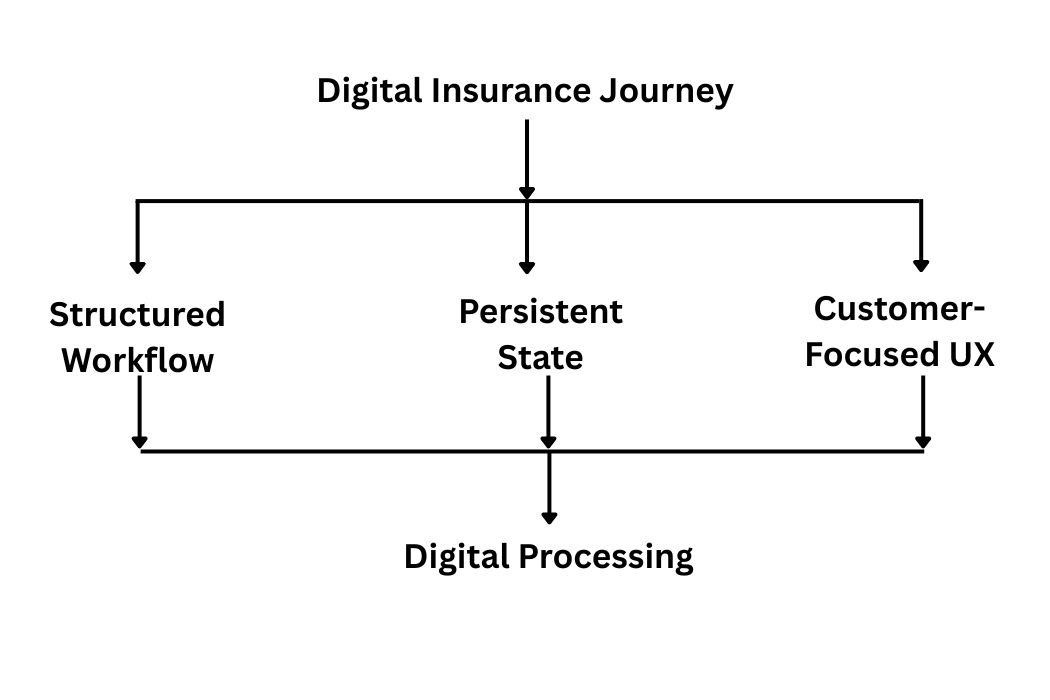
The combination of structured steps, validation, persistent application state, review functionality, and digital submission creates a foundation for a more efficient insurance application experience.
Key Features at a Glance
| Capability | Purpose |
|---|---|
| Multi-step application | Breaks a complex process into manageable stages |
| Personal information | Captures applicant details |
| Medical history | Collects relevant health information |
| Employment details | Supports eligibility and benefits assessment |
| Legal & signature | Handles declarations and signature requirements |
| Review & submit | Allows users to verify information before submission |
| Save progress | Allows incomplete applications to be continued later |
| Persistent application state | Preserves previously entered information |
| Digital processing | Moves the workflow away from paper-based processes |
| Security focus | Supports secure handling of sensitive information |
| Integration-ready foundation | Provides potential for future enterprise integrations |
Conclusion
Insurance organizations are increasingly looking for ways to replace fragmented, paper-heavy processes with digital customer experiences.
A well-designed Insurance Benefits Application can address this opportunity by bringing multiple stages of the application journey into one structured workflow.
The project developed for our client demonstrates several important principles: guided multi-step data collection, validation, digital review and submission, secure handling of sensitive information, and persistent application state.
Among these capabilities, save-and-resume is particularly important. Customers should not have to start an application from scratch simply because a browser was closed or a session was interrupted. By preserving the state of the application, the digital experience can allow customers to return and continue from where they left off.
For insurance organizations, this type of application can serve as a foundation for broader digital transformation—connecting customer-facing application workflows with insurance systems, CRM platforms, enterprise data, and downstream processing.
FAQs
Frequently Asked Questions
What is an Insurance Benefits Application?
It is a digital application workflow that allows customers to provide information required for insurance benefits processing through a structured online experience.
What information can an insurance benefits application collect?
Depending on the organization’s requirements, it can collect personal information, medical history, employment details, legal declarations, signatures, and other information required for benefits processing.
Can users save an insurance application and complete it later?
Yes. A digital application can implement save-and-resume functionality by maintaining the state of information entered by the user.
What happens if the application is accidentally closed?
With persistent application-state functionality, previously saved information can be restored when the user returns, allowing them to continue rather than starting from the beginning.
Why is save-and-resume important for insurance applications?
Insurance applications can require substantial information. Save-and-resume reduces the need for customers to repeat completed work when they cannot finish the application in one session.
Can a digital insurance application integrate with existing insurance systems?
Yes. A digital application can potentially integrate with insurance platforms, CRM systems, databases, document-management platforms, and other enterprise applications through appropriate integration mechanisms.
How can digital insurance applications reduce manual processing?
Structured digital data capture and validation can reduce repetitive manual data entry and provide information in a format that can potentially be processed by downstream systems.
Is an online insurance application GDPR compliant?
Compliance depends on the complete implementation, data processing activities, security controls, organizational processes, jurisdiction, and applicable legal requirements. The application described here was designed with secure and GDPR-compliant handling of customer information as a focus, but organizations should conduct their own compliance assessment before production use.
Mobile
Related Articles
Generative AI in Mobile Apps: Use Cases, Benefits, and Challenges
Generative AI is changing how people interact with mobile applications. Instead of relying only on predefined menus, forms, and workflows, users can…

AwsQuality Develops Solar Building Finder Prototype to Identify and Prioritize Rooftop Solar Opportunities
Finding the right rooftops is one of the first challenges in solar sales. Sales teams and installers need to identify buildings that…
Mobile App Development Timeline: How Long Does It Take to Build an App?
Building a mobile app is rarely just a matter of writing code. From validating the idea and defining requirements to designing the…