Salesforce has become an essential platform for managing customer relationships, automating business processes, and connecting enterprise applications. As businesses expand their Salesforce environments with custom applications, integrations, workflows, and AI-powered capabilities, maintaining security throughout the development lifecycle becomes increasingly important.
A single poorly secured component, excessive user permissions, exposed credentials, or an inadequately tested deployment can introduce risks that affect sensitive data and business operations.
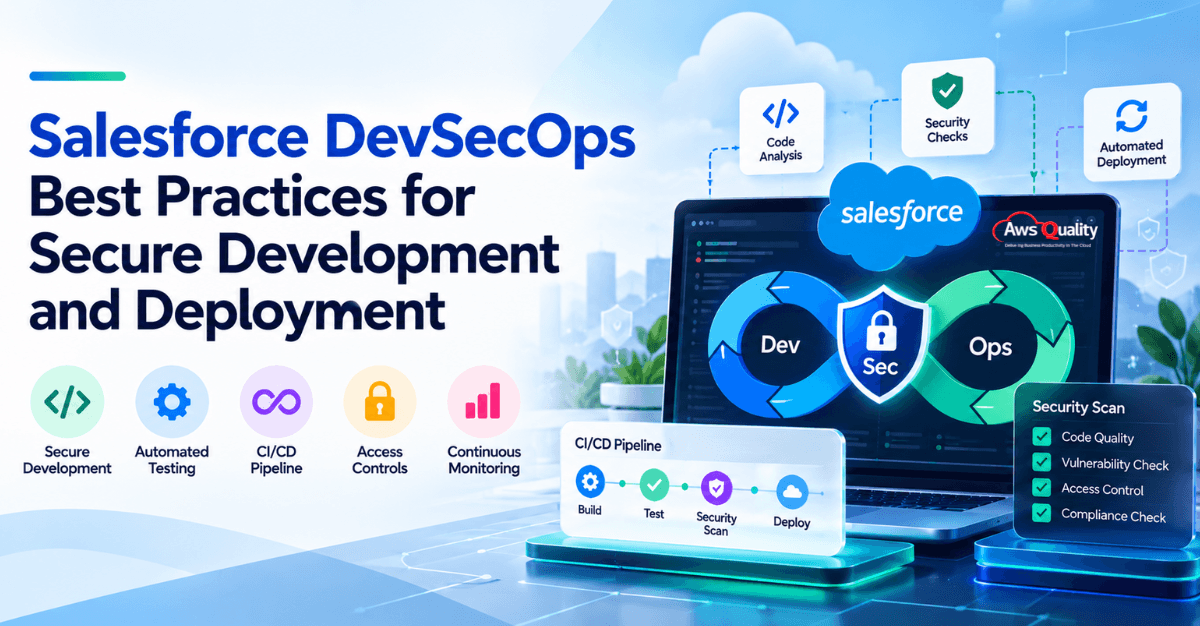
Salesforce DevSecOps addresses these challenges by integrating security into every stage of Salesforce development and deployment. Rather than relying exclusively on a final security review, it combines secure coding practices, automated analysis, testing, controlled deployments, and continuous monitoring.
For businesses, the goal is to make security a consistent part of software delivery without creating unnecessary bottlenecks for development teams.
This guide covers 12 Salesforce DevSecOps best practices, explains how to integrate security into a CI/CD pipeline, and provides an implementation roadmap and checklist to help businesses strengthen their Salesforce development and deployment processes.
Key Takeaways
- Salesforce DevSecOps integrates security into planning, development, testing, deployment, and ongoing maintenance.
- Automated tools such as Salesforce Code Analyzer can help identify potential security and code quality issues earlier.
- Access controls, secure credential management, and environment protection are essential parts of a secure Salesforce delivery process.
- CI/CD pipelines should include appropriate security checks, automated tests, deployment permissions, and approval requirements.
- Salesforce security applies to Apex code, Lightning components, Flows, integrations, and configuration—not just custom code.
- A phased implementation helps businesses improve security while maintaining a practical development workflow.
What is Salesforce DevSecOps?
Salesforce DevSecOps is an approach to Salesforce development that integrates security into the software delivery lifecycle.
The term DevSecOps combines three disciplines:
- Development: Building Salesforce applications, writing Apex code, configuring Flows, developing Lightning Web Components, and implementing integrations.
- Security: Identifying vulnerabilities, enforcing access controls, protecting sensitive data, and validating security requirements.
- Operations: Managing development environments, releases, deployments, monitoring, and application reliability.
In a traditional workflow, developers may build an application, test its functionality, and submit it for a security review near the end of development.
A DevSecOps approach moves security checks earlier and incorporates them into repeatable development and deployment processes.
For example, when a developer submits an Apex code change, an automated workflow can run code analysis and relevant tests. The results can be reviewed before the change progresses toward deployment. The pipeline can also enforce defined requirements for approvals, credentials, and production access.
This approach helps teams identify issues earlier and apply security requirements more consistently.
Read: Salesforce is Building an AI That Watches You – and Acts for You
Salesforce DevSecOps vs. Salesforce DevOps: What’s the Difference?
Salesforce DevOps and Salesforce DevSecOps share many practices, including version control, automated testing, continuous integration, and repeatable deployments.
The primary difference is the emphasis placed on security.
| Area | Salesforce DevOps | Salesforce DevSecOps |
|---|---|---|
| Primary focus | Improving development collaboration and release processes | Improving delivery while integrating security throughout the lifecycle |
| Code reviews | Review functionality, maintainability, and quality | Also evaluate potential security weaknesses |
| Automated testing | Validate functionality and help prevent regressions | Include security-focused checks alongside functional testing |
| Deployment pipeline | Automate and standardize releases | Add appropriate security checks and access controls to the pipeline |
| Credential management | Manage credentials needed for deployments | Apply strong credential protection, restricted access, and secure authentication practices |
| Monitoring | Track application and release health | Also consider security events, access risks, and configuration changes |
| Team responsibility | Shared ownership of development and operations | Shared ownership of development, security, and operations |
The important distinction: DevSecOps doesn’t replace DevOps. It extends the delivery process by making security an integral part of how teams plan, build, test, deploy, and maintain Salesforce solutions.
A mature Salesforce delivery process can incorporate both approaches.
Understanding Salesforce’s Shared Responsibility Model
Salesforce and its customers share responsibility for security. Salesforce manages foundational security controls for its platform and infrastructure, while customers must appropriately configure their Salesforce environments, manage user access, protect their data, and secure their custom code, integrations, and installed applications.
The exact division of responsibility depends on the Salesforce products and services being used. Businesses should review the applicable Salesforce security guidance and ensure that their internal controls address their own responsibilities.
Your organization is responsible for:
- The Apex code your developers write and deploy
- The declarative configuration — flows, profiles, permission sets, sharing rules, page layouts — that your admins build
- The data you store in the org, including how it is classified, protected, and governed
- The third-party applications and managed packages you install from the AppExchange
- The integrations that connect Salesforce to your other systems
- The users who access the org, their permissions, and how access is provisioned and deprovisioned
Varonis Threat Labs has reported high- and critical-severity security issues to Fortune 500 companies and government agencies stemming from Apex classes running without proper sharing enforcement — issues that exist not because Salesforce has a flaw, but because the organizations deployed insecure code that the platform executed faithfully.
Every best practice in this guide addresses one part of the responsibility your organization bears. Together, they constitute a DevSecOps program that discharges that responsibility systematically rather than leaving it to chance.
Why are Salesforce DevSecOps Best Practices Important?
Salesforce environments frequently contain customer information, sales records, service histories, confidential business data, and integrations with other enterprise systems.
As these environments become more complex, security risks can arise from several sources, including custom code, misconfigured permissions, insecure integrations, exposed credentials, and insufficient testing.
Following Salesforce DevSecOps best practices helps organizations address these risks systematically.
1. Identify Security Issues Earlier
Finding a vulnerability during development generally gives a team more opportunity to investigate and resolve it before it affects a production environment.
Automated code analysis, peer reviews, and security-focused testing can identify potential problems before deployment.
For example, a code scan may flag a potentially unsafe data-access pattern in Apex. Developers can review the finding, determine whether it represents a genuine risk, and address it before the change progresses through the pipeline.
2. Protect Sensitive Customer Data
Salesforce applications may process personal information, customer records, financial data, and other sensitive information.
Security practices help teams control who can access this information and how applications use it. They also help reduce the risk of exposing production data through development environments, logs, integrations, or source control.
3. Improve Deployment Reliability
A deployment process that depends heavily on manual steps can be difficult to repeat consistently.
Automated validation, testing, and security checks help standardize releases. They also provide clearer evidence that defined requirements have been met before a change reaches production.
4. Support Governance and Audit Readiness
Businesses may need to demonstrate that changes are reviewed, access is controlled, and security requirements are followed.
Version-controlled changes, documented approvals, pipeline logs, and recorded test results can support these activities.
DevSecOps does not automatically make an organization compliant with a particular regulation. Security controls must still be mapped to the organization’s applicable regulatory, contractual, and internal requirements.
5. Reduce Unnecessary Development Delays
When security reviews occur only at the end of a project, findings can lead to unexpected rework.
Introducing appropriate checks earlier helps teams identify issues while the relevant changes are still being developed. Over time, this can improve visibility, reduce avoidable last-minute fixes, and make release planning more predictable.
Also read: Agentforce and the Future of Enterprise AI
12 Salesforce DevSecOps Best Practices for Secure Development and Deployment
The following practices can help organizations establish a more secure, consistent, and maintainable Salesforce development process.
1. Integrate Security Into the Development Lifecycle
One of the most important Salesforce DevSecOps best practices is to make security part of the process from the beginning.
This approach is commonly called shifting security left. It means identifying and addressing security requirements during planning and development rather than waiting until testing or deployment.
For Salesforce projects, security requirements should be considered when designing Apex classes, Lightning components, Flows, integrations, and data models.
Teams should ask questions such as:
- What sensitive data will the application access?
- Which users need permission to view or modify that data?
- What authentication and authorization controls are required?
- Will the application connect to external systems?
- What security checks must pass before deployment?
- Are there specific compliance or audit requirements?
For higher-risk features, teams can also perform threat modeling to identify potential attack paths before implementation begins.
How to implement this practice
- Include security requirements in user stories and acceptance criteria.
- Review data access and permissions during solution design.
- Identify sensitive integrations and external entry points.
- Define the security checks required for each type of change.
- Review security requirements whenever the application architecture changes.
Salesforce’s secure development guidance emphasizes integrating security into design, development, testing, and deployment rather than treating it as a final review. Explore the Salesforce Well-Architected Secure Development Lifecycle guidance.
2. Follow Secure Apex Coding Practices
Custom Apex code can implement important business logic, process records, and interact with Salesforce data. If this code does not enforce appropriate security controls, it may expose information or allow operations that a user should not be able to perform.
Secure Apex development requires more than making sure the code executes successfully.
Developers should consider object-level permissions, field-level permissions, record access, input validation, and safe query construction.
Key practices for secure Apex development
Enforce appropriate data permissions. Review whether the code respects the current user’s access to objects, fields, and records. Apex execution context matters, so developers should understand when code runs with elevated privileges and apply appropriate controls.
Use safe query patterns. Prefer bind variables for dynamic SOQL values and avoid building queries by directly concatenating untrusted input. Where query structure must be dynamic, validate and allowlist identifiers that cannot be handled as ordinary bind values.
Validate inputs. Check user-supplied values and external inputs before using them in queries, business logic, or downstream operations.
Handle errors carefully. Avoid returning unnecessary internal details, sensitive values, or implementation information in error messages.
Review authorization logic. Verify that users can perform only the actions allowed by the application’s requirements and their permissions.
Write security-focused tests. Test relevant operations using users with different permissions to verify that access restrictions behave as intended.
Example: Avoid unsafe dynamic SOQL
A query built by concatenating untrusted input can create a risk of SOQL injection.
A safer approach is to use bind variables when inserting values into supported query conditions.
Illustrative Apex example:
String searchName = userProvidedName;
List
SELECT Id, Name
FROM Account
WHERE Name = :searchName
];
Here, the value is bound to the query instead of being inserted directly into the query string.
This example demonstrates one protective technique, not a complete security solution. Developers must still consider permissions, record access, input requirements, and the surrounding application logic.
For additional guidance, review the Salesforce secure development resources.
3. Use Salesforce Code Analyzer for Automated Code Analysis
Manual code reviews are valuable, but they may not consistently identify every issue across a large Salesforce codebase.
Salesforce Code Analyzer helps teams automate source-code analysis and identify potential security, quality, and performance issues.
It supports analysis of Salesforce-related code and components, including Apex, Visualforce, JavaScript, and Flows through supported analysis engines and rules.
How Salesforce Code Analyzer supports DevSecOps
Teams can use Code Analyzer to:
- Identify potential security weaknesses in supported code.
- Detect violations of configured coding standards.
- Highlight potential performance issues.
- Provide developers with earlier feedback.
- Generate results that can be reviewed and tracked.
- Integrate analysis into automated development and deployment workflows.
Recommended implementation approach
Run scans during development. Give developers an opportunity to identify and address potential issues before submitting changes.
Run scans in CI/CD. Automatically analyze changes when the pipeline detects a new commit or pull request.
Configure severity thresholds. Decide which findings should block a merge or deployment and which should require review.
Review findings in context. Automated findings may require investigation. Teams should distinguish genuine vulnerabilities from false positives or issues that do not apply to their specific context.
Keep tool versions supported. Maintain the analyzer and its integrations according to current Salesforce documentation.
Salesforce recommends integrating Code Analyzer into CI/CD workflows so that changes can be scanned regularly. Its documentation also describes using severity thresholds to make automated workflows fail when findings meet configured criteria.
For implementation details, consult the Salesforce Code Analyzer overview and the official CI/CD integration guide.
4. Enforce Least-Privilege Access Controls
The principle of least privilege means giving each user, service account, and automated process only the access necessary to perform its assigned responsibilities.
This principle is particularly important in Salesforce environments, where permissions can affect access to business records, fields, administrative functions, and integrations.
Excessive permissions can increase the impact of compromised credentials, accidental changes, and unauthorized actions.
Best practices for Salesforce access control
- Assign permissions according to job responsibilities.
- Use permission sets and permission set groups where appropriate.
- Review object permissions, field-level security, and record access.
- Restrict administrative privileges to authorized personnel.
- Limit production deployment permissions.
- Review integration-user permissions regularly.
- Remove access that is no longer required.
- Test application behavior under different permission levels.
Security testing should verify not only whether an authorized user can perform an action, but also whether an unauthorized user is correctly prevented from performing it.
For example, a service representative may need to view certain customer records but should not automatically receive permission to modify sensitive financial fields.
The application’s design and security configuration should enforce the intended access rules.
5. Secure Credentials, Tokens, and Secrets
CI/CD pipelines need a way to authenticate with Salesforce and other systems. Integrations may also require API credentials, certificates, access tokens, or other sensitive authentication material.
If these secrets are exposed in source code, logs, build artifacts, or unsecured configuration files, attackers may be able to use them to access systems or data.
How to protect secrets in Salesforce DevSecOps
Never commit secrets to source control. Keep credentials and private keys out of application code, configuration files, and version-controlled repositories.
Use an appropriate secrets manager. Store sensitive values in a dedicated secret-management system or protected CI/CD secret store with access restrictions.
Restrict who can retrieve secrets. Limit access to the people and automation processes that genuinely need it.
Use suitable authentication methods. Select an authentication approach supported by Salesforce and appropriate for the pipeline’s security requirements.
Avoid unnecessary long-lived credentials. Where supported and practical, prefer approaches that reduce exposure to reusable static credentials.
Monitor and rotate credentials. Establish procedures for rotation, revocation, and response to suspected exposure.
Scan for accidental disclosure. Use appropriate secret-scanning tools to identify credentials that may have been committed accidentally.
Use dedicated identities for automated deployments
Production deployment pipelines should not depend unnecessarily on an individual employee’s account.
A dedicated integration identity with narrowly defined permissions can make ownership clearer and reduce the risk of pipeline disruption when a team member changes roles or leaves the organization.
The authentication method and permissions should be reviewed against the pipeline’s requirements.
Salesforce documents authentication options for automated workflows, including JWT-based authentication for suitable enterprise pipelines. See the Salesforce guide to authenticating a Salesforce org in CI/CD.
6. Automate Security Checks in the CI/CD Pipeline
A continuous integration and continuous delivery (CI/CD) pipeline automates parts of the process used to validate, test, and deploy software changes.
In Salesforce DevSecOps, the pipeline provides a practical place to run repeatable security checks before changes progress toward production.
Instead of relying on developers to remember every step, teams can configure automated workflows to enforce defined requirements.
Security checks to consider
Depending on the project, a Salesforce CI/CD pipeline may include:
- Source-code analysis.
- Secret scanning.
- Relevant dependency vulnerability checks.
- Apex unit tests.
- Integration and regression tests.
- Configuration validation.
- Deployment permission checks.
- Approval requirements for production releases.
Not every check needs to run at every stage. Teams should select controls based on the risk, speed, and technical requirements of their environment.
Example of a secure Salesforce CI/CD workflow
Consider a company that maintains a custom Salesforce application using source control and an automated deployment platform.
Its workflow might look like this:
Step 1: Developer submits a change.
The developer commits code and opens a pull request for review.
Step 2: Automated checks begin.
The pipeline runs configured code analysis and secret scanning.
Step 3: Tests validate the change.
Relevant automated tests check functionality and identify regressions.
Step 4: Findings are reviewed.
The pipeline reports violations. Defined rules determine whether critical findings block further progress or require a documented exception.
Step 5: Changes are validated in a suitable environment.
The team confirms that the release includes the required components and behaves as expected.
Step 6: Authorized personnel approve production deployment.
The pipeline enforces the required approvals and uses protected credentials.
Step 7: Post-deployment checks run.
The team verifies that critical application functions work and reviews relevant monitoring signals.
This workflow creates repeatable checkpoints throughout the delivery process.
How to make security gates effective
Security gates should be strict enough to prevent unacceptable risks but practical enough to support consistent delivery.
To achieve this balance:
- Define severity levels and blocking criteria.
- Assign owners to security findings.
- Make scan results visible to developers.
- Document exceptions and their approval requirements.
- Review false positives and tune rules appropriately.
- Prevent unauthorized bypasses of required controls.
- Track unresolved findings to completion.
A pipeline that reports findings without any process for reviewing them provides limited protection. Teams need clear rules about what happens after an issue is detected.
7. Protect Sandbox and Development Environments
Salesforce sandboxes and other development environments allow teams to build, test, and validate changes without directly modifying the live production environment.
However, non-production environments can still contain sensitive data, credentials, or configurations that require protection.
If these environments are poorly managed, they may become a source of unnecessary security exposure.
Recommended environment security practices
Separate environments by purpose. Use appropriate development, testing, user acceptance testing, and production environments according to the team’s release process.
Restrict sandbox access. Give users access only to the environments and data required for their responsibilities.
Protect copied production data. Where possible, use synthetic data or appropriately masked data for testing. If production data must be copied, apply suitable safeguards and access restrictions.
Keep credentials separate. Avoid reusing production secrets in development and testing environments.
Control changes between environments. Use a documented process to promote changes and validate them before production deployment.
Review environment configuration. Check permissions, connected applications, integration endpoints, and other security-sensitive settings.
Clean up unused environments and access. Remove unnecessary access and retire environments when they are no longer needed, following appropriate retention requirements.
Salesforce recommends using suitable development environments and structured release validation rather than developing application changes directly in production.
Review the official Salesforce deployment best practices for guidance on environment usage, release planning, and change management.
8. Test Salesforce Flows, Permissions, and Configuration Changes
Salesforce security is not limited to Apex code.
Declarative features such as Flows, permission settings, sharing rules, and connected applications can affect how data is accessed and processed.
A workflow can function correctly while still allowing unintended access or performing an operation under inappropriate permissions.
What should teams review?
Salesforce Flows: Review entry criteria, data access, execution context, input handling, and actions that create, update, or expose records.
Object and field permissions: Verify that users can access only the records and fields required for their responsibilities.
Sharing and record access: Confirm that record visibility matches the business requirements.
Connected applications and integrations: Review authentication, scopes, permissions, and access to external services.
Configuration changes: Identify changes that could affect security, business logic, or data integrity.
User-specific behavior: Test relevant features using users with different roles and permission levels.
Include declarative changes in release reviews
A metadata deployment may contain configuration changes that affect security even when no Apex code has changed.
For example, a new Flow might update customer records as part of an automated process. The team should verify that its execution behavior and data access are appropriate for the intended use case.
The goal is to evaluate the security impact of the entire change—not only the source-code files that happen to be present.
9. Manage Third-Party Dependencies and Integrations Securely
Salesforce environments often depend on external applications, managed packages, JavaScript libraries, APIs, and other services.
These dependencies can introduce security risks if they contain vulnerable components, use excessive permissions, or are not maintained.
Integrations can also expose data when authentication and authorization are not configured appropriately.
Best practices for dependency and integration security
- Maintain an inventory of important third-party components and integrations.
- Use trusted sources and evaluate packages before installing them.
- Monitor relevant dependencies for known vulnerabilities.
- Update components according to a risk-based maintenance process.
- Restrict API access and integration permissions.
- Protect credentials used for external connections.
- Validate data received from external systems.
- Review error handling and logging to prevent unnecessary exposure of sensitive information.
- Test integrations after security-related changes.
For public-facing Salesforce applications and APIs, consider whether additional security testing or penetration testing is appropriate based on the application’s exposure and risk.
The specific tools and testing methods should match the technologies involved. A scanner that analyzes Apex code, for example, does not automatically validate every external service connected to Salesforce.
10. Establish Secure Deployment and Change Management Policies
Even well-tested code can create problems if it is deployed without appropriate controls.
A secure Salesforce deployment process should establish who can initiate a release, who can approve it, which checks must pass, and how changes are tracked.
Recommended deployment controls
Use controlled promotion between environments. Validate changes in appropriate non-production environments before production deployment.
Restrict production access. Limit who can perform programmatic deployments and modify critical production configurations.
Require appropriate approvals. Apply approval requirements according to the risk and impact of the change.
Maintain traceability. Record relevant information about changes, reviews, approvals, and deployment outcomes.
Plan release timing. Consider business activity, potential disruption, and the availability of staff who can respond if an issue occurs.
Prepare recovery procedures. Define how the team will investigate and address a failed deployment, including any necessary corrective changes or data-recovery procedures.
Review emergency changes. Establish a controlled process for urgent fixes and ensure that emergency procedures do not become a routine way to bypass security checks.
A good change management process should provide accountability without creating unnecessary administrative overhead.
11. Monitor Salesforce Security After Deployment
DevSecOps does not end when a change reaches production.
Applications, integrations, user permissions, and business requirements change over time. Ongoing monitoring helps organizations identify issues that may not have been visible during development or testing.
Areas to monitor and review
- Changes to security-sensitive configuration.
- User access and permission changes.
- Relevant authentication and activity events.
- Integration failures and unexpected behavior.
- Unresolved security findings.
- Changes to CI/CD workflows and deployment permissions.
- Security-related incidents and recurring patterns.
The appropriate monitoring capabilities depend on the Salesforce products, licenses, and tools available to the organization.
Teams should also define how alerts are reviewed, who responds to suspected incidents, and how findings are escalated.
Establish a clear response process
A monitoring tool is useful only when the organization knows what to do with the information it produces.
Define responsibilities for:
- Reviewing and validating alerts.
- Determining the severity and business impact.
- Containing or mitigating confirmed issues.
- Investigating the cause.
- Documenting the response.
- Updating controls to reduce the chance of recurrence.
This process connects production security monitoring with the continuous improvement goals of DevSecOps.
12. Measure Security Performance and Continuously Improve
Salesforce DevSecOps should evolve as the organization changes.
Teams can use a small set of meaningful metrics to understand whether security checks are being applied consistently and whether identified issues are being resolved.
Useful measures include:
| Metric | What It Helps Measure |
|---|---|
| Security findings by severity | The number and seriousness of issues identified |
| Mean time to remediate | How quickly prioritized findings are resolved |
| Automated scan coverage | How much of the relevant codebase or change process is covered by scans |
| Security gate compliance | Whether required security checks are completed before release |
| Deployment success rate | How reliably releases complete |
| Change-related incidents | How frequently deployed changes contribute to incidents |
| Open exceptions | The number and age of approved deviations from security requirements |
| Repeat findings | Whether previously identified issues continue to recur |
Establish a baseline before setting targets. Interpret the results in context rather than treating a single metric as proof that an environment is secure.
For example, an increase in detected findings may reflect improved scan coverage rather than deteriorating security. Similarly, a high deployment success rate does not prove that applications are free from vulnerabilities.
Use metrics to identify gaps, prioritize improvements, and make the process more effective over time.
Check out: How We Built a Duplicate Lead Detection Solution Inside Salesforce
A Practical Implementation Roadmap
Building a Salesforce DevSecOps program does not require doing everything at once. A phased approach that prioritizes the highest-value controls first and builds incrementally creates momentum and demonstrates return on investment before the full program is operational.
Phase 1 – Establish the Foundation
Set up Git-based version control for all Salesforce metadata (code and configuration). Establish a structured deployment pipeline with separate development, testing, and production environments. Implement backup and recovery for production metadata. Run your first SAST(Static Application Security Testing) scan on the existing codebase to establish a security baseline.
Phase 2 – Shift Left
Introduce SAST into the development workflow as a blocking check on pull requests. Implement secrets scanning with pre-commit hooks. Define and document Apex code security standards — sharing mode policy, SOQL injection prevention, CRUD/FLS enforcement. Begin data masking in sandbox environments.
Phase 3 – Pipeline Security Gates
Add DAST(Dynamic Application Security Testing), SCA(Software Composition Analysis), and IaC(Infrastructure as Code) scanning to the CI/CD pipeline as blocking gates on releases. Configure deployment approval matrices. Enable Event Monitoring in production and establish baseline activity profiles. Deploy change monitoring.
Phase 4 – Governance and Observability
Establish the Center of Excellence governance structure. Enable Security Center across all orgs. Conduct access recertification for all users. Launch recurring security champion training. Build the compliance matrix for applicable regulatory frameworks.
Phase 5 – Continuous Improvement
Establish security health score targets and improvement cadence. Integrate security metrics into team retrospectives. Conduct periodic security reviews of the Apex codebase against the documented security standards, and update those standards as the Salesforce environment, application architecture, and security requirements evolve. Review and update security practices in response to Salesforce’s major platform releases, including Spring, Summer, and Winter, as well as relevant security advisories and changes to your organization’s environment.
Also check : Building Interactive Map Visualizations in Salesforce
Common Salesforce DevSecOps Mistakes to Avoid
Even organizations that invest in security tools can struggle if the underlying process is poorly designed.
Watch out for these common mistakes.
Treating Code Scanning as Complete Security Coverage
Static analysis can identify many potential issues, but it cannot validate every aspect of an application’s security.
What to do instead: Combine code analysis with access-control reviews, automated testing, integration testing, configuration reviews, and appropriate monitoring.
Ignoring Findings Because of Release Deadlines
Repeatedly bypassing security gates can undermine the purpose of the DevSecOps process.
What to do instead: Establish clear severity thresholds, ownership, remediation timelines, and a documented exception process.
Granting Excessive Permissions to Automation Accounts
Deployment pipelines often need elevated access, but unnecessary permissions increase the potential impact of compromised credentials.
What to do instead: Use dedicated identities, restrict permissions to required tasks, and review access regularly.
Testing Only the Happy Path
A feature may work correctly for an authorized user but behave incorrectly when accessed by someone with different permissions.
What to do instead: Include negative tests and permission-based test scenarios to verify that unauthorized operations are prevented.
Protecting Custom Code but Ignoring Configuration
Security problems can arise from Flows, sharing settings, connected applications, and other configuration changes.
What to do instead: Review the security impact of metadata and configuration changes alongside custom code.
Automating Everything Before Establishing Clear Policies
Adding numerous tools without defining priorities can create noisy alerts, unnecessary delays, and confusion about ownership.
What to do instead: Begin with high-value controls, establish clear rules, and expand automation as the process matures.
Check: 15 Types of Salesforce Clouds and Their Feature
Salesforce DevSecOps Implementation Checklist
Use this checklist to assess whether your Salesforce development and deployment workflow includes the essential security practices.
| Area | Checklist Item | Status |
|---|---|---|
| Planning | Security requirements are included in relevant user stories and designs | ☐ |
| Secure coding | Apex code follows appropriate security and data-access practices | ☐ |
| Code analysis | Salesforce Code Analyzer is configured for relevant code and components | ☐ |
| Source control | Changes are version-controlled and reviewed | ☐ |
| Access control | Users and automation accounts follow least-privilege principles | ☐ |
| Secrets management | Credentials and private keys are stored securely | ☐ |
| CI/CD | Appropriate automated security checks run in the pipeline | ☐ |
| Testing | Functional, regression, and security-focused tests cover relevant risks | ☐ |
| Environments | Sandboxes and development environments have suitable access controls | ☐ |
| Data protection | Sensitive test data is appropriately protected | ☐ |
| Integrations | External connections and third-party dependencies are reviewed | ☐ |
| Deployment | Production releases follow controlled approval and validation processes | ☐ |
| Monitoring | Relevant security events and configuration changes are reviewed | ☐ |
| Remediation | Findings have assigned owners and a defined resolution process | ☐ |
| Governance | Exceptions and security decisions are documented | ☐ |
The checklist can serve as a starting point for an internal review. The specific controls required will depend on the organization’s architecture, risk profile, and business obligations.
Frequently Asked Questions
1. What are Salesforce DevSecOps best practices?
Salesforce DevSecOps best practices include integrating security early in development, following secure Apex coding practices, using Salesforce Code Analyzer, enforcing least-privilege access, protecting credentials, automating security checks, securing sandboxes, testing configuration changes, and monitoring production environments.
The goal is to make security a consistent part of the development and deployment process.
2. How does Salesforce DevSecOps improve application security?
Salesforce DevSecOps helps teams identify potential issues earlier by incorporating security checks into development, testing, and deployment workflows. It also supports better access control, safer credential management, consistent releases, and ongoing monitoring.
It reduces avoidable risks but does not guarantee that every vulnerability will be detected.
3. Which tools are used for Salesforce DevSecOps?
Common tools and technologies include Salesforce Code Analyzer, Salesforce CLI, source-control platforms, CI/CD systems, automated testing tools, secret-scanning tools, and appropriate secrets-management solutions.
The right combination depends on the organization’s existing infrastructure, application architecture, and security requirements.
4. How can Salesforce Code Analyzer be integrated into CI/CD?
Salesforce Code Analyzer can be invoked through supported command-line workflows and integrated into CI/CD systems. Teams can run scans when changes are detected, publish the results, and configure severity thresholds to determine whether certain findings should fail a pipeline check.
See the official Salesforce Code Analyzer CI/CD documentation for implementation guidance.
5. How can businesses secure Salesforce deployments?
Businesses can secure Salesforce deployments by validating changes in appropriate environments, running automated tests and code analysis, restricting production access, protecting deployment credentials, requiring appropriate approvals, and maintaining traceable release records.
Post-deployment validation and monitoring are also important.
6. Why is least-privilege access important in Salesforce?
Least-privilege access limits users and automated processes to the permissions they need. This reduces unnecessary access to sensitive data and helps limit the potential impact of compromised credentials or unauthorized actions.
Teams should review object permissions, field-level security, record access, administrative privileges, and integration permissions.
7. Should Salesforce Flows be included in DevSecOps security reviews?
Yes. Salesforce Flows and other declarative configurations can affect data access, record updates, automation behavior, and business logic. Teams should review their execution context, permissions, inputs, and actions as part of the overall security assessment.
8. How often should Salesforce security checks run?
The frequency depends on the type of check and the organization’s risk requirements. Automated code analysis and secret scanning can often run whenever code changes are submitted. Other checks, such as broader architecture reviews or penetration testing, may be scheduled according to release milestones and risk.
Security monitoring should continue after deployment.
9. Can small businesses implement Salesforce DevSecOps?
Yes. Small businesses can start with source control, peer reviews, automated tests, appropriate code analysis, secure credential management, and restricted production access.
They can expand the process as their Salesforce environment, team size, and security requirements grow.
10. How do you measure the success of Salesforce DevSecOps?
Businesses can measure security findings, remediation time, automated scan coverage, security gate compliance, deployment success, change-related incidents, and recurring issues.
Metrics should be interpreted together and compared with a baseline to understand whether the process is improving.
Conclusion
Salesforce DevSecOps helps businesses integrate security into the way they develop, test, deploy, and maintain Salesforce applications.
The most effective approach combines secure coding, automated analysis, access controls, credential protection, testing, controlled deployments, and continuous monitoring. These practices work together to help teams identify risks earlier and manage changes more consistently.
However, implementing DevSecOps is not simply a matter of installing a security tool. Organizations also need clear policies, defined responsibilities, practical automation, and a process for resolving findings.
The best starting point is to assess your current Salesforce delivery process, identify the highest-priority security gaps, and introduce controls in phases. As the process matures, expand automation and use measurable results to guide further improvements.
For organizations managing complex Salesforce environments, integrations, or frequent releases, a structured DevSecOps approach can help create a more secure and predictable software delivery process.
 Bio
Bio