Two years ago, the conversation about AI in customer service was primarily about potential. Leaders discussed what AI agents might do for customer satisfaction, service costs, and agent productivity. The discussion was speculative, optimistic, and largely disconnected from verifiable production results.
That conversation has fundamentally changed.
Now, AI agents are changing what a CRM can actually do.
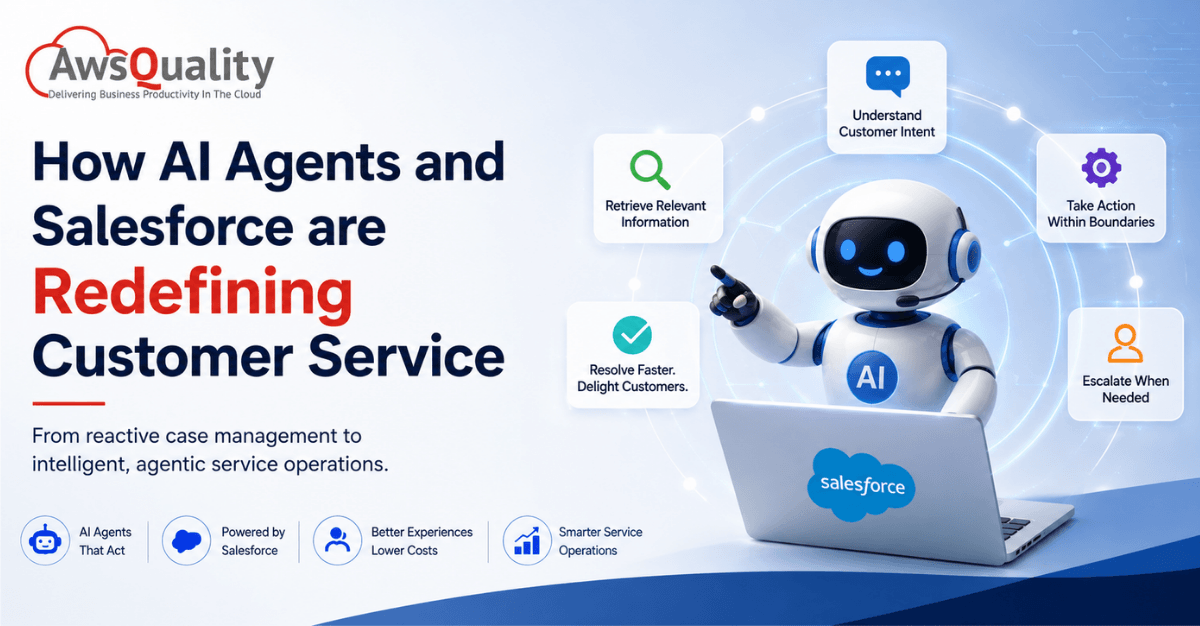
Instead of simply helping a service representative find information, an AI agent can interpret a customer’s request, retrieve relevant information, determine the next step, perform approved actions, and escalate the interaction when human judgment is required.
When these capabilities are combined with Salesforce customer data, workflows, and Service Cloud, customer service can move from reactive case management to proactive, intelligent service operations.
Salesforce’s Agentforce platform is designed around this shift, enabling organizations to deploy AI agents that can reason over business context and take actions within defined workflows and permissions.
But the opportunity is not simply about replacing human support with AI.
The more practical model is AI working alongside human service teams—handling volume and repetitive work while people focus on complex cases, empathy, negotiation, and situations that require judgment.
This article explores how AI agents and Salesforce are redefining customer service, the most important use cases, benefits, implementation considerations, risks, and what businesses should do to prepare for agentic customer service.
What are AI Agents in Customer Service?
An AI agent is an AI-powered system capable of more than generating a response.
Traditional conversational AI typically follows a relatively simple pattern:
Customer question → AI response
An AI agent can operate through a more complete workflow:
Customer request → Understand intent → Retrieve context → Reason → Select action → Execute action → Verify result → Respond or escalate
For example, imagine a customer contacts a company because an order has not arrived.
A traditional chatbot might provide a link to the order-tracking page.
An AI agent could potentially:
- Identify the customer.
- Retrieve the order.
- Check shipment status.
- Review delivery history.
- Determine whether the order is delayed.
- Create or update a service case.
- Initiate an approved replacement or refund workflow.
- Notify the customer.
- Escalate the case if an exception requires human review.
The difference is significant.
The AI is no longer simply answering questions. It is participating in the service process.
Read: How AI Agents Are Redefining Sales and Marketing
From Chatbots to AI Agents: Understanding the Architectural Difference
The most important framing shift in understanding AI agents in customer service is the distinction between what came before and what is available now. These are not the same technology marketed differently.
Traditional customer service chatbots operate on decision trees and pattern matching. They recognize a question that resembles a question in their training data and return the pre-written response associated with that pattern. When a customer’s question does not match a known pattern, the chatbot either fails visibly (“I’m sorry, I didn’t understand that”) or invisibly (returns a plausible-sounding but incorrect answer). The chatbot cannot look up the customer’s account, cannot process a transaction, cannot check order status in real time, and cannot adapt its response based on what it learned from the first message when formulating the second.
Engine, a B2B travel platform that handles 800,000-plus customer service inquiries per year, describes the previous state precisely: their chatbot “could recognize a request like ‘cancel my reservation’ but couldn’t actually process it — every cancellation still went to a human rep.” The bot was a routing mechanism, not a resolution mechanism.
AI agents built on Salesforce Agentforce operate differently across four dimensions that determine their practical value:
Reasoning. Agentforce’s Atlas Reasoning Engine does not pattern-match against a decision tree. It reasons dynamically over the specific situation — reading the full context of a conversation, consulting the customer’s CRM record, identifying what the customer needs, determining the appropriate sequence of actions to meet that need, and executing those actions. This dynamic reasoning handles the variation that makes pattern-matching systems fail at the margins.
Action. Agentforce agents can take actions — updating CRM records, processing transactions, triggering workflows, sending communications, querying external systems — rather than only returning text responses. The ability to act is what closes the gap between recognizing a request and resolving it.
CRM context. Every Agentforce agent operates on the customer’s full Salesforce record: their purchase history, their open cases, their communication preferences, their loyalty tier, their most recent interaction. This context makes the response personalized to the specific customer rather than generic across all customers asking similar questions.
Human collaboration. When a situation exceeds the agent’s defined scope or confidence threshold, Agentforce escalates to a human representative — with the full conversation summary, the customer’s record, and the actions already taken pre-populated for the human. The human picks up where the agent reached its limit, with complete context rather than starting over.
Read: Low Salesforce Adoption? Try These 7 Fixes That Work
Why Customer Service Is the Highest-ROI AI Deployment
Customer service is the function where AI agents generate returns fastest — and the data on why reflects both the characteristics of the work and the scale at which it occurs.
A service team handling 20 conversations per day per agent — Salesforce’s own ROI framework baseline — is processing structured, categorizable work at enormous volume. Reading a case, summarizing what the customer wants, classifying the issue type, routing to the right team, drafting a response, checking account status, updating the case record: these activities are cognitively demanding but largely repetitive. They are the exact category of work that AI agents address most reliably.
The published outcome benchmarks for Agentforce in Service Cloud reflect this fit between the technology and the task:
- 20% reduction in service costs and case resolution times (Salesforce/Inspark 2026)
- 20% increase in customer satisfaction (Salesforce/Inspark 2026)
- 18% increase in case deflection — cases resolved without human intervention (Salesforce 2026)
- 15% increase in upsell revenue from AI-assisted recommendations during service interactions (Salesforce 2026)
- 20–40% faster resolution on human-handled cases where Agentforce assists, even when a human closes the ticket (CRMxAI 2026)
- Industry average ROI: 171% for enterprise Agentforce deployments; top-quartile deployments reach 8× returns (CRMxAI, June 2026)
- $3.50 returned for every $1 spent at median performance for customer-facing AI agents (CRMxAI 2026)
The most strategically significant figure in this set is the 18% increase in case deflection — the proportion of cases resolved entirely by the AI without requiring human agent time. 30% of customer service cases are now resolved by AI, and Salesforce projects that figure to reach 50% by 2027. For a service organization processing tens of thousands of cases monthly, the shift of 18% of case volume from human-handled to AI-resolved represents a fundamental change in the economics of the function.
Also read: Why Salesforce implementations fail — and how to avoid common mistakes
How Salesforce Enables AI-Powered Customer Service
Salesforce provides the CRM foundation that stores customer and service information.
Depending on the organization’s Salesforce architecture, relevant information can include:
- Customer profiles
- Accounts
- Contacts
- Service cases
- Orders
- Products
- Knowledge articles
- Service history
- Communication history
- Customer preferences
- Entitlements
- Workflows
- Business rules
AI agents can use this business context to provide more relevant assistance and execute approved actions.
Salesforce’s Agentforce capabilities are designed to connect AI agents with Salesforce data and business processes, allowing organizations to build agents for service and other business functions.
This creates a potential progression:
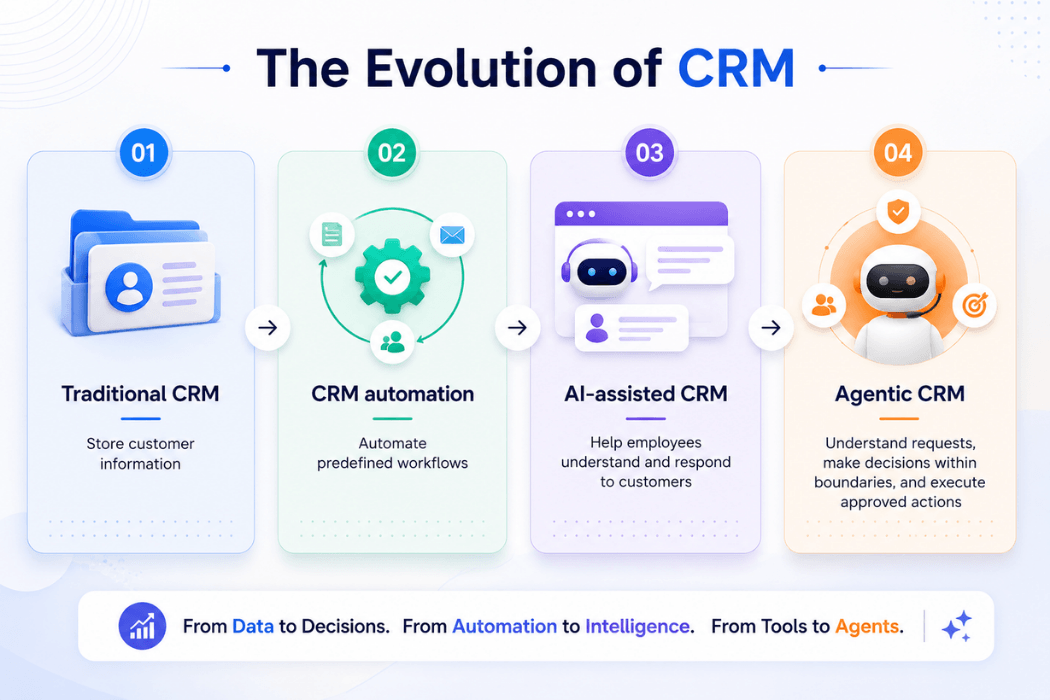
This is one of the most important changes happening in enterprise customer service.
AI Agents vs. Traditional Customer Service Automation
It is important to understand the difference between rules-based automation and AI agents.
| Capability | Traditional Automation | AI Agent |
|---|---|---|
| Rules | Predefined | Can interpret context |
| Inputs | Usually structured | Structured + unstructured |
| Decision-making | Rule-based | AI-assisted reasoning |
| Customer conversations | Limited | Natural-language interaction |
| Tool use | Preconfigured workflows | Can select approved tools |
| Adaptability | Limited | Handles greater variation |
| Complex requests | Usually escalates | Can resolve some within defined |
| Actions | Predetermined | Dynamically selected within permissions |
| Human escalation | Rule-triggered | Context-aware escalation |
Traditional automation remains extremely useful.
For predictable processes such as:
- Case assignment
- Email notifications
- Status updates
- Scheduled reminders
- Simple approvals
rules-based automation can be efficient and reliable.
AI agents become more valuable when a process involves language, context, multiple systems, and variable customer requests.
Check out: Why your Salesforce implementation isn’t delivering results
Agentforce for Service: What It Actually Does
Understanding how Agentforce transforms customer service requires specificity about which capabilities are deployed in which contexts. The platform covers the complete service workflow — from the moment a case arrives through resolution and follow-up — across customer-facing and agent-facing applications.
Customer-Facing AI Agent Capabilities
Autonomous case resolution across all channels. Agentforce Service Agent handles customer inquiries across web chat, messaging apps (WhatsApp, Messenger, SMS), email, and voice — resolving routine issues without human involvement. The agent reads the full conversation context, retrieves the customer’s Salesforce record, determines the appropriate resolution, executes the required actions, and confirms resolution to the customer. For the highest-volume, most routine case types — account inquiries, order status, password resets, return processing, payment questions — this autonomous resolution happens without any human involvement on the service team’s side.
Proactive outreach. 77% of service teams with AI agents deploy them in both customer-facing and internal operations, according to Salesforce’s 2026 research. On the proactive side, AI agents initiate contact with customers before a service issue surfaces: notifying customers of a shipment delay before they contact support to inquire, reaching out when a subscription is approaching renewal with personalized options, or flagging an account anomaly before it becomes a complaint. This shift from reactive service — responding to problems after customers report them — to proactive service — preventing or pre-empting service events — represents the most significant change in the customer relationship model that AI enables.
Personalized product and service recommendations. During a service interaction, Agentforce agents access the customer’s full purchase and engagement history and offer contextually relevant recommendations: an upgrade that addresses the limitation causing the customer’s current issue, a complementary product that resolves a related unmet need, or a service tier change that reduces the probability of future service events. The 15% upsell revenue increase documented in production deployments reflects this capability applied at the scale of automated service interactions.
Multichannel consistency. A customer who contacts support via WhatsApp, follows up via email, and then calls — receives consistent, contextually aware service at each touchpoint because the agent’s knowledge of the conversation and the customer’s record is not channel-dependent. The conversation history, the actions taken, and the outstanding resolution all follow the customer regardless of channel.
Internal Operations AI Agent Capabilities
Case summary and triage. When a case arrives, Agentforce reads the full email thread or conversation history and generates a plain-language summary: what the customer wants, what has been tried, what the current status is. The human agent opens the case with full situational awareness rather than spending the first minutes reading back through a lengthy email thread. This single capability — case summary — consistently ranks among the highest-ROI Agentforce deployments because it saves time on every single case that passes through the service team.
Automatic case classification. Product issue, billing question, technical support, policy inquiry, complaint — Agentforce assigns the case category before a human touches it. Routing happens automatically based on category, customer tier, and team availability. The human agent who receives the case has already been matched to the appropriate case type before the assignment occurs.
AI-drafted response suggestions. For cases requiring human response, Agentforce drafts a personalized, contextually grounded reply that the service rep reviews, edits if needed, and sends. The rep is not writing from a blank page — they are reviewing and approving AI-generated output that already incorporates the customer’s history and the relevant resolution logic. This capability shifts the rep’s role from author to editor, which is significantly faster.
Knowledge base integration. Agentforce retrieves relevant knowledge articles during case resolution — surfacing the specific procedure, policy, or technical guidance that applies to the customer’s situation without requiring the rep to search manually. The agent grounds its responses in the organization’s documented knowledge, which reduces the probability of incorrect information and accelerates resolution.
Real-World Results: What Published Deployments Deliver
The published outcomes from specific Agentforce customer service deployments provide the most reliable indicator of what organizations in similar situations can expect.
Wiley (Education Publishing). Wiley faces seasonal demand spikes — service call volumes surge at the start of every new semester, placing acute pressure on human service teams that are sized for average rather than peak demand. The company deployed Agentforce on its highest-volume, most repetitive issue types: account access, password resets, registration and payment triage. Published results: 213% ROI from the Service Cloud integration, $230,000 in savings, 50% faster onboarding for seasonal agents who joined with AI assistance, and a 40%-plus improvement in case resolution compared to the previous chatbot. The Wiley case is frequently cited because it illustrates a principle that appears consistently across successful deployments: automating the most predictable, highest-volume work first — rather than trying to automate everywhere simultaneously — produces the fastest and most measurable returns.
Engine (B2B Travel). Engine built “Eva,” an Agentforce agent that handles routine use cases end-to-end across 800,000-plus annual inquiries. Rather than recognizing cancellation requests and routing them to humans as the previous chatbot did, Eva processes cancellations autonomously. Published results: 50% of customer cases now handled autonomously, 15% reduction in average handle time. The operational implication is that the service team’s capacity for complex cases — the group rebookings, the unusual itinerary situations, the edge cases requiring genuine judgment — expanded without headcount addition.
OpenTable. OpenTable’s previous chatbot was “the kind every customer hates: rigid scripts, no ability to adapt to nuance, frequent dead-ends that pushed people to call support anyway.” Agentforce was deployed first on the restaurant-facing site, grounded on an existing library of 1,500 knowledge articles. Published result: 73% case resolution rate — a figure that reflects the proportion of cases that reach complete resolution through the AI without requiring human involvement.
Pandora (Jewelry). Pandora faces dramatic inquiry volume surges during peak shopping seasons — holidays, Valentine’s Day — that would require significant temporary staffing under a human-only model. The brand deployed Gemma, an AI concierge powered by Agentforce, to maintain its high-touch, personalized service standard during these peaks. The Pandora case illustrates a scalability advantage that is structurally unavailable to human-staffed service teams: AI agents can expand their handling capacity to 350% of baseline skill coverage during peak demand without hiring, training, or managing additional headcount.
Salesforce’s Own Operations. The most internally verifiable Agentforce case study is Salesforce itself. The company’s internal help portal now handles over 1 million conversations per year with a 75% resolution rate without human escalation. Response time has been reduced by 65% for 90% of users. Agentforce handled 2.8 million interactions across Salesforce’s internal workflows and saved employees more than 500,000 hours through Agentforce in Slack alone.
Also check: How to Migrate to Salesforce Without Losing Your Data
The Integration Imperative: Why Data Architecture Determines AI Agent Outcomes
The most consistent pattern in underperforming Agentforce deployments is not a model quality problem. It is a data integration problem.
44% of service leaders report that technology silos are delaying or limiting their AI initiatives, according to Salesforce’s 2026 State of Service research. 88% have made technology integration a priority in response. The pattern this reflects is that AI agents are only as effective as the data they can access and act on. An Agentforce agent that cannot retrieve the customer’s current order status from the order management system, cannot check inventory availability, and cannot trigger a fulfillment action in the ERP is limited to returning general information — which is what chatbots do.
The full technical architecture that enables high-performing AI service agents in the Salesforce ecosystem:
Salesforce Service Cloud provides the case management, knowledge base, omnichannel routing, and agent desktop infrastructure. Service Cloud is the operational system of record for the customer service function — the platform where cases are created, managed, escalated, and resolved.
Salesforce Data Cloud provides the real-time customer 360 data layer — unifying customer data from CRM, transactional systems, behavioral signals, and external data sources into a single, queryable customer record. Agentforce agents that access Data Cloud operate on a complete picture of each customer’s relationship with the organization, not just the data that happens to be in the most recently updated CRM field.
Agentforce sits above both — accessing the customer record from Data Cloud, performing actions in Service Cloud, reasoning over the conversation context, and orchestrating the resolution workflow.
MuleSoft connects external systems — ERP, order management, inventory, billing, external knowledge bases — to the Agentforce and Service Cloud layer. Without this integration, the AI agent’s ability to resolve issues end-to-end is constrained by whatever data already exists in Salesforce. With it, the agent can query and act on every system the service team uses.
Organizations that deploy Agentforce before resolving integration gaps consistently report lower deflection rates and lower CSAT improvements than organizations that complete the integration architecture first. The investment in data architecture is not preparatory overhead — it is the variable that determines how much of the published benchmark performance the deployment will actually achieve.
Read: Top Salesforce Integrations Every Growing Business Needs
How to Deploy AI Agents in Salesforce Service Cloud
The implementation sequence that produces the fastest measurable ROI from Agentforce in customer service:
Step 1 — Identify the highest-volume, most routine case types.
The Wiley principle applies universally: automate the most predictable, highest-volume work first. Run a case category analysis to identify which case types represent the greatest volume, the most consistent resolution paths, and the most complete knowledge documentation. These are the cases where deflection rates will be highest and where ROI will be fastest.
Step 2 — Assess data readiness.
For each target case type, map the data an agent needs to resolve it: customer account status, order records, payment history, product entitlements, relevant knowledge articles. Identify the systems that hold this data and whether they are accessible to Agentforce. Fill the integration gaps before deployment rather than discovering them when the agent fails to resolve cases that require data it cannot access.
Step 3 — Configure and test the agent.
Build the Agentforce agent with the actions, topics, and instructions required for the target case types. Test against a representative set of real cases — not just ideal-path scenarios — to validate resolution accuracy. Configure escalation criteria that define when the agent transfers to a human and what context it passes with the transfer.
Step 4 — Deploy with defined success metrics.
The most reliable predictor of an AI agent deployment that loses its budget is the absence of defined success metrics before deployment began. Establish baseline metrics for the target case types — deflection rate, case resolution time, CSAT score, cost per case — before the agent goes live. Measure against these baselines at 30 and 60 days.
Step 5 — Expand based on evidence.
The organizations generating the most compelling Agentforce results in 2026 are those that expanded agent scope methodically — adding new case types and new channels after validating performance in the initial deployment rather than deploying broadly before any use case is working well.
Also read: Guide to Hiring Salesforce Support and Maintenance Developers
Salesforce Integrations Become Even More Important
An AI agent operating inside Salesforce may need information that doesn’t originate in Salesforce.
For example:
Customer Service Agent
May need:
- Salesforce → Customer profile
- ERP → Order information
- Commerce platform → Purchase history
- Shipping system → Delivery status
- Knowledge base → Product guidance
If those systems aren’t connected effectively, the agent’s understanding of the customer remains incomplete.
This is why Salesforce integration becomes a foundational component of agentic customer service.
The more systems an agent needs to access, the more important it becomes to have:
- Reliable APIs
- Clear system ownership
- Consistent data models
- Secure authentication
- Integration monitoring
- Error handling
- Appropriate permissions
Check: Salesforce Integration v/s. Migration – Which Strategy Works Best for Your Business
AI Agents and Human Service Representatives
The most effective customer service model is unlikely to be AI vs. humans.
It is more likely to be:
AI + Humans
AI is well suited to:
- High-volume requests
- Repetitive tasks
- Information retrieval
- Classification
- Summarization
- Standard workflows
- First-line support
Humans remain particularly valuable for:
- Emotional situations
- Complex disputes
- Negotiation
- Exceptions
- Sensitive cases
- Strategic customers
- Decisions requiring judgment
The goal should therefore be to determine where AI creates value and where humans should remain in control.
Human-in-the-Loop Controls
AI agents should not automatically receive unrestricted access to business systems.
A mature implementation should establish action boundaries.
For example:
Low-risk action
AI can execute automatically
- Retrieve account information
- Search knowledge articles
- Provide order status
- Update a low-risk case field
Medium-risk action
AI can prepare the action
- Draft refund
- Prepare account changes
- Create a service request
High-risk action
Human approval required
- Large refunds
- Account termination
- Financial transactions
- Sensitive customer-data changes
- Legal commitments
This creates a controlled model in which AI can operate autonomously within clearly defined boundaries.
Security Considerations for AI-Powered Customer Service
AI agents introduce security considerations beyond traditional CRM automation.
Organizations should consider:
Identity
Every agent should have a defined identity.
Permissions
Use least-privilege access so an agent can access only what it needs.
Data Protection
Sensitive customer information should be protected throughout the AI workflow.
Prompt Injection
Customer messages and external content can contain malicious instructions designed to influence an AI agent.
Action Authorization
The agent should not be allowed to perform actions simply because it believes they are appropriate.
Auditability
Organizations should maintain records of important agent actions and decisions.
Monitoring
Organizations should monitor unusual activity, failures, unexpected tool use, and escalation patterns.
Security should be designed into the agent architecture—not added after deployment.
Read: Driving Salesforce User Adoption – A CXO’s Guide to Maximizing ROI
Common AI Agent Use Cases in Salesforce Service
Here are some practical applications businesses can evaluate.
| Use Case | Potential AI Agent Role |
|---|---|
| Case triage | Classify and prioritize cases |
| Customer FAQ | Answer routine questions |
| Order tracking | Retrieve and communicate status |
| Returns | Guide or initiate approved workflows |
| Case summarization | Summarize customer history |
| Knowledge search | Find relevant service information |
| Agent assistance | Recommend responses and actions |
| Appointment management | Schedule or modify appointments |
| Billing support | Explain invoices and account information |
| Escalation | Identify cases requiring human intervention |
| Proactive support | Identify and communicate potential issues |
Not every use case should be automated immediately.
The best starting point is generally a high-volume, well-defined process with measurable outcomes and manageable risk.
How to Identify the Right Customer Service Use Cases
Organizations should evaluate potential use cases against several criteria.
Volume
How frequently does the process occur?
Complexity
Does it involve simple rules or complex judgment?
Data Availability
Is the required information accessible and reliable?
Business Impact
How much time, cost, or customer frustration could be reduced?
Risk
What happens if the AI makes a mistake?
Actionability
Can the AI safely take action, or should it only provide recommendations?
A useful prioritization model is:
High volume + predictable workflow + good data + measurable value + manageable risk = strong candidate
Also read: Salesforce Marketing Cloud Integration Challenges and How to Solve Them
How to Implement AI Agents in Salesforce
A structured implementation can reduce risk and improve adoption.
Step 1: Define the Business Objective
Don’t start with:
“Where can we use Agentforce?”
Start with:
“Which customer service problem are we trying to solve?”
Examples:
- Reduce case backlog
- Improve first-response time
- Increase self-service resolution
- Reduce repetitive work
- Improve customer satisfaction
- Reduce service costs
Step 2: Map the Existing Process
Document:
- Inputs
- Decisions
- Systems
- Actions
- Exceptions
- Escalations
- Human involvement
This reveals where AI can actually contribute.
Step 3: Assess Data Readiness
Evaluate:
- Salesforce data quality
- Knowledge base quality
- Integration completeness
- Data freshness
- Access permissions
Step 4: Start With a Controlled Use Case
Choose a use case with:
- Clear boundaries
- High volume
- Low-to-moderate risk
- Measurable outcomes
Avoid starting with the most complex customer-service workflow.
Step 5: Define Agent Permissions
Document exactly what the agent:
- Can read
- Can recommend
- Can change
- Can execute
- Must escalate
Step 6: Build Human Escalation
Define when and how the AI hands control to a person.
The handoff should include relevant context so the customer doesn’t have to repeat the entire conversation.
Step 7: Test Before Production
Test against:
- Normal scenarios
- Edge cases
- Incorrect information
- Adversarial inputs
- Security scenarios
- Escalation scenarios
- Integration failures
Step 8: Monitor and Improve
After deployment, measure:
- Resolution rate
- Escalation rate
- Customer satisfaction
- Human override rate
- Error rate
- Average handling time
- Cost per interaction
- Agent action failures
AI agents should be continuously evaluated rather than treated as a one-time implementation.
Metrics to Measure AI Agent Customer Service ROI
Organizations should define success metrics before deployment.
Customer Metrics
- Customer satisfaction
- First-contact resolution
- Resolution time
- Customer effort score
- Escalation rate
Employee Metrics
- Cases handled per representative
- Average handling time
- Administrative time saved
- Employee satisfaction
- Agent productivity
AI Metrics
- Task completion rate
- Hallucination rate
- Incorrect action rate
- Human override rate
- Tool-call accuracy
- Escalation accuracy
Business Metrics
- Cost per case
- Service cost reduction
- Revenue retention
- Customer churn
- Self-service adoption
The most useful measurement framework connects AI performance to business outcomes, not just model performance.
Challenges of AI Agents in Customer Service
Despite the potential benefits, implementation isn’t risk-free.
1. Inaccurate Responses
AI agents can generate incorrect information.
2. Poor Data Quality
Incomplete or outdated CRM data can produce poor decisions.
3. Security Risks
AI agents with excessive permissions can create significant security exposure.
4. Integration Complexity
Agents often need access to multiple enterprise systems.
5. Customer Trust
Customers may not want every interaction handled by AI.
6. Inadequate Escalation
A poorly designed agent may continue attempting to resolve an issue that requires human judgment.
7. Governance
Organizations need clear ownership for agent behavior, monitoring, and incident response.
8. Change Management
Service representatives need training and clarity about how AI changes their roles.
How Customer Service Teams Should Prepare for AI Agents
Organizations should prepare beyond technology.
Build an AI governance framework
Define:
- Ownership
- Risk levels
- Approval requirements
- Monitoring
- Data policies
- Escalation procedures
Improve knowledge management
AI agents depend heavily on accurate business knowledge.
Clean Salesforce data
Data quality becomes even more important when AI begins using CRM data to make decisions.
Train service teams
Employees should understand:
- What AI can do
- What it cannot do
- When to override it
- When to escalate
- How to monitor AI-generated information
Start small
Use early deployments to learn before expanding agent autonomy.
What Does the Future of Salesforce Customer Service Look Like?
The future is likely to be less about individual automation features and more about orchestrated customer-service workflows.
Imagine a customer experiencing a product issue.
An AI agent could potentially:
- Identify the customer.
- Understand the issue.
- Review service history.
- Search product documentation.
- Check order and warranty information.
- Diagnose the likely problem.
- Recommend a solution.
- Execute an approved action.
- Update Salesforce.
- Follow up with the customer.
- Escalate if the situation falls outside its authority.
The human representative then becomes less focused on searching for information and completing repetitive administrative tasks.
Instead, people can focus on complex cases, relationships, exceptions, and decisions that require human judgment.
This is a fundamental change in how customer service operations can be designed.
Final Thoughts
AI agents and Salesforce are redefining customer service by bringing together customer data, AI reasoning, automation, and business workflows.
The opportunity isn’t simply to build smarter chatbots.
It is to create service operations where AI can:
- Understand customer intent
- Access relevant information
- Personalize interactions
- Recommend decisions
- Execute approved actions
- Automate repetitive workflows
- Escalate complex situations
- Support human service representatives
Salesforce provides the CRM and business-process foundation, while Agentforce and related AI capabilities can add a new layer of intelligent interaction and action.
But successful adoption depends on more than deploying an AI agent.
Organizations need clean data, reliable integrations, clear permissions, strong security, human oversight, measurable KPIs, and ongoing evaluation.
The companies that gain the most value are unlikely to be those that automate the greatest number of tasks.
They will be the organizations that identify the right customer-service decisions and workflows for AI—and design the right boundaries around them.
The future of customer service isn’t necessarily AI replacing people.
It is AI handling what it does best while human teams focus on what requires judgment, empathy, and relationships.
Frequently Asked Questions
What are AI agents in Salesforce?
AI agents in Salesforce are AI-powered systems that can understand customer requests, use relevant Salesforce data, follow defined business rules, and perform approved actions within business workflows.
How can AI agents improve customer service?
AI agents can automate repetitive requests, provide faster responses, assist service representatives, personalize interactions, triage cases, and execute approved workflows.
What is Agentforce?
Agentforce is Salesforce’s platform for building and deploying AI agents that can work with Salesforce data and business processes.
Can Salesforce AI agents replace customer service representatives?
Not entirely. AI agents are better suited to repetitive and well-defined tasks, while human representatives remain important for complex, sensitive, emotional, and judgment-based interactions.
How important is Salesforce data quality for AI agents?
Extremely important. AI agents depend on accurate, current, and accessible data to provide reliable responses and make appropriate decisions.
What Salesforce systems can AI agents integrate with?
Depending on the architecture, AI-powered service workflows can connect Salesforce with ERP, commerce, payment, shipping, knowledge, data, and other enterprise systems through appropriate integrations.
Are Salesforce AI agents secure?
They can be designed with security controls such as dedicated identities, least-privilege permissions, action boundaries, human approval, monitoring, and auditability. Security depends on the specific implementation.
How should businesses start with AI agents?
Start with a high-volume, well-defined customer service process where the required data is available, the business value is measurable, and the risk can be controlled.
 Bio
Bio