
Progressive web apps vs native mobile apps: when PWA is the smarter investment
 Michelle Jones 25 min read
Building a mobile application is an important step for businesses looking to improve customer engagement, expand their digital presence, and deliver convenient user experiences. However, one of the first decisions businesses face is choosing the right mobile application development approach: should they invest in a Progressive Web App (PWA) or build a native mobile application?
Both options offer distinct advantages, but they differ significantly in development costs, accessibility, performance, device integration, maintenance, and long-term scalability.
Native mobile applications are developed specifically for operating systems such as Android and iOS. They provide deep device integration, high performance, and access to platform-specific capabilities. Progressive Web Apps, on the other hand, combine the accessibility of websites with many features traditionally associated with mobile applications.
For startups, small businesses, and organizations looking to reach customers across multiple devices without maintaining separate platform-specific applications, a PWA can be a practical investment. However, businesses developing performance-intensive applications or products that depend heavily on advanced device capabilities may find native development more suitable.
So, which approach makes more business sense?
In this guide, we compare Progressive Web Apps and native mobile apps, explore their advantages and limitations, and explain when investing in a PWA can deliver better long-term value.
What is a Progressive Web App (PWA)?
A Progressive Web App (PWA) is a web application built using standard web technologies such as HTML, CSS, and JavaScript. Modern Progressive Web App technologies enable developers to deliver app-like experiences through supported web browsers.
Unlike traditional websites, PWAs can offer capabilities such as installation on a device, offline access to selected content, push notifications, background processing, and integration with supported device features.
PWAs use technologies such as:
- Web App Manifest: Defines application details such as its name, icon, theme color, and display behavior.
- Service Workers: Enable capabilities such as offline experiences, caching, and push notification handling.
- HTTPS: Provides secure communication between the application and its server.
- Responsive Design: Allows the interface to adapt to different screen sizes and devices.
- Web APIs: Provide access to supported device capabilities such as location, camera, storage, and sharing.
For example, an online retail business can develop a PWA that allows customers to browse products, add items to their carts, save selected information for offline access, and receive order notifications without necessarily installing an application from an app store.
One of the biggest advantages of PWAs is accessibility. Users can open them through a URL, just like a regular website. If they want an app-like experience, they can install the PWA on supported devices.
What is a Native Mobile App?
A native mobile app is an application developed specifically for a mobile operating system using its supported programming languages, development frameworks, and tools.
Native applications are typically distributed through platforms such as the Apple App Store and Google Play Store.
Common native development technologies include:
- Swift and SwiftUI: Used for iOS application development.
- Kotlin: Commonly used for Android development.
- Java: Also used for Android application development.
- Xcode: Apple’s development environment for building iOS applications.
- Android Studio: Google’s development environment for Android applications.
Native applications can take advantage of operating-system-specific capabilities, including advanced camera functions, Bluetooth, biometrics, location services, sensors, background processing, and graphics acceleration.
For example, a fitness application that relies on continuous activity tracking, health data, wearable integrations, and background sensor access may benefit from native development.
Native applications can also provide highly optimized interfaces and performance for complex mobile experiences.
PWA vs. Native Mobile App: What’s the Difference?
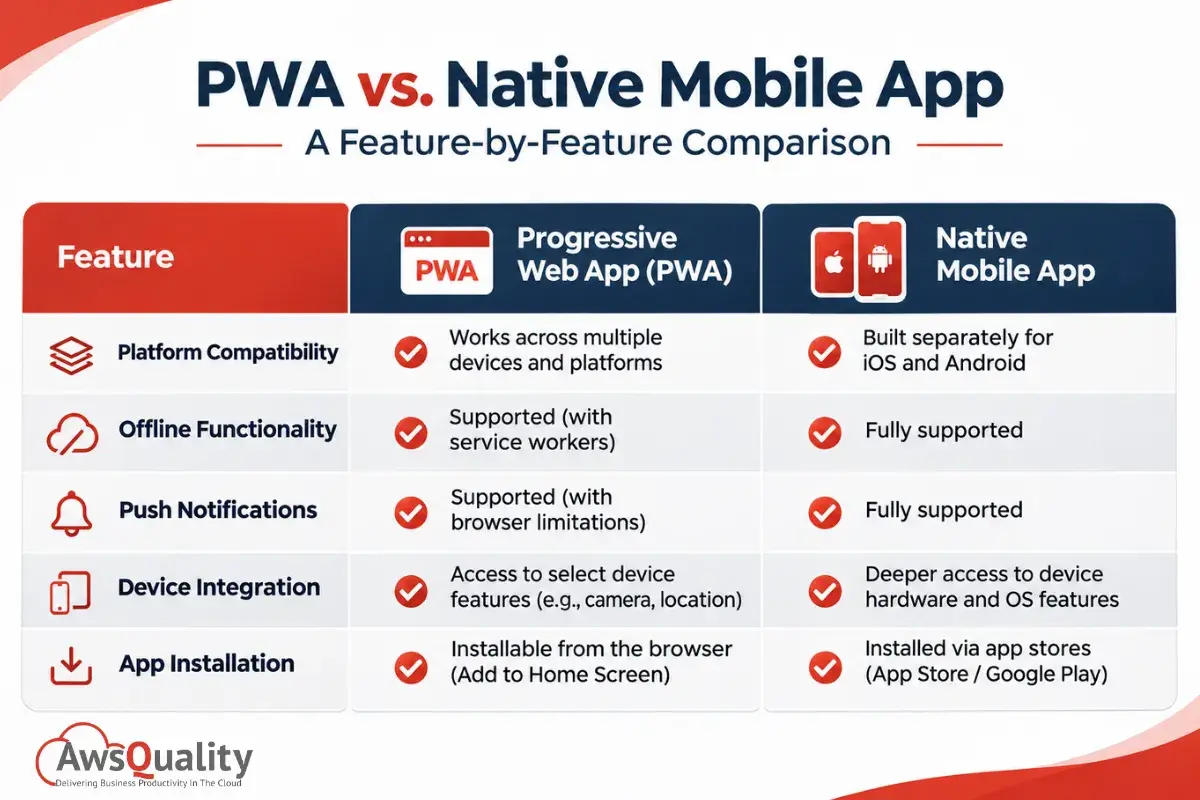
A Progressive Web App (PWA) is a web-based application that works through supported browsers and offers app-like features such as installation, offline access, and push notifications. A native mobile app is developed specifically for an operating system, such as Android or iOS, and provides deeper access to device hardware and platform-specific capabilities. PWAs are often more cost-efficient for businesses seeking cross-platform accessibility, while native apps are generally better suited to applications requiring advanced device integration and performance.
PWA vs. Native: Feature-by-Feature Comparison
| Capability | PWA (Chrome/Android) | PWA (Safari/iOS) | Native iOS | Native Android |
|---|---|---|---|---|
| Offline mode | Supported with service workers and caching | Supported with service workers and caching | Supported | Supported |
| Push notifications | Supported on | Supported for installed | Supported | Supported |
| Home screen installation | Supported on compatible devices | Supported | App installation | App installation |
| Camera/microphone | Supported with permissions and API limitations | Supported with permissions and API limitations | Supported | Supported |
| Geolocation (GPS)n | Supported with user permission | Supported with user permission | Supported | Supported r |
| Biometric authentication | WebAuthn/passkeys where supported | WebAuthn/passkeys where supported | Platform biometric APIs | Platform biometric APIs |
| Background sync | Supported in compatible browsers | Limited; alternative strategies may be needed | Platform-managed background tasks | Platform-managed background tasks |
| Web Bluetooth | Supported in compatible Chromium environments | Not supported in Safari | Native Bluetooth APIs | Native Bluetooth APIs |
| Web NFC | Limited NDEF support in compatible Android browsers | Not supported in Safari | Native NFC APIs | Native NFC APIs |
| File system access | Supported with API and permission limitations | Limited browser support | Platform file APIs | Platform file APIs |
| App Store listing | Possible through Trusted Web Activity or packaging | Possible through an approved native wrapper | Supported | Supported |
| 3D graphics (GPU) | WebGL/WebGPU, depending on browser support | WebGL and supported WebGPU capabilities | Metal | Vulkan/OpenGL ES |
| In-app payments | Web payment gateways and applicable processing fees | Web payment gateways and applicable processing fees | Platform billing rules and applicable fees | Platform billing rules and applicable fees |
| Installation process | Direct browser access; installation | Direct browser access; Home Screen | App store or approved distribution | Play Store or approved distribution |
| Update mechanism | Web deployment; cached assets may require refresh | Web deployment; cached assets may require refresh | App release and distribution process | App release and distribution process |
| Cross-platform development | Shared web codebase | Shared web codebase | Platform-specific or shared cross-platform frameworks | Platform-specific or shared cross-platform frameworks |
Note: PWA capabilities vary depending on browser versions, operating systems, device hardware, permissions, and implementation. Native applications also have platform-specific limitations. The comparison represents general capabilities and should not be treated as a guarantee of identical functionality across all devices.
7 Key Advantages of Progressive Web Apps
PWAs have become an attractive option for businesses that want to deliver mobile-friendly experiences without building and maintaining separate native applications for every platform.
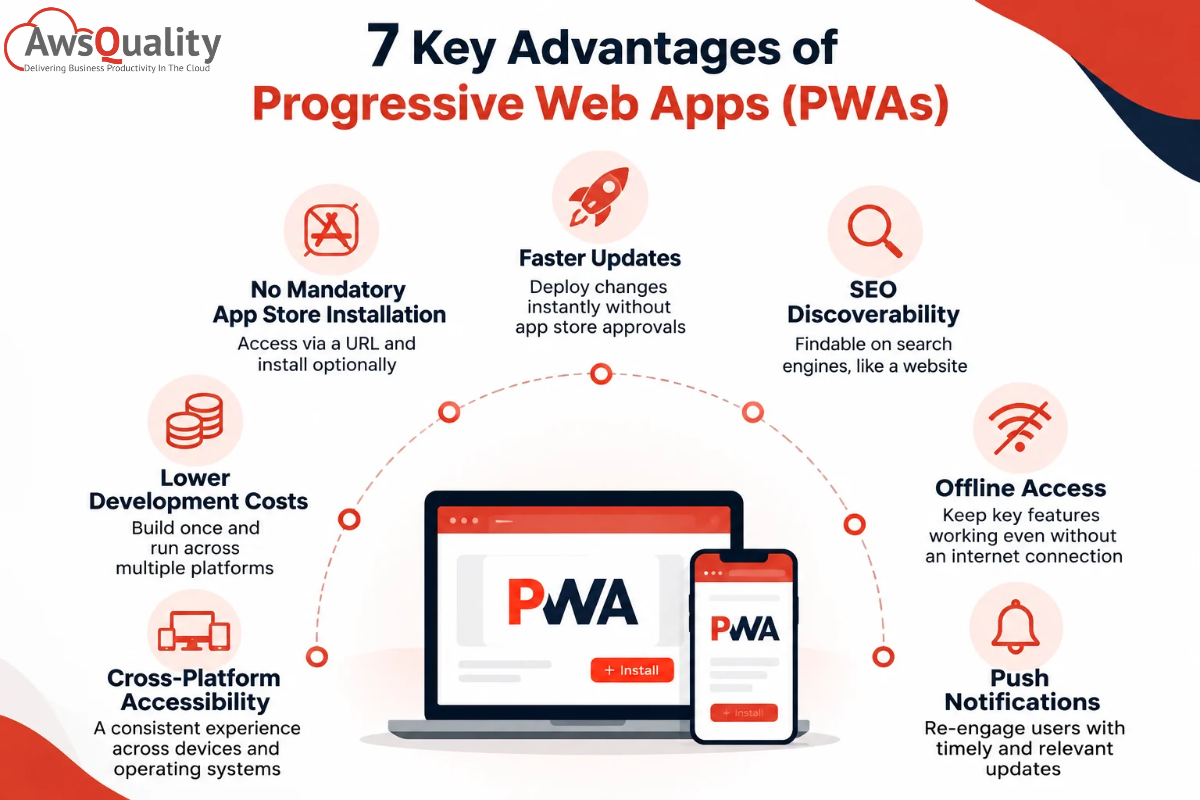
Here are seven reasons why businesses consider investing in PWAs.
1. Lower Development and Maintenance Costs
One of the biggest advantages of PWAs is the ability to build a cross-platform experience using a shared web codebase.
Instead of developing separate applications for Android and iOS, businesses can use web technologies to create an application that works across supported browsers and devices.
This can reduce:
- Initial development effort
- Platform-specific development requirements
- Maintenance complexity
- Testing effort across separate codebases
- Costs associated with managing multiple releases
For startups and businesses with limited development budgets, this can make PWAs a financially attractive option.
However, actual savings depend on application complexity, required integrations, and the development team’s expertise.
2. No Mandatory App Store Installation
Traditional mobile applications generally require users to visit an app store, download the application, and complete the installation process.
PWAs simplify this experience.
Users can access a PWA directly through a browser by clicking a link. On supported platforms, they can also install it on their home screen or desktop.
This is particularly useful for businesses that want to reduce barriers between discovering a product and using it.
For example, an online retailer can share a product link through social media, email campaigns, or advertisements. Customers can immediately access the shopping experience without first downloading an application.
3. Faster Updates and Deployment
Updating native mobile applications often involves preparing new builds, submitting releases to app stores, and waiting for the distribution process to complete.
PWAs generally make updates simpler because changes are deployed through the web infrastructure.
When developers deploy changes to the web application, users can receive the updated version through the browser and service worker update mechanisms. However, cached resources and service worker version management must be handled properly to ensure users receive the latest application content.
This gives development teams more flexibility when introducing:
- New features
- Interface improvements
- Bug fixes
- Security updates
- Performance optimizations
Service worker caching and version management still require careful implementation to avoid outdated content or inconsistent application behavior.
4. Search Engine Discoverability
Unlike applications that are primarily distributed through app stores, PWAs can be accessed through standard web URLs.
Their public-facing pages can be indexed by search engines, provided they meet normal technical and content accessibility requirements.
This creates opportunities to attract organic traffic through:
- SEO-optimized landing pages
- Product and category pages
- Informational content
- Local search visibility
- Search-driven customer acquisition
For businesses that depend on organic search traffic, combining website accessibility with app-like functionality can be particularly valuable.
One important distinction: installing a PWA does not automatically improve search rankings. Its public web content still needs proper technical SEO, useful content, and a crawlable site architecture.
Businesses should also ensure that important content is accessible to search engine crawlers, URLs are properly structured, and JavaScript-rendered content can be discovered and indexed. A well-optimized PWA can combine organic search visibility with an application-like user experience.
5. Offline Access and Improved Reliability
PWAs can use service workers and browser storage to provide offline functionality.
Developers can cache essential resources, store selected data locally, and design experiences that remain usable when connectivity is interrupted.
For example, a field service application could allow technicians to access previously downloaded job details while working in areas with limited internet connectivity.
Depending on the application design, users may also be able to enter information offline and synchronize it when connectivity returns.
However, offline functionality is not automatic. It requires careful planning around caching, local data storage, synchronization, and conflict resolution.
6. Push Notifications and User Engagement
Push notifications help businesses communicate important updates and encourage users to return to their applications.
PWAs can support web push notifications on compatible browsers and platforms.
For example, an e-commerce PWA could notify users about:
- Order confirmations
- Shipping updates
- Special promotions
- Price changes
- Important account notifications
Apple supports web push notifications for web apps added to the Home Screen on iOS and iPadOS 16.4 and later. Users must grant notification permission through an interaction with the web app before receiving notifications.
However, notification capabilities and permission flows differ across platforms. Businesses should verify support on the devices used by their target customers.
7. Cross-Platform Accessibility
A PWA can run on different operating systems and device types through supported web browsers.
This makes it possible to reach users across:
- Android smartphones
- iPhones and iPads
- Windows computers
- macOS devices
- Supported Linux environments
- Tablets and other browser-enabled devices
Rather than maintaining completely separate applications for every platform, businesses can deliver a consistent experience through a shared web application.
This can simplify product distribution and help organizations reach broader audiences.
How Do Progressive Web Apps Affect Performance?
Progressive Web Apps can deliver fast and responsive user experiences when developed with proper performance optimization techniques. Their performance depends on factors such as application architecture, network conditions, browser capabilities, and resource management.
Businesses can improve PWA performance through several approaches:
1. Caching and Service Workers
Service workers can cache essential application resources and selected data, reducing repeated network requests and improving loading times.
2. Image and Asset Optimization
Compressing images, using modern image formats, and optimizing CSS and JavaScript files can reduce page size and improve loading performance.
3. Lazy Loading
Loading images, videos, and other resources only when needed helps reduce initial loading time and unnecessary resource consumption.
4. Code Splitting
Breaking application code into smaller bundles allows browsers to load only the resources required for the current page or functionality.
5. Core Web Vitals Optimization
Optimizing metrics such as Largest Contentful Paint (LCP), Interaction to Next Paint (INP), and Cumulative Layout Shift (CLS) can help improve the overall user experience.
Although modern PWAs can provide excellent performance, native applications may offer advantages for graphics-intensive operations, complex animations, and tasks requiring deeper hardware integration.
Advantages of Native Mobile Apps
While PWAs offer several business advantages, native applications remain the better choice for many products.
Here are the key strengths of native mobile development.
1. Better Access to Device Features
Native applications can access a wider range of operating-system capabilities and hardware features.
Depending on the platform, these may include:
- Advanced camera functionality
- Bluetooth and connected devices
- Biometrics
- GPS and location services
- Device sensors
- Background processing
- Health and fitness integrations
- Advanced media capabilities
This makes native development suitable for applications that depend heavily on hardware integration.
2. High Performance for Complex Applications
Native applications can be optimized for specific operating systems and hardware configurations.
They are often preferable for applications involving:
- High-performance graphics
- Complex animations
- Real-time processing
- Advanced gaming
- Intensive media operations
- Complex background tasks
Although modern web technologies can deliver impressive performance, native development provides more direct access to platform-specific optimization capabilities.
3. More Comprehensive Platform Integration
Native applications can integrate more deeply with operating-system features.
Depending on the platform, this can include widgets, shortcuts, background tasks, system-level sharing, notification controls, and other native interactions.
These capabilities can be important when an application needs to become a deeply integrated part of the user’s daily mobile experience.
4. App Store Distribution and Discovery
Publishing through app stores provides businesses with an additional distribution channel.
Users can discover applications through store searches, recommendations, categories, ratings, and reviews.
App stores also provide established distribution and update mechanisms.
However, app store visibility is not guaranteed. Businesses still need a strong app store optimization strategy, positive reviews, and effective marketing.
5. Advanced Offline and Background Capabilities
Native applications can support extensive offline experiences and operating-system-managed background activities.
For example, a navigation application may need to download maps, access location data, and provide directions when connectivity is unavailable.
Similarly, messaging and productivity applications may require reliable background processing and synchronization.
These capabilities make native development suitable for applications with complex offline and background requirements.
When is a PWA the Smarter Investment?
A PWA is not automatically better than a native application. Its value depends on the business model, application requirements, target audience, and available resources.
However, there are several situations where investing in a PWA can be a smarter business decision.
1. When You Want to Reach a Wider Audience
If your business wants to reach users across multiple devices without requiring application downloads, a PWA can be a practical choice.
Users can access your application through a simple URL, making it easier to share through marketing campaigns, email, social media, and search engines.
This is especially useful for businesses where reducing access barriers is more important than deep device integration.
2. When Your Development Budget Is Limited
Startups and small businesses often need to balance product development costs with customer acquisition, marketing, and operational expenses.
Developing separate native applications for Android and iOS can increase the initial investment and ongoing maintenance requirements.
A PWA can offer a more cost-efficient starting point when the product’s features can be delivered effectively through web technologies.
3. When Your Application Is Content- or Transaction-Focused
PWAs work particularly well for applications where users primarily browse information, interact with forms, search products, or complete transactions.
Examples include:
- E-commerce platforms
- Online booking systems
- Educational platforms
- Business directories
- Customer portals
- News and publishing platforms
- Event registration systems
- Service request applications
These use cases generally benefit from accessibility, responsive design, and simplified updates.
4. When You Need Faster Time to Market
If launching quickly is important, a PWA can help businesses establish a cross-platform presence without building separate native applications from the beginning.
A team can develop and release the web application, gather user feedback, and improve the product based on actual usage.
This approach is especially useful for startups validating a new business idea or organizations testing a new digital service.
5. When Organic Search Traffic is Important
Businesses that depend on search engine visibility can benefit from the web-based nature of PWAs.
For example, an online marketplace can create indexable product pages while providing an app-like shopping experience.
This allows the business to combine SEO-driven discovery with mobile-friendly functionality.
6. When Your Application Needs Basic Offline Functionality
If users need access to selected information when connectivity is unreliable, a PWA can provide a suitable solution.
Examples include:
- Previously viewed product information
- Downloaded educational content
- Saved forms
- Basic task lists
- Previously accessed documents
A well-designed offline strategy can make the experience more reliable without requiring a fully native application.
When Should You Choose a Native Mobile App Instead?
There are situations where a PWA may not provide sufficient capabilities.
Consider native mobile development when your application requires:
Advanced hardware integration: Applications involving specialized Bluetooth devices, connected hardware, health sensors, or extensive camera functionality.
High-performance gaming: Games requiring advanced graphics processing, complex animations, or intensive real-time interactions.
Complex background processing: Applications that depend on reliable operating-system-managed background activities.
Advanced offline functionality: Products that require extensive local data processing, synchronization, and complex offline workflows.
Deep operating-system integration: Applications that rely heavily on platform-specific features, widgets, or system-level interactions.
Specialized enterprise requirements: Business applications requiring particular device-management capabilities, platform SDKs, or native integrations.
For example, a banking application that requires extensive device security integrations, platform-specific authentication capabilities, secure hardware interactions, and complex background processing may benefit from native mobile development.
The final decision should be based on a technical assessment of the application’s mandatory features rather than assumptions about the superiority of either approach.
Also read: Mobile App Development Guide: Trends, Technologies & Strategy
Need Help Choosing Between a PWA and a Native App?
Choosing the right mobile application architecture can significantly impact development costs, user experience, and long-term scalability.
AwsQuality helps businesses evaluate their application requirements and select the right development approach, whether it involves Progressive Web Apps, native mobile applications, or cross-platform solutions.
Let’s discuss your project requirements and identify the right development strategy.
Discuss Your Project with Our Team
PWA vs. Native Mobile App: Industry-Wise Use Cases
Different industries have different application requirements. Understanding these requirements can help businesses select the right development approach.
| Industry | PWA use cases | Native app use cases |
|---|---|---|
| E-commerce | Product browsing, shopping carts, online purchases | Advanced shopping experiences, AR product visualization |
| Education | Online courses, learning portals, digital resources | Interactive learning, offline lessons, device integrations |
| Healthcare | Appointment booking, patient portals | Health tracking, wearable integrations, specialized monitoring |
| Banking | Customer portals, basic financial services | Advanced mobile banking, biometrics, secure device integrations |
| Travel | Booking platforms, travel information | Navigation, location tracking, offline travel assistance |
| Retail | Product catalogs, promotions, loyalty portals | Advanced in-store experiences and device integrations |
| Logistics | Shipment tracking, delivery portals | GPS-intensive tracking, barcode scanning, specialized hardware |
| Media | News platforms, content discovery | Advanced video playback, media processing, offline downloads |
These are general recommendations. The best development approach depends on the application’s actual functionality and technical requirements.
Real-World Examples of Progressive Web Apps
Several well-known companies have adopted PWA technologies to improve accessibility and user experiences.
1. Starbucks
Starbucks introduced a Progressive Web App to improve its mobile web ordering experience. The PWA enabled customers to browse the menu, customize orders, and access ordering features through a browser-based experience. It demonstrated how web technologies could support convenient customer-facing commerce experiences.
2. Pinterest
Pinterest introduced a PWA to improve its mobile web experience, focusing on faster loading, improved engagement, and easier content discovery. Its adoption demonstrated how PWAs can help content-driven platforms deliver more accessible mobile experiences.
3. Uber
Uber developed a lightweight web experience that allowed users to access essential ride-booking functionality through a browser. This demonstrated how businesses can make important services accessible without requiring users to download a full mobile application.
4. Forbes
The Forbes PWA case study illustrates how publishers can leverage Progressive Web App technology to improve mobile content accessibility and user experiences. This example highlights the potential of PWAs for publishers and businesses that depend on content discovery.
These examples illustrate different applications of PWA technology; they should not be interpreted as evidence that these companies use PWAs exclusively or have replaced all their native applications.
How to Decide Between a PWA and a Native Mobile App
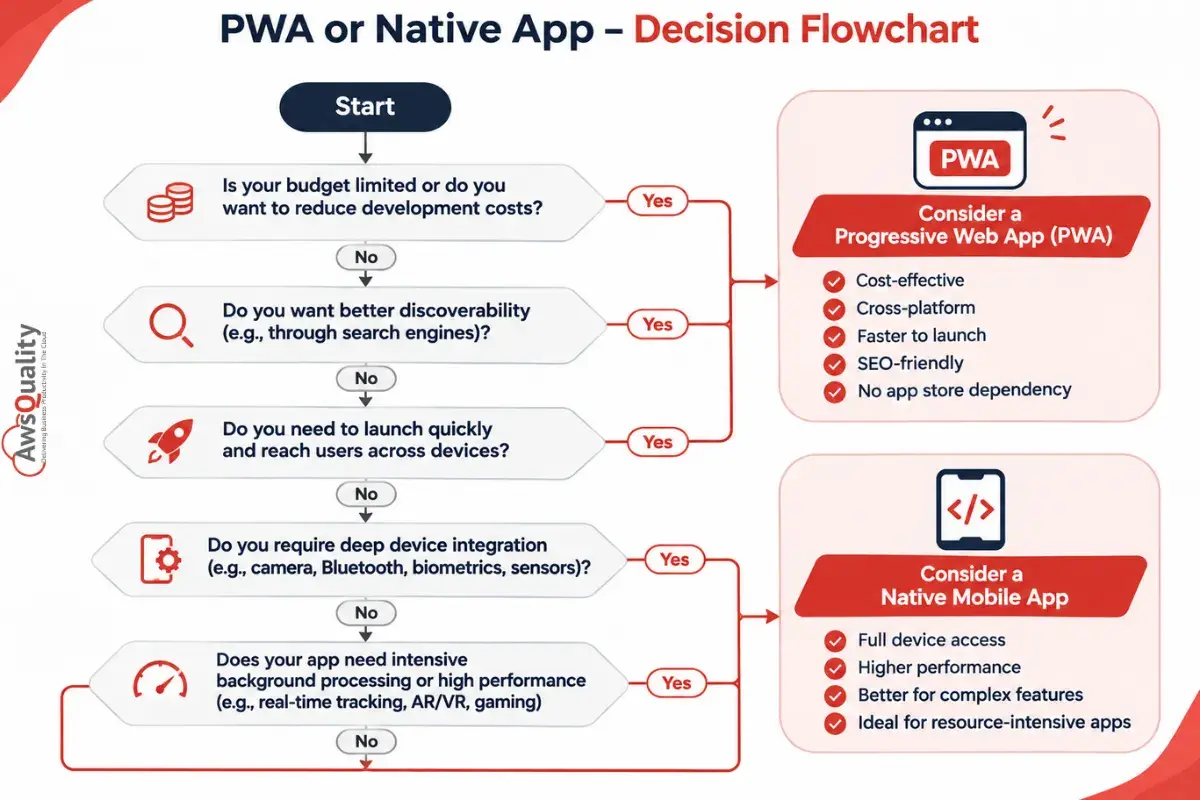
Choosing the right approach requires evaluating more than development costs.
Businesses should consider their product requirements, target audience, performance expectations, distribution strategy, and long-term maintenance needs.
Here is a practical decision framework.
| Business requirement | Recommended approach |
|---|---|
| Limited development budget | PWA |
| Quick product launch | PWA |
| Search engine discoverability | PWA |
| Broad cross-platform accessibility | PWA |
| Content-based applications | PWA |
| Basic offline functionality | PWA |
| Advanced device integration | Native |
| High-performance gaming | Native |
| Complex background processing | Native |
| Deep OS-specific functionality | Native |
| Extensive hardware integration | Native |
Five Questions to Ask Before Making a Decision
Before investing in either approach, answer these questions:
1. What functionality does the application require?
List all essential features, including offline access, notifications, camera usage, GPS, Bluetooth, payment processing, and background activities.
2. Who are your target users?
Understand whether your audience primarily accesses applications through mobile browsers, desktops, or app stores.
3. What is your development budget?
Consider initial development, infrastructure, maintenance, testing, updates, and future enhancements.
4. How important is app store distribution?
If app store discovery, platform-specific distribution, and native integrations are important to your business model, native development may be more suitable.
5. How will the application evolve?
Consider future requirements, including advanced functionality, scalability, integrations, and user experience improvements.
Answering these questions can help businesses avoid investing in an architecture that does not align with their long-term product strategy.
Hybrid Strategies: When You Need Both
The PWA vs. native decision is not always binary. Several hybrid strategies allow teams to leverage the strengths of both:
PWA-First, Native Wrapper Later
Build a PWA first to validate the product with real users and establish its core functionality across supported browsers and devices. As the product grows, businesses can introduce native capabilities using frameworks such as Capacitor or develop dedicated native applications when deeper device integration becomes necessary.
For Android distribution, a Trusted Web Activity can also provide a way to package a PWA for Google Play, subject to platform requirements. On iOS, a native wrapper must provide sufficient functionality and meet Apple’s App Review Guidelines.
Web + React Native
For businesses building applications across web and mobile platforms, React Native can help teams reuse selected business logic, components, and development resources across different environments.
With tools such as React Native for Web, developers can share certain UI components and application logic while maintaining platform-specific functionality where required.
The amount of code that can be reused depends on the application architecture, UI requirements, third-party integrations, and native device capabilities. This approach can reduce development duplication while allowing teams to deliver experiences suited to different platforms.
PWA-Like Experiences Within Super-App Ecosystems
In markets where super-app platforms such as WeChat and Grab have established large user ecosystems, businesses can explore mini-programs and other embedded application experiences to reach customers without requiring them to download a separate standalone application.
These mini-programs provide selected app-like capabilities within an existing platform ecosystem. Although they share some business advantages with PWAs, such as simplified access and distribution, they are platform-specific technologies rather than standard Progressive Web Apps.
This approach can be useful for businesses targeting customers who regularly use super-app platforms for shopping, payments, bookings, and other digital services.
Example: An e-commerce business
An online retailer could start with a PWA to establish its digital shopping experience across devices.
As its customer base grows, it could introduce native applications for users who want advanced device integrations, deeper mobile engagement, or specialized shopping experiences.
Both applications could connect to the same backend systems, product database, payment infrastructure, and customer management platform.
This approach allows businesses to expand their digital capabilities without rebuilding their entire technology infrastructure.
Cost Considerations: PWA vs. Native App Development
Development cost is one of the most important factors when choosing between a PWA and a native mobile application.
However, the total investment depends on the application’s complexity, features, integrations, design requirements, and ongoing maintenance.
Here are the primary cost factors.
The total cost of ownership should also account for infrastructure, third-party services, security updates, integration maintenance, and ongoing operational requirements. While PWAs can reduce development duplication, actual savings depend on the application’s complexity and the capabilities it needs to support.
How Can Businesses Optimize Development Investment?
Regardless of the chosen approach, businesses can manage development costs through a few practical strategies:
- Define essential features before starting development.
- Avoid unnecessary functionality in the initial release.
- Reuse components and backend services wherever practical.
- Choose technologies based on actual product requirements.
- Plan testing and maintenance from the beginning.
- Build an architecture that supports future enhancements.
The objective should not simply be to select the cheapest development option. It should be to maximize long-term business value while meeting user expectations.
Final Verdict: When Is a PWA the Smarter Investment?
Progressive Web Apps have changed how businesses approach mobile application development. They offer a practical combination of web accessibility, cross-platform compatibility, installability, and selected app-like capabilities.
For businesses that prioritize broad accessibility, faster deployment, search engine discoverability, and cost-efficient development, a PWA can be a smart investment.
Native mobile applications remain valuable for products that require advanced device integration, high-performance processing, complex background activities, or deeper operating-system capabilities.
There is no universal winner in the PWA vs. native mobile app comparison. The right decision depends on what your business is building, who will use it, and what experience you want to deliver.
In some cases, starting with a PWA and gradually introducing native capabilities can be an effective long-term strategy.
Choosing the right development approach requires evaluating your application’s functionality, target audience, integration requirements, and future growth plans. Working with an experienced mobile application development team can help businesses select an appropriate architecture, manage development costs, and build a solution that supports long-term objectives.
The smartest investment is the development approach that meets your users’ needs, supports your business objectives, and provides sustainable value as your product grows.
Build the Right Mobile Experience for Your Business
Whether you need a Progressive Web App, a native mobile application, or a combination of both, choosing the right development strategy is essential for long-term success.
AwsQuality helps businesses build scalable, secure, and user-friendly web and mobile applications tailored to their business requirements.
Looking to develop your next application?
Talk to Our Mobile App Development Experts
FAQs
Frequently Asked Questions
What is the main difference between a PWA and a native mobile app?
A Progressive Web App is built using web technologies and can run through supported browsers across multiple platforms. A native mobile app is developed specifically for an operating system, such as Android or iOS, using its platform-specific development technologies.
Are Progressive Web Apps cheaper than native apps?
PWAs are often less expensive to develop and maintain when compared with building separate Android and iOS applications with similar functionality. However, actual costs depend on the complexity of the application, integrations, design, testing, and maintenance requirements.
Can PWAs work without an internet connection?
Yes. PWAs can use service workers and browser storage to cache application resources and selected data. This allows users to access certain features offline. However, the level of offline functionality depends on how the application is designed.
Do Progressive Web Apps support push notifications?
Yes. PWAs support web push notifications on compatible platforms and browsers. However, notification permissions, installation requirements, and background behavior vary depending on the operating system and browser.
Can a PWA be published on the Google Play Store or Apple App Store?
Yes, PWAs can be distributed through certain app stores using supported packaging or distribution approaches. However, store eligibility and submission requirements vary by platform. Direct browser-based access is also possible without app store distribution.
Are PWAs good for e-commerce businesses?
Yes. PWAs can be suitable for e-commerce businesses because they support product browsing, shopping carts, responsive experiences, and web-based customer acquisition. They can also provide selected offline capabilities and push notifications where supported.
Are native mobile apps faster than PWAs?
Native applications generally offer advantages for performance-intensive tasks because they can be optimized for specific operating systems and hardware. However, modern PWAs can provide fast and responsive experiences when properly developed and optimized.
Can PWAs access mobile device features?
Yes. PWAs can access supported device features through web APIs, including location, camera, storage, and notifications. However, available capabilities differ across browsers and operating systems, and some features require native development.
Should startups choose a PWA or native mobile app?
Startups with limited budgets and a need for quick cross-platform access may benefit from starting with a PWA. However, startups developing products that depend on advanced hardware integration, intensive background processing, or platform-specific capabilities may be better served by native development.
Can businesses convert an existing website into a PWA?
Yes. An existing responsive website can often be enhanced with PWA capabilities by introducing a web app manifest, service worker, suitable caching strategies, and other required functionality. The amount of development effort depends on the existing website architecture.
What technologies are used to develop Progressive Web Apps?
Common technologies include HTML, CSS, JavaScript, React, Angular, Vue.js, service workers, web app manifests, and various web APIs. The specific technology stack depends on application requirements and development preferences.
Is a PWA suitable for enterprise applications?
Yes. PWAs can support enterprise portals, employee dashboards, internal tools, workflow applications, and customer-facing platforms. However, businesses should evaluate security, authentication, offline requirements, device management, and platform compatibility before choosing this approach.
Mobile
Related Articles
Generative AI in Mobile Apps: Use Cases, Benefits, and Challenges
Generative AI is changing how people interact with mobile applications. Instead of relying only on predefined menus, forms, and workflows, users can…
AwsQuality Develops Solar Building Finder Prototype to Identify and Prioritize Rooftop Solar Opportunities
Finding the right rooftops is one of the first challenges in solar sales. Sales teams and installers need to identify buildings that…
Digital Insurance Benefits Application: Modernizing the Insurance Application Process
Insurance application processes can involve substantial amounts of information, multiple forms, legal declarations, medical details, and customer verification. When these processes rely…