Salesforce Similar Leads: How We Built a Duplicate Lead Detection Solution Inside Salesforce
 Mohammad Usman 11 min read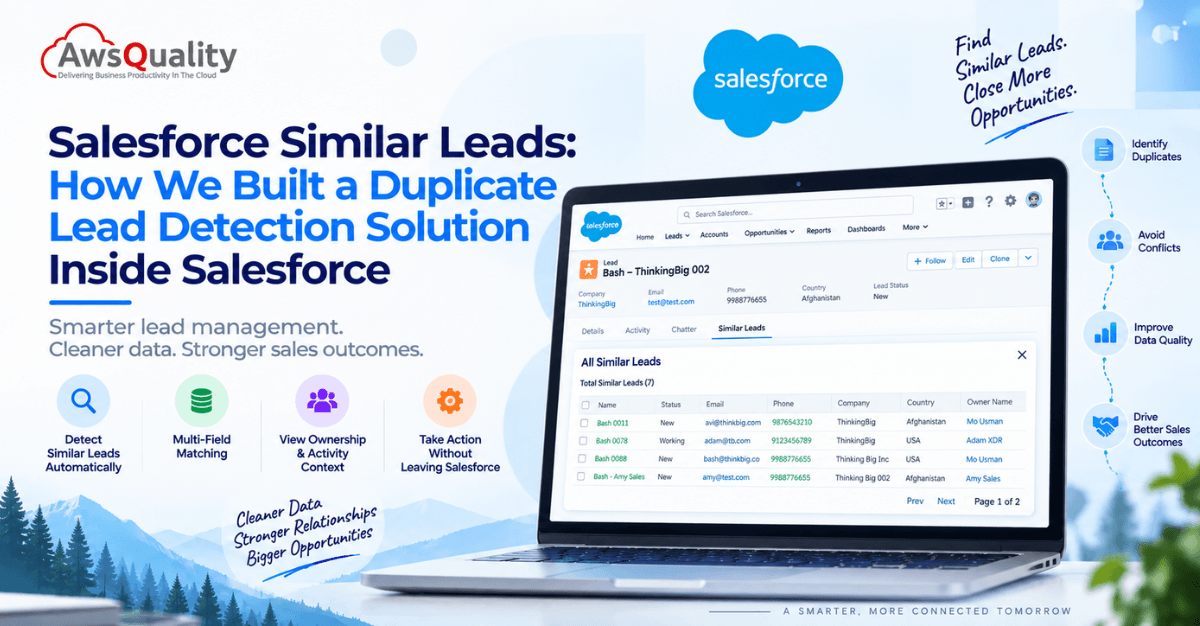
Why We Built This
Every organization that generates leads at scale eventually runs into the same problem. A prospect submits a website form. Three weeks later, the same person registers for a webinar. A month after that, a partner uploads a lead list that includes that person again. Salesforce now has three records for the same prospect — with slightly different names, slightly different company formatting, and three different lead owners who have no idea the others exist.
The result is predictable: duplicate outreach, conflicting sales conversations, confused prospects, and CRM data that becomes progressively less trustworthy the faster the pipeline grows.
This is not a fringe scenario. It is the default state of any Salesforce org that receives leads from more than one source — and most do.
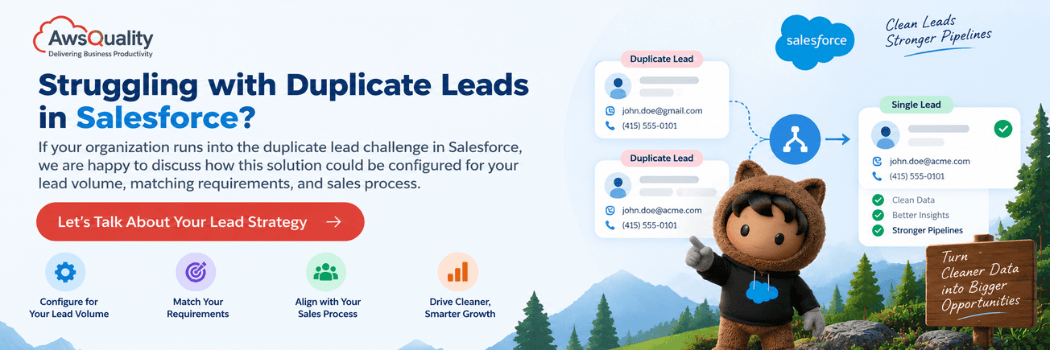
We built Salesforce Similar Leads to solve it natively inside Salesforce, without requiring sales reps to leave the lead record or manually search for duplicates that the system should already know about.
What the Solution Does
Salesforce Similar Leads is a custom Lightning Web Component (LWC) embedded directly in the Salesforce Lead record page. When a sales representative opens a lead, the component automatically analyzes that lead against existing Salesforce records and surfaces any potentially similar or duplicate leads — without any manual search required.
Instead of opening multiple tabs, running SOQL queries, or hoping the sales rep notices a familiar company name, the relevant matches appear right where the rep is already working.
A rep opening a lead for “Bash — ThinkingBig” might immediately see a panel showing 7 Similar Leads Found — with details on each match, who owns it, when it was last contacted, and what stage it is at.
That one piece of information changes the sales decision before the rep picks up the phone.
Key Capabilities
1. Intelligent Multi-Field Matching
The component does not rely on a single field match. It compares leads across multiple attributes simultaneously:
- First name and last name (including fuzzy matching)
- Email address (exact or domain-level)
- Phone number
- Company name (exact and fuzzy)
- Website domain
- Country and postal code
- Any custom Salesforce fields the organization uses
Matching logic is configurable. Organizations can define their own rules — for example, flagging a high-confidence match when email and phone both match, or a potential duplicate when company name and phone match without an email hit. The rules reflect how that organization’s leads actually flow, not a one-size-fits-all assumption.
2. Similar Lead Display Panel
Matched records are presented in a clean, sales-friendly interface inside the lead page. For each similar lead, the rep can see:
- Name, email, phone, and company
- Country and postal code
- Lead status and qualification stage
- Lead source (so the rep knows where the existing record came from)
- Lead score
- Lead owner (who already has this relationship)
- Last activity date, last call, last email, and next follow-up date
This gives the rep a complete picture of the existing relationship before initiating any contact.
3. Lead Ownership Visibility
One of the most operationally valuable features is seeing who already owns the similar lead. If a rep sees that a colleague is actively working for the same company, the next step is internal coordination — not another cold outreach to a prospect who is already in conversation with the organization.
This reduces internal sales conflicts, duplicate calls, and the kind of crossed-wires experience that damages the prospect relationship before a deal has a chance to develop.
4. Sales Activity Context
The component can surface recent activity on the similar lead — the last call date, the last email sent, and the next scheduled follow-up. A rep can immediately assess whether the existing record is being actively worked, recently lapsed, or completely dormant. That context shapes whether the right next step is to coordinate with the existing owner or to proceed independently with the new record.
5. Inline Sales Actions
From the similar leads panel, reps can take direct actions without navigating away:
- View Lead — open the existing record to review the full detail
- Create Follow-up Task — assign a task to the appropriate owner
- Contact Owner — identify the rep responsible and coordinate
- View Activity — review calls, emails, meetings, and tasks on the existing record
- Mark as Duplicate — initiate a duplicate-management workflow if the organization uses one
- Continue with New Lead — confirm the record is legitimately distinct and proceed
6. Flexible Embedding Options
Because this is a native LWC, it integrates into the Salesforce experience wherever the lead record appears:
- Lead Record Pages
- Lightning App Pages
- Sales Console
- Custom Salesforce Applications
- Utility bar components
- Record-triggered workflows
Sales reps do not learn a separate tool. The detection happens where they already work.
The Solution in Action
The screenshots below are taken directly from our sandbox implementation, with two different users logged into the same Salesforce org.
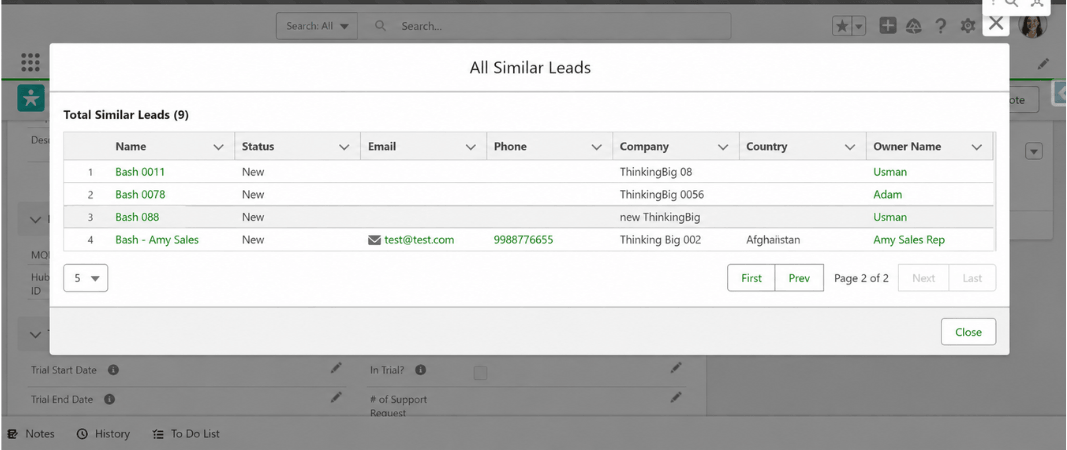
Amy Sales Rep opens a lead for “Bash — Thinking Big 002.” The component immediately surfaces an “All Similar Leads” modal showing 9 total similar leads across the ThinkingBig company cluster. On this page alone, she can see:
- Bash 0011 — ThinkingBig 08 — owned by Usman
- Bash 0078 — ThinkingBig 0056 — owned by Adam
- Bash 088 — new ThinkingBig — owned by Usman
- Bash – Amy Sales — Thinking Big 002 — her own record (test@test.com, phone 9988776655, Afghanistan)
She can see that Mo Usman and Adam are already working related ThinkingBig leads. Before placing a call, she has full context on the existing ownership landscape.
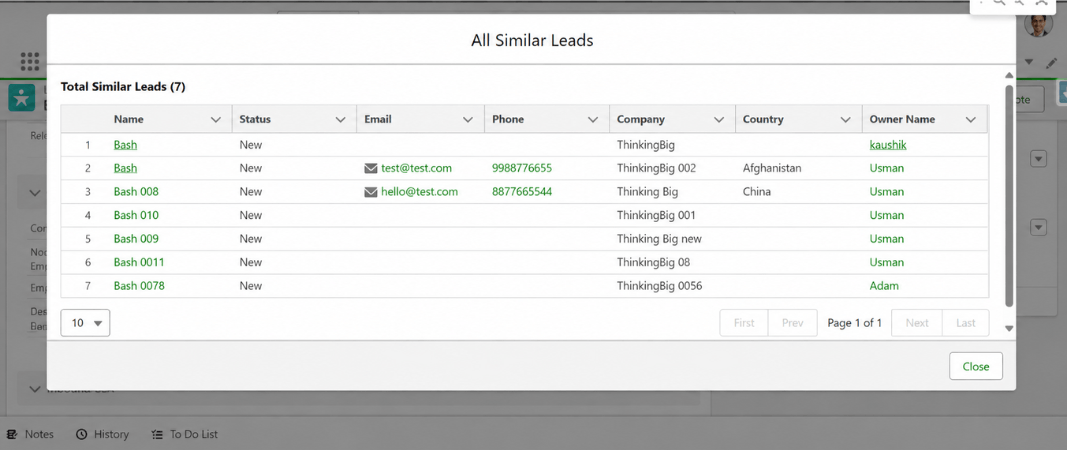
Adam opens a lead in the same org. The component shows him 7 total similar leads — a different count from Amy’s 9. His view includes:
- Bash — ThinkingBig — Kaushik
- Bash — ThinkingBig 002 — Usman (test@test.com, 9988776655, Afghanistan)
- Bash 008 — Thinking Big — Usman (hello@test.com, 8877665544, China)
- Bash 010 — ThinkingBig 001 — Usman
- Bash 009 — Thinking Big new — Usman
- Bash 0011 — ThinkingBig 08 — Usman
- Bash 0078 — ThinkingBig 0056 — Adam (his own record)
Why different counts? Because the solution respects Salesforce’s existing sharing and permission model. Adam sees 7 leads — the records his user profile has access to. Amy sees 9 — the records her permissions allow. Neither user sees records that sit outside their Salesforce access. The solution surfaces similar leads, not all leads — governed by the same rules that govern the rest of the org.
What the screenshots also demonstrate:
- Fuzzy company matching in production. The same underlying company appears as “ThinkingBig,” “ThinkingBig 002,” “ThinkingBig 0056,” “ThinkingBig 08,” “ThinkingBig 001,” “Thinking Big,” “Thinking Big new,” and “new ThinkingBig” — eight variations of the same company name across different leads. All are surfaced as similar. Without this matching, a rep would have no idea these records were related.
- Multi-owner visibility. Across the two views, the same company cluster is owned by four different reps: Mo Usman, Kaushik, Adam, and Amy Sales Rep. Without the similar leads panel, each of these reps works their record independently. With it, everyone can see the full ownership picture.
- Paginated results with configurable page size. Amy’s view shows page 2 of 2 with 5 records per page. Adam’s view shows all 7 on a single page with 10 records per page. The pagination controls and page-size selector (5 or 10 rows) are native to the component.
Also read: What is Salesforce AIforce? The Complete Guide to Salesforce’s New Agentic Integration Layer
The Problem It Solves, in Concrete Terms
Consider a realistic scenario: a company receives leads from six sources — a website form, two marketing campaigns, a trade show badge scan, a partner referral, and a purchased list from a data vendor. All six lead-generation activities run independently. None of them know what the others captured last week.
By the time those leads reach Salesforce, the same twenty prospects may have entered the CRM four or five times each, owned by different reps, sitting in different stages, with no one aware of the overlap.
Without a detection tool, those duplicates get worked independently. Four reps call the same contact in the same week. The contact receives the same introductory email twice. An SDR qualifies a lead that an AE already closed nine months ago.
With Salesforce Similar Leads, each rep opening a new lead sees the existing records immediately. The duplication is visible at the point of decision — before the outreach happens, not after the damage is done.
Who This is For
This solution is particularly relevant for organizations with:
High lead volume — companies receiving thousands of leads monthly from multiple channels, where manual duplicate checking is not operationally feasible.
Multiple sales teams or regions — organizations where several teams work overlapping territories or the same customer base, and where ownership conflicts create internal friction.
Salesforce integrations — organizations importing leads from marketing automation platforms, event management tools, partner portals, or purchased data sources, where deduplication at the source is inconsistent.
Global sales operations — companies where the same prospect can appear under different regional records, with different formatting conventions for names and company names.
Growing Salesforce orgs — businesses experiencing rapid CRM growth where data quality has not kept pace with lead volume.
Check out: 15 Types of Salesforce Clouds and Their Features
How It is Built
The solution is built entirely in Lightning Web Components — Salesforce’s native front-end development framework — which means it runs inside the Salesforce platform without requiring external services, middleware, or third-party subscriptions.
The matching logic runs against Salesforce data directly, using configurable SOQL-based comparison rules that can be tuned to the organization’s specific field structure and business rules. Because it lives inside Salesforce, it inherits the org’s existing security model: reps see similar leads only for records they already have permission to view. The screenshots above demonstrate this directly — the same org, the same company cluster, two different reps, two different result counts (9 for Amy, 7 for Adam) — because their Salesforce permissions differ. No configuration is required to achieve this; it is the default behavior of a natively built LWC solution.
The solution is private and was built for a specific client, but it represents a component architecture and matching approach that AwsQuality can adapt and deploy for any Salesforce organization experiencing the duplicate lead challenge.
Closing Note
Salesforce Similar Leads came out of a real client problem: a sales team spending meaningful time investigating whether a lead was genuinely new before beginning outreach, and still occasionally discovering mid-conversation that a colleague was already engaged with the same company.
We built a solution that moves that discovery to the beginning of the process, where it can inform the sales decision rather than interrupt an active conversation.
Built by AwsQuality using Salesforce Lightning Web Components. The similarlead-lwc-custom-sf solution is hosted in a private repository. Contact us to discuss implementation for your Salesforce organization.
FAQs
Frequently Asked Questions
What is the Salesforce Similar Leads solution?
Salesforce Similar Leads is a custom Lightning Web Component built by AwsQuality that detects potentially duplicate or similar leads directly within the Salesforce lead record page. When a sales representative opens a lead, the component automatically identifies existing Salesforce records that match on configurable criteria — including name, email, phone, company, and domain — and presents them in a sales-friendly panel within the lead view, without requiring any manual search.
Does this replace Salesforce’s native duplicate management?
Salesforce’s native duplicate management uses matching rules and duplicate rules to block or alert on exact or near-exact matches at the time a record is created. The AwsQuality Similar Leads solution complements this by surfacing a richer, more contextual view of similar records — including lead ownership, activity history, qualification stage, and lead score — directly within the rep’s working context, not just at record creation. It is designed for day-to-day sales workflow visibility rather than only point-of-creation enforcement.
Can the matching rules be customized for our organization?
Yes. The matching logic is configurable to reflect the organization’s specific definition of a duplicate or similar lead. Common configurations include exact email match, fuzzy company name match, phone plus company match, and domain-level email match. Custom Salesforce fields can also be incorporated into the matching logic. Organizations with specific data patterns — for example, company names that vary by region or legal entity suffix — can have the rules reflect those patterns.
Which organizations benefit most from this solution?
Organizations that generate leads from multiple sources simultaneously — website forms, marketing campaigns, events, partner referrals, and third-party lists — and that operate multiple sales teams or regional territories benefit most. These are the environments where duplicate leads accumulate fastest and where the cost of undetected duplicates in wasted sales effort, prospect experience damage, and reporting inaccuracy is highest.
Salesforce
Related Articles
Salesforce Shopify Integration: Connecting Customer Data, Orders, and Inventory
A successful eCommerce business depends on more than an attractive online store. It needs accurate customer information, reliable order processing, up-to-date inventory,…
15 Salesforce Consulting Partner Tips: Guide to Smart Integration
Salesforce has become an important part of how businesses manage customer relationships, streamline operations, and make data-driven decisions. However, its real business…
Salesforce DevSecOps Best Practices for Secure Development and Deployment
Salesforce has become an essential platform for managing customer relationships, automating business processes, and connecting enterprise applications. As businesses expand their Salesforce…