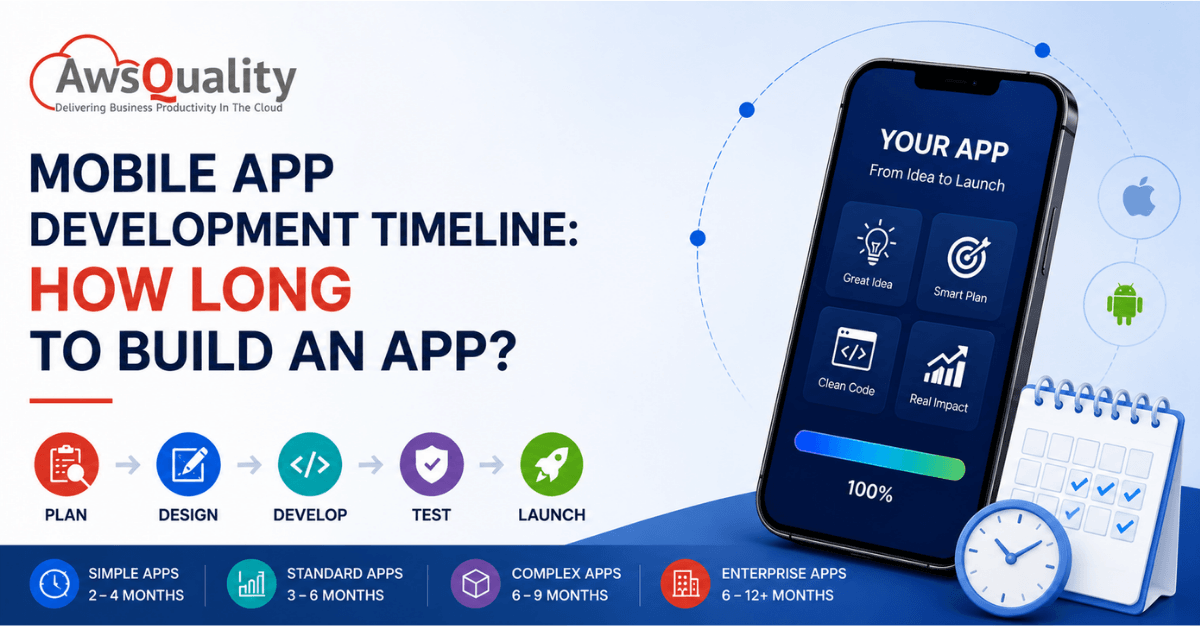
Building a mobile app is rarely just a matter of writing code. From validating the idea and defining requirements to designing the user experience, developing the app, integrating backend systems, testing across devices, and preparing for app-store launch, every stage affects the final timeline.
So, how long does it take to build a mobile app?
For a well-defined project, a focused MVP can often take around 8–16 weeks, while a standard production application may require 3–6 months. Complex enterprise, marketplace, fintech, healthcare, AI-powered, or highly integrated applications can take 6–12 months or longer. Current industry estimates vary considerably because scope, integrations, platforms, compliance, and technical complexity have a much larger impact than screen count alone.
The key is to understand what is included in the timeline before committing to a launch date.
Quick Reference: Mobile App Development Timeline at a Glance
A realistic mobile app development timeline generally looks like this:
| App Type | Typical Timeline | Examples |
|---|---|---|
| Prototype / Proof of Concept | 2–5 weeks | Clickable prototype, concept validation |
| Simple MVP | 8–16 weeks | Basic booking, content, utility, or service app |
| Standard Business App | 3–6 months | E-commerce, booking, customer portal |
| Complex App | 6–9 months | Marketplace, social, fintech, logistics |
| Enterprise App | 6–12+ months | Multi-system, multi-role, highly secure applications |
| AI/IoT/Highly Integrated App | 9–12+ months | AI applications, connected devices, advanced enterprise platforms |
These are planning ranges rather than guarantees. A small-looking application can take longer than expected if it requires complex integrations, security controls, offline functionality, real-time synchronization, or regulatory compliance.
What Determines a Mobile App Development Timeline?
The biggest mistake businesses make is estimating development time based on the number of screens.
An app with 10 screens could take three months, while another with 30 screens could take six months or more.
The actual timeline depends on factors such as:
- Number and complexity of features
- iOS, Android, or both
- Native vs. cross-platform development
- Backend requirements
- Third-party integrations
- Payment processing
- Real-time functionality
- Authentication and user roles
- Data and API complexity
- AI or machine learning requirements
- Security and compliance requirements
- Admin dashboard requirements
- Offline functionality
- Testing requirements
- App Store and Google Play preparation
- Stakeholder feedback and approval cycles
A reliable estimate therefore starts with scope and technical requirements, not simply a list of screens.
Check out: How to Build a Minimal Viable Product and Secure Funding?
Mobile App Development Timeline: Phase by Phase
Phase 1: Discovery and Planning (2–4 Weeks)
Every professional mobile application starts with a structured discovery phase. This is not optional overhead — it is the phase that determines the accuracy of every timeline estimate that follows.
What happens during discovery:
The development team and client establish the app’s core objectives, target users, primary use cases, and the competitive context it will enter. User research — understanding the specific pain points the app addresses and the behavior patterns of the people who will use it — produces the insight that separates well-designed apps from technically functional ones that nobody uses.
Requirement documentation translates the business goals into specific, testable functional specifications: what the app will do, how it will behave, what data it stores, how it connects to external systems, and what security and compliance requirements apply. Technical feasibility assessment identifies any architectural challenges — third-party API limitations, platform-specific constraints, data complexity — that need to be resolved at the design stage rather than discovered mid-development.
The output of discovery is a scope document precise enough to produce an accurate timeline and budget estimate. Teams that skip this phase typically experience scope creep during development, budget overruns, and timeline extensions that would have been predictable had the scope been defined properly before work began.
What affects this phase’s duration: First-time projects with no existing documentation take longer than revisions to established products. Stakeholder alignment across multiple decision-makers adds time. Regulatory or compliance research (HIPAA for healthcare apps, PCI-DSS for payment processing, accessibility standards) adds time proportionally to the complexity of the requirements.
Phase 2: UI/UX Design (2–6 Weeks)
Mobile app UI/UX design is not about making the application look attractive. It is about making the application work intuitively for the people who will use it — and getting that right before a single line of production code is written.
What happens during design:
Information architecture defines the structure of the application: how screens are organized, how users navigate between them, and how the content hierarchy guides users toward their goals. Wireframes create low-fidelity layouts of every screen, establishing the placement of elements without the distraction of visual styling. Wireframes are the cheapest stage to make structural changes — moving a button in a wireframe takes minutes; moving it in production code after testing has begun takes significantly longer.
Prototyping — converting wireframes into interactive mockups that simulate the app’s navigation flows — enables user testing before development investment is made. A prototype reveals usability problems that wireframes cannot: the checkout flow that users abandon because it requires one too many taps, the navigation structure that does not match the mental model users bring to the task. Fixing these problems in the prototype phase costs hours; discovering them post-launch costs users.
Visual design applies the brand’s color system, typography, iconography, and illustration style to the wireframe structure — producing the high-fidelity design files that development teams implement.
What affects this phase’s duration: Apps with complex user journeys (multiple user roles, complex onboarding, multi-step transactional flows) require more design iterations. Apps with custom illustration, animation, or brand-differentiated visual identity take longer than apps using standard design system components. Design revision cycles — the number of rounds of stakeholder feedback between first draft and approved final — are the most variable factor in design timelines.
Phase 3: Development — Frontend and Backend (8–16 Weeks)
Development is the longest single phase of the mobile app timeline and the one where complexity has the most pronounced effect on duration. The development phase itself divides into frontend development (what users see and interact with) and backend development (the server-side logic, database architecture, and API layer that the app depends on).
Frontend development implements the UI/UX designs as functional screens and interactions on the target platform — Swift for iOS, Kotlin for Android, Dart (Flutter) or JavaScript (React Native) for cross-platform. This involves: implementing every screen from the approved design files; coding navigation flows between screens; integrating animations and interactive elements; connecting frontend components to the backend API; and implementing platform-specific features (push notifications, camera access, biometric authentication, location services).
Backend development builds the server-side infrastructure: the API that the mobile app communicates with; the database that stores user data, app content, and transactional records; authentication and authorization systems; business logic that governs the app’s core functions; third-party service integrations; and the administrative systems that power the app’s content management.
Timeline benchmarks by complexity:
- Simple app development: 8–12 weeks total (frontend + backend)
- Medium complexity: 12–20 weeks
- Complex/enterprise: 20–40+ weeks
What extends the development timeline most significantly:
Third-party integrations. Each payment gateway, mapping provider, social login system, CRM integration, ERP connection, or enterprise API adds development time proportional to the complexity of the integration and the quality of the third party’s documentation. Poorly documented APIs can triple the integration timeline.
Real-time features. Live chat, real-time data updates, push-to-talk, collaborative features, and live streaming all require WebSocket or server-sent events architecture that adds development complexity beyond standard request-response patterns.
Offline functionality. Apps that must function without an internet connection require local data storage, synchronization logic, conflict resolution, and connection state management — significant additional engineering effort relative to online-only apps.
AI and ML features. Generative AI integration adds 2 to 4 weeks to typical development timelines, according to AgileSoftLabs’ 2025 analysis. On-device machine learning (Core ML for iOS, TensorFlow Lite for Android) adds further complexity depending on the model’s requirements.
Phase 4: Quality Assurance and Testing (2–6 Weeks)
Testing is the phase most commonly underinvested in mobile app development, and the most consistently expensive to under-invest in. Applications that reach users with significant bugs lose users at rates that rarely recover — app store ratings are difficult to improve after they decline, and early negative reviews establish reputational signals that compound over time.
What comprehensive mobile QA covers:
Functional testing validates that every feature works as specified: user registration completes correctly, payment flows process without errors, data saves and retrieves accurately, push notifications deliver on the correct triggers, and navigation flows behave as designed.
Device compatibility testing validates performance across the range of physical devices the application must support. Android fragmentation makes this particularly important — the Android ecosystem spans hundreds of device models, screen sizes, and hardware specifications, and behavior differences between a flagship Samsung and a budget Android device can be significant.
Performance testing validates behavior under load: what happens when many users access the application simultaneously, how the application performs on slow network connections, whether memory management handles extended use sessions without degradation.
Security testing validates that sensitive data is encrypted correctly, that authentication systems resist common attacks, that input fields do not expose SQL injection or XSS vulnerabilities, and that the application complies with relevant security standards.
User acceptance testing (UAT) engages real users or internal stakeholders in testing the application in realistic usage scenarios before release — identifying usability issues that functional testing cannot catch because it validates behavior rather than experience.
Timeline note: QA and security review are the least compressible phases in the development timeline. Unlike the feature build phase, where parallelism can increase throughput, testing must often proceed sequentially — issues found during testing must be fixed before the next round of testing validates the fix. Budget 2 to 6 weeks for thorough QA regardless of pressure to compress the overall timeline. Apps that launch with significant quality issues cost more to remediate post-launch than pre-launch testing would have cost.
Phase 5: App Store Submission and Launch (1–3 Weeks)
App Store submission is the phase most likely to surprise development teams who have not navigated it before. Both Apple’s App Store and Google’s Play Store review applications before they become publicly available — a process with timelines, requirements, and rejection risks that are worth understanding before planning a launch date.
Google Play Store submission: Google’s review process typically completes within 1 to 3 days for new apps. However, apps with specific permissions, content categories, or sensitive functionalities are subject to longer review processes. Policy compliance — with Google’s content policies, privacy requirements, and advertising standards — must be verified before submission.
Apple App Store submission: Apple’s review process typically completes within 1 to 3 days, with the possibility of review requests or rejections requiring clarification or modification. Apple’s guidelines are more prescriptive than Google’s — covering UI/UX patterns, monetization models, data collection disclosures, and performance standards. Rejected applications require modifications followed by re-submission, which adds time to the launch window.
Launch preparation: Beyond submission, the launch phase includes App Store optimization (app title, description, keywords, and screenshots that maximize discoverability); press release and marketing materials; analytics and monitoring configuration; customer support infrastructure; and the communication to users or stakeholders that the product is live.
Phase 6: Post-Launch Stabilization (2–4 Weeks)
The first weeks after launch routinely surface issues that testing environments did not — because real users use applications in ways that testing scenarios do not anticipate, across device configurations and network conditions that lab testing cannot fully replicate.
Post-launch stabilization covers: monitoring crash reports and error logs to prioritize fixes; responding to user feedback and App Store reviews that identify usability issues; performance optimization informed by real usage data; and the rapid iteration cycle that converts launch feedback into immediate product improvements.
The most successful mobile applications treat launch not as completion but as the beginning of a continuous improvement cycle. App store ratings, retention metrics, and user lifetime value are all significantly determined by what happens in the weeks and months after initial release.
Also check: MVP to Market – Realistic Cost, Timelines and Tech Stack for MVP App Development
Complete Timeline by App Complexity
Simple Mobile Apps: 2–4 Months
Examples: Informational apps, basic utility apps (calculator, timer, converter), simple to-do apps, basic chat apps with no back-end complexity, single-function apps.
Characteristics: Limited features, minimal or no back-end infrastructure, standard UI components without heavy custom design, no third-party payment or enterprise integrations, a single user role.
| Phase | Duration |
|---|---|
| Discovery & Planning | 1–2 weeks |
| UI/UX Design | 2–3 weeks |
| Frontend Development | 3–6 weeks |
| Backend Development | 2–4 weeks |
| QA & Testing | 2–3 weeks |
| App Store Submission | 1–2 weeks |
| Total | 11–20 weeks (2.5–5 months) |
Medium Complexity Apps: 4–6 Months
Examples: E-commerce apps (product catalog, cart, checkout, payment processing, order management), booking apps (restaurant, salon, appointment scheduling), fitness and health trackers, HR management mobile tools, basic marketplace apps.
Characteristics: Multiple user roles, payment gateway integration, push notifications, backend database with user profiles and transactional data, social login, moderately complex UX with custom design elements.
| Phase | Duration |
|---|---|
| Discovery & Planning | 2–3 weeks |
| UI/UX Design | 3–5 weeks |
| Frontend Development | 6–10 weeks |
| Backend Development | 5–8 weeks |
| QA & Testing | 3–5 weeks |
| App Store Submission | 1–2 weeks |
| Total | 20–33 weeks (5–8 months) |
Complex and Enterprise Apps: 6–12+ Months
Examples: Multi-vendor marketplaces, fintech and banking platforms, healthcare applications with HIPAA compliance requirements, enterprise ERP mobile clients, real-time collaboration platforms, IoT device management apps, AI-powered applications with on-device inference.
Characteristics: Complex multi-role user systems, enterprise system integrations (Salesforce, SAP, Oracle, ERP), real-time features, advanced security and compliance requirements, high-volume performance requirements, custom AI or ML features, extensive multi-device testing requirements.
| Phase | Duration |
|---|---|
| Discovery & Planning | 3–5 weeks |
| UI/UX Design | 5–8 weeks |
| Frontend Development | 12–20 weeks |
| Backend Development | 10–18 weeks |
| QA & Testing | 5–8 weeks |
| App Store Submission | 1–3 weeks |
| Total | 36–62 weeks (9–15+ months) |
Read: From Idea to Launch – How Mobile App Development Services Work
Timeline by Platform: iOS, Android, and Cross-Platform
iOS App Development: iOS development in Swift or SwiftUI benefits from a more uniform device ecosystem — Apple manufactures its own hardware, which means significantly fewer device configurations to test against than Android. iOS app development typically runs at the shorter end of the timeline estimates for each complexity tier.
Android App Development: Android’s diversity is both its strength (largest global market share at 71.42%) and its primary development complexity. Testing across the range of Android device manufacturers, screen sizes, hardware capabilities, and OS versions requires broader QA coverage than iOS. Android development timelines are typically 10% to 20% longer than equivalent iOS projects specifically due to device fragmentation testing requirements.
Cross-Platform Development (Flutter / React Native): Cross-platform development with React Native or Flutter is the correct default choice for approximately 80% of new mobile app builds in 2026, according to Bolder Apps’ analysis. For a single codebase producing apps that run on both iOS and Android, cross-platform development typically requires 20% to 35% more time than a single-platform native build — but produces two apps rather than one. Compared to building two separate native apps, cross-platform development saves 40% to 60% of the equivalent two-native-app timeline.
Cross-platform is the right choice when: visual and behavioral consistency between platforms is required; the budget does not justify two separate native builds; the team already operates in JavaScript (React Native) or Dart (Flutter); or time-to-market for both platforms is the primary constraint.
Native development remains superior when: platform-specific capabilities (ARKit, Core ML, HealthKit on iOS; specific Android hardware APIs) are core to the product; maximum performance is required for gaming or heavy computation; or the application’s design deliberately embraces platform-specific UI conventions.
Also read: 5 Signs You’ve Found the Right Mobile Application Development Company
10 Factors That Most Significantly Affect Your App Development Timeline
1. Scope Definition Quality Apps with rigorously scoped requirements at project start ship 30% to 50% faster than those where scope is loosely defined. Every feature that is added after development begins costs approximately three times the effort it would have cost had it been included from the start — because design, development, and testing must all be revisited.
2. Third-Party Integration Complexity Each external API integration — payment processor, mapping service, CRM, ERP, social authentication, enterprise data source — adds time proportional to the complexity of the integration and the API’s documentation quality. Enterprise system integrations (Salesforce, SAP) add 3 to 6 weeks per system. Payment gateway integrations typically add 1 to 2 weeks. Well-documented consumer APIs (Google Maps, Stripe) add days.
3. User Authentication and Security Requirements Standard email and social login adds minimal time. Multi-factor authentication, biometric login, enterprise SSO (SAML, OIDC), role-based access control, and end-to-end encryption each add development time. Compliance requirements (HIPAA, SOC 2, PCI-DSS) add both development time and documentation requirements.
4. AI and ML Features Generative AI API integrations add 2 to 4 weeks. On-device machine learning with Core ML or TensorFlow Lite adds 4 to 8 weeks depending on model complexity. Real-time AI features (live image recognition, real-time language processing, continuous inference) add the most significant timeline impact.
5. Backend Infrastructure Complexity Apps that use existing APIs or simple CRUD databases develop faster than apps requiring complex business logic, real-time event processing, multi-tenancy, or high-availability infrastructure. A simple backend for a basic app adds 2 to 4 weeks; a complex enterprise backend can be the longest phase of the entire project.
6. Offline Functionality Apps that must work without connectivity require local storage architecture, synchronization logic, conflict resolution, and connection-state-aware UI — adding 4 to 8 weeks to the development timeline relative to online-only equivalents.
7. Design Complexity and Custom Animation Standard UI component implementations develop faster than custom design systems with brand-specific interactions, custom animations, and non-standard navigation patterns. Complex custom animations add 2 to 4 weeks. Custom UI components that must behave identically across platforms in a cross-platform project add additional development time.
8. Team Structure and Collaboration Efficiency Distributed teams across multiple time zones add communication overhead that extends timelines relative to collocated teams. Poorly defined handoffs between design and development create revision cycles. Teams with established collaborative processes and clear ownership consistently outperform teams where these processes must be built during the project.
9. App Store Review Cycles App Store rejections — which typically require modifications and re-submission — add 1 to 2 weeks per rejection cycle. Applications with content categories or permissions that trigger manual review (healthcare apps, apps accessing sensitive device features) should budget additional time in the launch phase.
10. Stakeholder Approval Cycles Internal review and approval cycles that require multiple stakeholders to align on design decisions, feature scope, or content add time proportional to the number of approvers and the clarity of the decision-making process. Clear approval authority assigned before the project begins reduces this variable significantly.
How to Reduce Mobile App Development Timeline Without Reducing Quality
Invest in Discovery Before Development. The most reliable way to compress the overall project timeline is to spend more time in the discovery and planning phase than feels necessary before development begins. Every hour of unresolved ambiguity in the requirements produces multiple hours of expensive rework during development.
Adopt an MVP-First Strategy. A Minimum Viable Product approach — releasing a version with only the core features required to validate the product’s value proposition — reduces launch time by 40% to 60% compared to a full-featured first release, according to AgileSoftLabs’ 2025 development timeline analysis. The MVP approach trades scope for speed: the product reaches real users faster, generating validated feedback that guides the second phase of development more accurately than any assumption made before launch.
Choose Cross-Platform Where It Fits. Cross-platform development with Flutter or React Native produces iOS and Android apps from a single codebase. For projects that need both platforms, this consistently reduces the two-platform timeline versus building two separate native applications.
Use Pre-Built Component Libraries. Material Design (Android), Apple’s Human Interface Guidelines (iOS), and cross-platform component libraries (Flutter’s widget catalog, React Native’s component ecosystem) provide extensively tested UI building blocks that accelerate interface development without sacrificing quality.
Run Design and Development in Parallel. Development of early screens can begin while later screens are still in design — provided the information architecture and data models are finalized before parallel work begins. Parallel workstreams add coordination overhead but compress total project duration.
Engage an Experienced Development Partner. Teams with previous experience building similar applications recognize failure modes before they occur, have established solutions to common integration challenges, and do not spend discovery time on problems they have already solved. Experience translates directly into timeline accuracy and delivery reliability.
Real-World Timeline Benchmarks by App Category
| App Category | Typical Timeline | Primary Timeline Drivers |
|---|---|---|
| E-commerce app | 4–7 months | Product catalog, payment integration, order management |
| Food delivery app | 5–8 months | Multi-role (customer, restaurant, driver), real-time tracking, payments |
| Healthcare / HIPAA | 7–12+ months | Compliance requirements, security architecture, data sensitivity |
| Fintech / banking | 8–14+ months | Regulatory compliance, security, payment rails, real-time data |
| Social networking | 5–9 months | Real-time feeds, media handling, content moderation, scaling |
| On-demand services | 5–9 months | Multi-role, real-time matching, payments, location services |
| Enterprise CRM mobile | 4–8 months | Backend integration depth (Salesforce, SAP), data sync |
| Fitness / wellness | 3–6 months | Wearable integrations, data visualization, subscription billing |
| Education / e-learning | 4–7 months | Content delivery, progress tracking, assessment functionality |
| IoT companion app | 4–9 months | Device communication protocols, real-time data, offline operation |
Planning your next mobile app? Explore our Mobile App Development Services to turn your idea into a secure, scalable product.
Should You Build an MVP or the Full App First?
For startups and businesses validating a new product, an MVP is often a more practical starting point.
Instead of asking:
“How can we build everything?”
Ask:
“What is the smallest version of this product that can validate the business idea?”
An MVP can help you:
- Validate market demand
- Collect user feedback
- Identify usability problems
- Test the business model
- Measure adoption
- Prioritize future features
Once the MVP demonstrates traction, you can invest in additional functionality based on actual user behavior rather than assumptions.
What Should You Ask a Mobile App Development Company About Timeline?
Before hiring an app development partner, don’t simply ask:
“How quickly can you build my app?”
Ask more specific questions:
- What assumptions are included in the estimate?
- What features are included in version one?
- Does the timeline include UX/UI design?
- Does it include backend development?
- Are third-party integrations included?
- Does it include QA and device testing?
- Does it include App Store and Google Play submission?
- What happens if requirements change?
- Which activities can run in parallel?
- What dependencies could delay the project?
- What happens after launch?
- How will progress be measured?
A professional estimate should explain what is included, what isn’t, and what assumptions the timeline depends on.
Frequently Asked Questions
How long does it take to build a mobile app?
A focused MVP can take approximately 8–16 weeks. Standard business applications commonly take 3–6 months, while complex enterprise applications can take 6–12 months or longer.
Can a mobile app be built in one month?
A simple prototype or highly focused MVP may be possible in around a month, but a production-ready application with backend services, integrations, comprehensive QA, and store launch typically requires more time.
What takes the most time when developing a mobile app?
Development is often the largest phase, but integrations, unclear requirements, design changes, testing, and compliance requirements can significantly affect the overall timeline.
Is iOS or Android faster to develop?
Neither is universally faster. The answer depends on the application’s requirements, development approach, team expertise, device coverage, and platform-specific functionality.
Is cross-platform development faster?
Often, yes, particularly when an application needs to support both iOS and Android and most functionality can be shared. However, platform-specific requirements can reduce the advantage.
How long does it take to build an MVP?
A focused mobile MVP can often take approximately 8–16 weeks, depending on features, backend complexity, integrations, and team structure.
Does the timeline include app-store approval?
A professional project plan should account for store preparation and review, but approval timing isn’t completely controlled by the development team. Apple notes that review time can vary depending on the app and review circumstances.
Can adding more developers make the project faster?
Not always. Additional developers can accelerate suitable parallel work, but adding people to a poorly defined project can increase coordination and communication overhead. The best way to shorten a timeline is usually to reduce ambiguity, control scope, parallelize appropriate work, and remove dependencies.
Final Thoughts
There is no universal answer to how long it takes to build a mobile app.
A simple MVP may be ready in a few months, while a sophisticated enterprise application may require a year or more. The difference isn’t simply the number of developers or screens. It comes from the scope, architecture, integrations, platforms, security requirements, testing strategy, and business complexity.
The most reliable approach is to:
Define → Design → Build → Integrate → Test → Launch → Optimize
If you’re planning a mobile application, focus less on finding the company that promises the shortest timeline and more on finding a development partner that can provide a realistic, transparent, milestone-based roadmap.
A realistic timeline may look slower on paper—but it is usually much faster than launching with technical debt, unresolved defects, or major rework.
Looking for Mobile App Development Services?
AwsQuality helps businesses design, develop, integrate, test, and deploy mobile applications tailored to their business requirements. A structured development approach can help organizations move from idea to production while maintaining scalability, security, usability, and long-term maintainability.
Planning a mobile app? Start with a clear scope and a realistic development roadmap before writing the first line of code.
 Bio
Bio