
ServiceNow Implementation: A Step-by-Step Guide for Businesses
 Mohammad Usman 27 min read
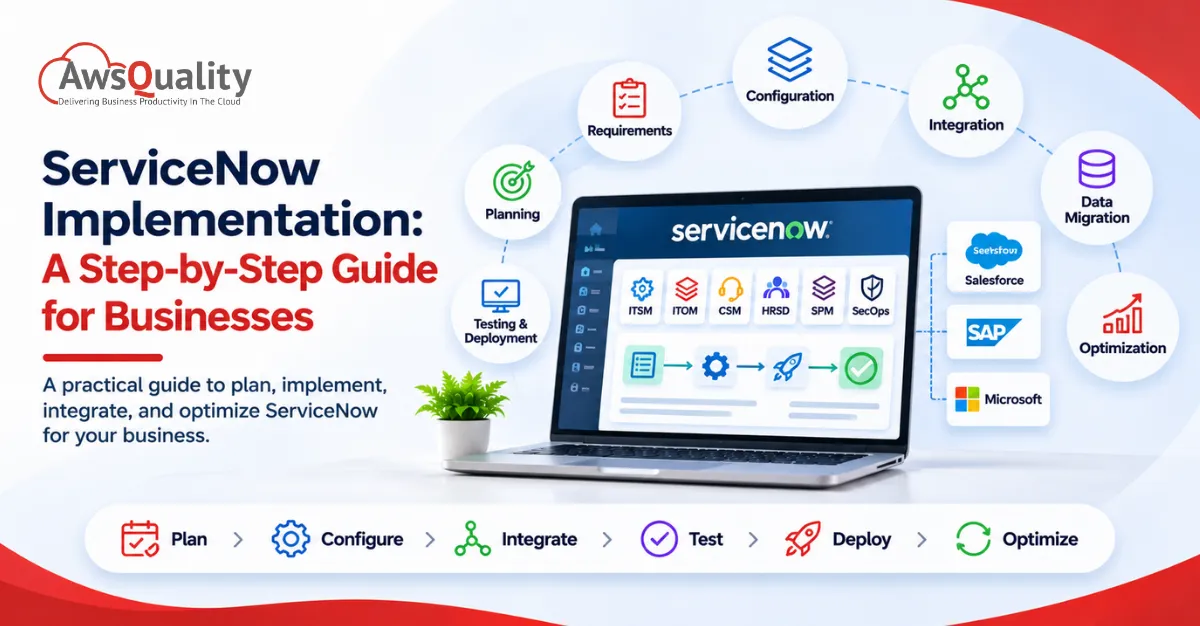
Businesses today manage increasingly complex IT environments, employee requests, customer interactions, and internal workflows. When these processes operate across disconnected systems, organizations often struggle with slow service delivery, limited visibility, manual work, and inefficient communication between departments.
This is where ServiceNow can make a significant difference.
ServiceNow provides a cloud-based platform that helps organizations connect people, processes, applications, and data through automated digital workflows. From IT service management (ITSM) and IT operations management (ITOM) to customer service management (CSM) and HR service delivery, the platform enables businesses to streamline operations and improve service experiences.
However, purchasing a ServiceNow subscription is only the beginning. To realize its full potential, businesses need a well-planned implementation strategy that aligns platform capabilities with their operational requirements and long-term goals.
So, how do you implement ServiceNow successfully?
This guide explains the complete ServiceNow implementation process, including planning, requirement gathering, platform configuration, integrations, testing, deployment, and ongoing optimization. Whether you are implementing ServiceNow for the first time or replacing an existing IT service management solution, these steps will help you approach the project with greater clarity and confidence.
What is ServiceNow Implementation?
ServiceNow implementation is the process of planning, configuring, integrating, testing, and deploying the ServiceNow platform to meet an organization’s business and operational requirements.
It involves understanding existing workflows, identifying improvement opportunities, selecting the appropriate ServiceNow applications, configuring platform capabilities, migrating relevant data, and connecting ServiceNow with other enterprise systems.
The objective is not simply to introduce another software platform. It is to create a connected environment where business processes work together more efficiently.
For example, consider an organization that manages employee IT requests through emails and spreadsheets. Employees submit requests, IT teams manually assign tickets, and managers have limited visibility into pending tasks.
With ServiceNow implementation, the organization can:
- Create a centralized IT service portal.
- Automatically categorize and assign service requests.
- Establish approval workflows.
- Track incidents and service-level agreements (SLAs).
- Notify employees about request progress.
- Generate reports to monitor IT performance.
This transforms a fragmented, manual process into a structured and measurable workflow.
Read: A Complete Guide to Choose the Right ServiceNow Consulting Company
Why Do Businesses Need ServiceNow Implementation?
ServiceNow implementation can help organizations address operational challenges while establishing a foundation for digital transformation.
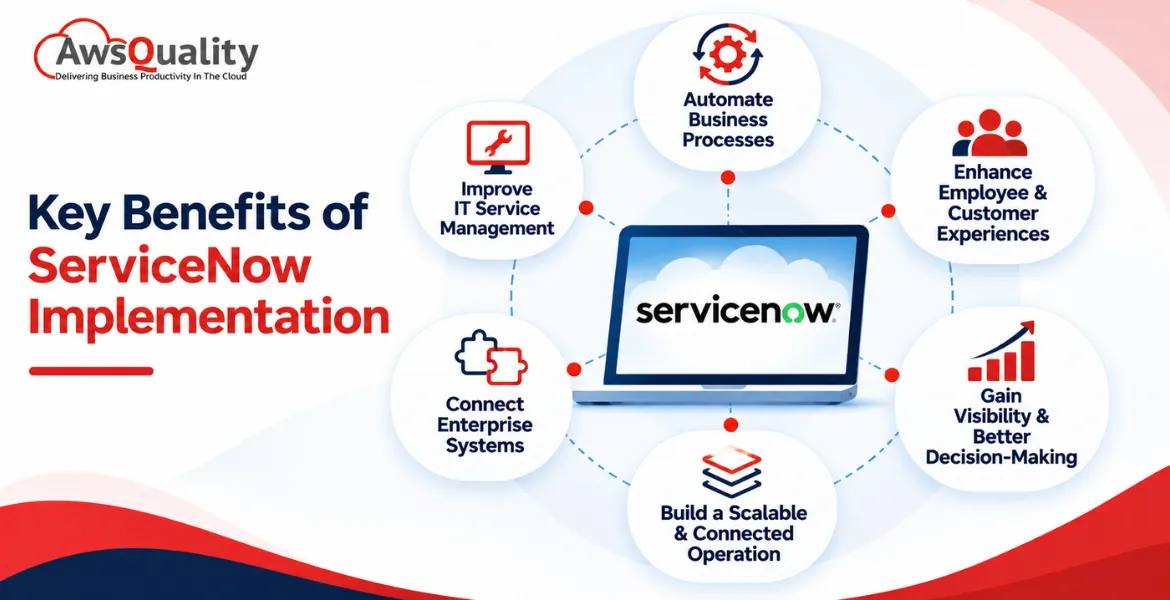
Here are some of the key reasons businesses invest in ServiceNow.
1. Automate Repetitive Business Processes
Many organizations spend considerable time handling repetitive tasks such as ticket assignments, approval requests, password resets, employee onboarding, and service notifications.
ServiceNow helps automate these activities through workflow automation capabilities, reducing manual intervention and allowing employees to focus on higher-value responsibilities.
For example, when an employee submits an IT access request, ServiceNow can automatically route it to the appropriate manager, initiate the approval process, and notify the IT team once authorization is received.
2. Improve IT Service Management
Managing IT incidents, service requests, changes, and problems across disconnected tools can create delays and inconsistencies.
With ServiceNow ITSM, organizations can centralize IT service operations, standardize workflows, track incidents, and improve collaboration between IT teams.
This provides better visibility into service performance and helps teams resolve issues more systematically.
3. Connect Enterprise Systems
Businesses typically use multiple applications for CRM, ERP, HR, finance, collaboration, and IT operations.
ServiceNow can integrate with these systems to facilitate information exchange and coordinate workflows across departments.
For instance, integrating ServiceNow with an HR system can help automate employee onboarding by triggering IT account provisioning, equipment requests, and access approvals.
4. Enhance Employee and Customer Experiences
A centralized service portal gives employees and customers a convenient way to submit requests, access information, and monitor their cases.
Automated notifications, knowledge articles, self-service capabilities, and virtual support options can reduce unnecessary back-and-forth communication.
5. Improve Visibility and Decision-Making
ServiceNow provides reporting and analytics capabilities that help organizations monitor operational performance.
Managers can track metrics such as:
- Incident resolution time
- First-contact resolution rate
- SLA compliance
- Service request volumes
- Workflow completion time
- Backlog and pending requests
These insights help businesses identify bottlenecks and make more informed operational decisions.
6. Establish a Foundation for AI-Driven Workflows
As organizations explore AI-powered automation, they need connected workflows and reliable enterprise data.
ServiceNow offers AI-related capabilities that can support intelligent assistance, workflow recommendations, and automated task execution, depending on the products and subscriptions deployed.
A properly designed implementation creates a stronger foundation for adopting these capabilities over time.
Also read: How to Choose The Right ServiceNow Development Company for Your Business
Step-by-Step ServiceNow Implementation Process
A successful ServiceNow implementation requires a structured approach. Each phase should build on the previous one, ensuring that business requirements, technical architecture, and user expectations remain aligned.
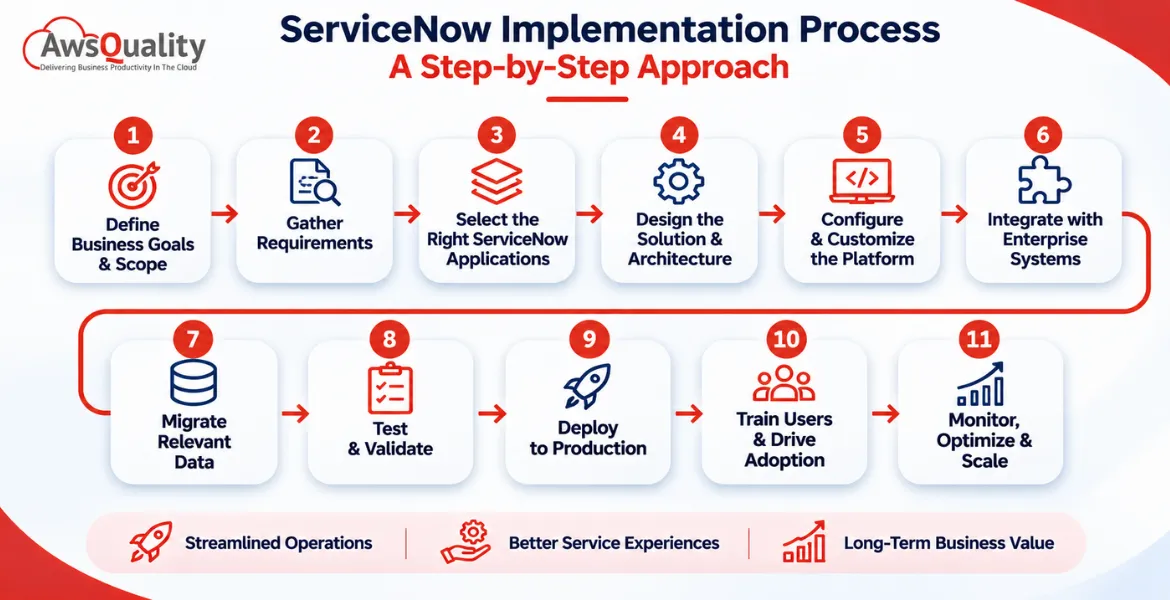
The following steps provide a practical implementation framework.
Step 1: Define Business Goals and Implementation Objectives
The first step is to understand why your organization needs ServiceNow.
Before configuring the platform, identify the business challenges you want to solve and the outcomes you expect from the implementation.
For example, your organization may want to:
- Reduce manual IT ticket handling.
- Improve incident resolution time.
- Automate employee onboarding.
- Standardize change management processes.
- Improve visibility into IT assets and infrastructure.
- Connect existing enterprise applications.
- Improve customer service operations.
Avoid starting with a long list of ServiceNow features. Instead, begin with specific business problems.
Example:
Suppose an organization receives approximately 2,000 IT service requests every month. Most requests are manually assigned to support teams, resulting in delays and inconsistent prioritization.
Its implementation objective could be to automate ticket categorization and assignment, improve SLA compliance, and reduce the time required to resolve common requests.
Once objectives are defined, establish measurable key performance indicators (KPIs).
| Business objective | Suggested KPI |
|---|---|
| Improve incident management | Average incident resolution time |
| Automate service requests | Percentage of automated requests |
| Improve service quality | SLA compliance rate |
| Enhance employee experience | Employee satisfaction score |
| Reduce operational workload | Manual tasks eliminated |
These KPIs will help evaluate whether the implementation is delivering the expected business value.
Step 2: Assess Existing Processes and Gather Requirements
After defining the objectives, evaluate your organization’s existing workflows, systems, and operational challenges.
This phase is important because implementing ServiceNow without understanding current business processes can result in unnecessary customization and inefficient workflows.
Conduct discovery workshops with relevant stakeholders, including:
- IT managers and administrators
- Department heads
- HR and finance representatives
- Service desk teams
- Security and compliance teams
- Business process owners
- End users
Document how existing processes work, who is responsible for each activity, what systems are involved, and where delays occur.
For example, consider an employee onboarding process.
A typical onboarding workflow may involve:
- HR creates a new employee record.
- The hiring manager approves the request.
- IT creates user accounts.
- The facilities team arranges equipment.
- Security assigns building access.
- HR confirms onboarding completion.
During requirement gathering, identify which activities can be automated and which systems need to exchange information.
The output of this phase should include:
- Business requirements document (BRD)
- Functional requirements
- Technical requirements
- Current-state process maps
- Integration requirements
- User roles and responsibilities
- Reporting requirements
- Initial implementation scope
Best practice: Separate essential business requirements from optional enhancements. This helps prevent scope expansion and keeps the implementation focused.
Step 3: Select the Right ServiceNow Products and Modules
ServiceNow offers multiple products and applications designed to address different business requirements.
Selecting the appropriate modules is an important part of implementation planning.
Not every organization needs every ServiceNow product. Your selection should depend on business priorities, existing technology infrastructure, budget, and long-term objectives.
Some commonly implemented ServiceNow solutions include:
1. IT Service Management (ITSM)
ServiceNow ITSM helps organizations manage IT incidents, service requests, problems, changes, and knowledge management processes.
It is commonly used by IT departments that want to centralize service delivery and automate support operations.
2. IT Operations Management (ITOM)
ServiceNow ITOM helps organizations gain visibility into their IT infrastructure, applications, services, and operational dependencies.
It includes capabilities such as Discovery, Service Mapping, and event-related operations, depending on the selected products.
3. Customer Service Management (CSM)
ServiceNow CSM helps organizations manage customer cases, coordinate support activities, and connect customer service workflows with other business processes.
4. HR Service Delivery (HRSD)
ServiceNow HRSD enables HR departments to manage employee inquiries, onboarding, employee requests, and other HR-related workflows through centralized service experiences.
5. Strategic Portfolio Management (SPM)
ServiceNow SPM helps organizations manage strategic planning, project portfolios, investments, resources, and business priorities.
6. Security Operations (SecOps)
ServiceNow Security Operations supports security incident response and vulnerability-related workflows, helping security teams coordinate activities and improve visibility.
When selecting modules, consider their dependencies, licensing requirements, integration needs, and implementation complexity.
Start with the products that address your most important business challenges, then expand as your organization becomes more comfortable with the platform.
Step 4: Develop the ServiceNow Implementation Strategy and Architecture
Once the requirements and product scope are finalized, develop a comprehensive implementation strategy.
This phase translates business requirements into a technical design that explains how the ServiceNow platform will operate within your existing IT environment.
Key activities include:
Platform architecture planning
Define how ServiceNow will interact with your organization’s applications, databases, infrastructure, and identity management systems.
Environment planning
Establish appropriate development, test, and production environments to support controlled configuration and deployment.
User access and role planning
Determine which users can access specific modules, records, workflows, and administrative functions.
Data architecture
Define how business data, configuration items, users, departments, and other records will be structured and maintained.
Integration architecture
Identify how ServiceNow will exchange information with existing enterprise systems.
Security planning
Establish access controls, authentication requirements, data protection policies, and audit requirements.
Another important consideration is the Common Service Data Model (CSDM).
CSDM provides a standardized framework for organizing service-related data and configuration items within the ServiceNow Configuration Management Database (CMDB). It helps establish consistent relationships between applications, infrastructure, technical services, and business services.
Organizations implementing ITOM or building a mature CMDB should consider CSDM early in the architecture process.
A well-designed architecture helps avoid fragmented implementations and supports future expansion.
Step 5: Configure the ServiceNow Platform
Platform configuration is where the implementation begins to take shape.
Based on the approved requirements and architecture, the implementation team configures ServiceNow applications, workflows, forms, user interfaces, access controls, and business rules.
Common configuration activities include:
- Setting up users, groups, and roles.
- Configuring incident and request management.
- Creating service catalogs.
- Defining approval workflows.
- Configuring SLAs and notification rules.
- Setting up knowledge management.
- Configuring dashboards and reports.
- Establishing assignment rules.
- Defining access control lists (ACLs).
For example, an organization may configure an incident management workflow with the following sequence:
- An employee reports an IT issue.
- ServiceNow creates an incident record.
- The system categorizes and prioritizes the incident.
- An assignment rule routes it to the appropriate support team.
- The support team investigates and resolves the issue.
- The employee receives an update.
- The incident is closed after resolution.
ServiceNow provides out-of-the-box functionality for many common business processes. Organizations should use standard platform capabilities wherever possible before introducing extensive custom development.
This approach helps reduce technical debt and makes future platform upgrades easier to manage.
Important consideration: Configuration vs. customization
Configuration involves adapting existing platform capabilities to meet business requirements, while customization involves extending or modifying application functionality through additional development.
A practical approach is to:
- Use out-of-the-box functionality first.
- Explore available configuration options.
- Use low-code tools where appropriate.
- Introduce custom development only when a genuine business requirement cannot be addressed through standard capabilities.
- Document every significant customization.
This balance helps maintain platform flexibility and long-term maintainability.
Step 6: Integrate ServiceNow With Existing Business Systems
Most enterprises already use multiple applications to manage their operations. For ServiceNow to become an effective workflow platform, it often needs to communicate with these systems.
ServiceNow integrations help connect applications, synchronize relevant information, and automate processes across departments.
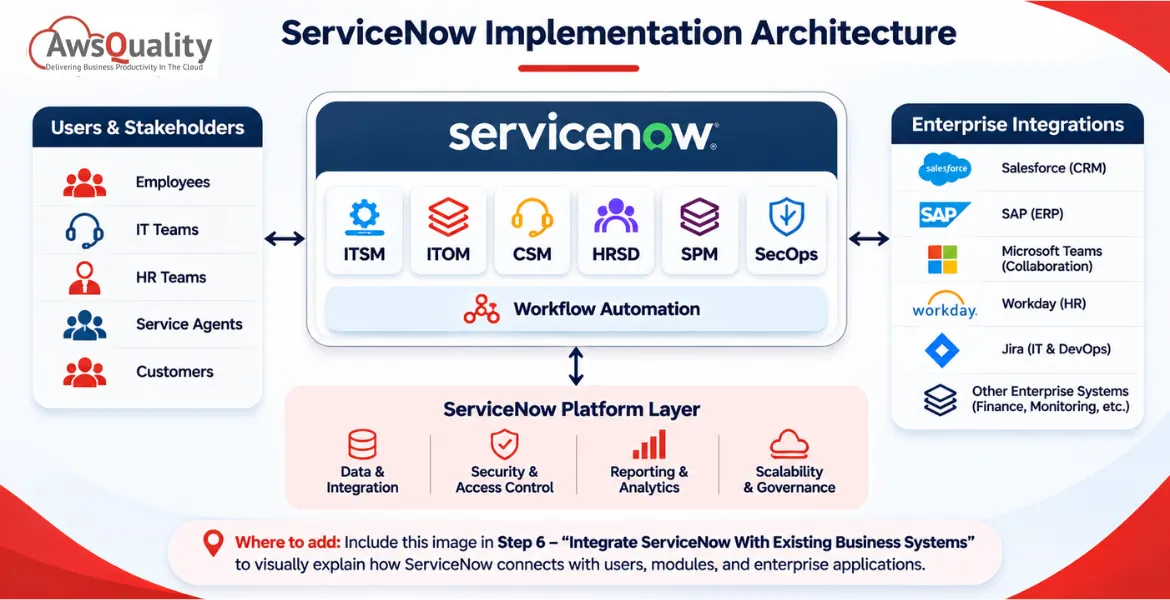
Common integration scenarios include:
| External system | Integration use case |
|---|---|
| Salesforce | Synchronize customer or case-related information |
| SAP | Connect IT workflows with ERP-related processes |
| Microsoft Entra ID | Support identity and access-related workflows |
| Microsoft Teams | Send notifications and facilitate collaboration |
| Workday | Connect HR information and employee workflows |
| Monitoring tools | Receive infrastructure and event information |
| Jira | Coordinate development and IT service workflows |
ServiceNow supports several integration approaches, including REST and SOAP APIs, Integration Hub, and other integration mechanisms.
For example: ServiceNow and Salesforce integration
Suppose a customer reports a technical issue through a Salesforce-based customer service process.
An integration can help create or update a corresponding ServiceNow record, allowing technical teams to investigate the issue while customer service representatives maintain visibility into its status.
This reduces manual data entry and helps different departments work with consistent information.
When planning integrations, consider:
- Data mapping and transformation
- Authentication and authorization
- API limits and performance
- Error handling and retry mechanisms
- Data synchronization frequency
- Logging and monitoring
- Integration ownership and maintenance
Not every integration needs to operate in real time. Select the appropriate integration approach based on business requirements, data sensitivity, and system capabilities.
Step 7: Migrate and Validate Existing Data
If your organization is moving from an existing ITSM solution or another enterprise system, data migration will be an important implementation activity.
Poor data quality can create problems even when the ServiceNow platform itself is configured correctly.
Before migrating data, identify which information needs to be transferred and whether it is accurate, relevant, and properly structured.
Common data migration categories include:
- User and employee records
- Departments and organizational information
- Incident and service request history
- Configuration items (CIs)
- Asset information
- Knowledge articles
- Service and application records
- Relevant operational data
A structured data migration process generally includes:
- Data assessment: Identify data sources, formats, volume, and quality issues.
- Data cleansing: Remove duplicate, outdated, and incomplete records where appropriate.
- Data mapping: Map source fields to the corresponding ServiceNow tables and fields.
- Data transformation: Convert data into the required formats and structures.
- Data migration: Import data using suitable ServiceNow data import and integration capabilities.
- Data validation: Verify record counts, relationships, field values, and data completeness.
For CMDB implementations, pay particular attention to configuration item identification, relationships, and data ownership.
A reliable CMDB should provide meaningful information about the technology components supporting business services rather than simply storing a large collection of records.
ServiceNow recommends a staged approach to CSDM adoption, allowing organizations to develop their CMDB foundation progressively instead of attempting to model everything at once.
Step 8: Test the Implementation Thoroughly
Testing is one of the most important phases of ServiceNow implementation.
Even a well-designed platform can experience problems if workflows, integrations, permissions, and data are not validated before deployment.
A comprehensive testing strategy should cover several areas.
Functional testing
Verify that configured features and workflows perform according to business requirements.
For example, confirm that incident records are created correctly, approval requests reach the appropriate managers, and assignment rules work as expected.
Integration testing
Verify that connected applications exchange information correctly and that data remains consistent across systems.
User acceptance testing (UAT)
Involve actual business users in validating whether the platform meets their day-to-day operational requirements.
Performance testing
Evaluate whether the platform performs reliably under expected workloads and usage patterns.
Security testing
Validate user permissions, access controls, authentication, and sensitive data visibility.
Regression testing
Check whether existing functionality continues to work after configuration changes or new features are introduced.
ServiceNow also provides the Automated Test Framework (ATF), which helps teams create repeatable automated tests for validating application functionality.
Best practice: Do not treat testing as a final activity. Include testing throughout the implementation lifecycle so issues can be identified and resolved before they affect production operations.
Step 9: Deploy ServiceNow and Go Live
After configuration, integration, data migration, and testing are complete, the implementation moves toward production deployment.
However, going live requires more than simply moving configurations into the production environment.
The implementation team should prepare a detailed go-live plan that includes:
- Deployment schedule
- Approved configuration changes
- Data migration plan
- Integration readiness
- User access validation
- Security checks
- Backup and recovery considerations
- Communication plan
- Support team responsibilities
- Rollback and contingency procedures
Before deployment, ensure that all critical business workflows have passed the required testing and that stakeholders have approved the solution.
A phased rollout may be preferable for large organizations.
For example, a company could initially deploy ServiceNow ITSM to its IT department, evaluate the results, and then expand to HR service delivery and other business functions.
This approach helps reduce deployment risk and allows teams to incorporate feedback before scaling the platform.
Step 10: Train Employees and Manage Organizational Change
Technology adoption depends heavily on how effectively people understand and use the new platform.
Even a technically successful ServiceNow implementation may fail to deliver its intended benefits if employees continue relying on old processes.
Organizational change management should therefore be part of the implementation strategy from the beginning.
Key activities include:
Role-based training: Provide relevant training for administrators, IT agents, managers, and end users.
User documentation: Develop practical guides covering common activities, request submission, approvals, and incident reporting.
Communication: Explain why the organization is implementing ServiceNow and how it will improve existing processes.
Internal champions: Identify employees who can help colleagues understand the platform and encourage adoption.
Feedback collection: Gather feedback after deployment and use it to identify usability issues and training gaps.
For example, employees should understand how to submit service requests through the new portal rather than sending emails directly to IT support teams.
Training should be practical, role-specific, and supported by accessible documentation.
Step 11: Monitor Performance and Continuously Optimize
ServiceNow implementation does not end when the platform goes live.
Business requirements evolve, application environments change, and organizations discover new opportunities for automation.
Continuous optimization helps ensure that the platform continues delivering value.
After deployment, regularly review:
- Incident resolution performance
- SLA compliance
- Service request volumes
- Workflow automation rates
- User satisfaction
- Integration reliability
- Data quality
- Platform performance
- Security and access controls
Use these insights to identify bottlenecks and prioritize improvements.
For example, if reports show that password reset requests account for a significant portion of service desk tickets, the organization could introduce a self-service password reset workflow where supported by its identity infrastructure and security policies.
Similarly, organizations can gradually introduce additional ServiceNow capabilities, improve existing workflows, and explore AI-powered features as their platform maturity increases.
The goal should be to treat ServiceNow as an evolving business platform rather than a one-time software deployment.
ServiceNow Implementation Best Practices
Following a structured implementation process is important, but adopting the right practices can make the difference between a successful deployment and a platform that becomes difficult to maintain.
Here are some recommendations businesses should consider throughout their ServiceNow implementation journey.
1. Start Small and Expand Gradually
Avoid implementing every ServiceNow module simultaneously.
Begin with the processes that offer the greatest business value. Once the initial implementation is stable, expand to additional departments and workflows.
A phased approach makes it easier to manage dependencies, collect feedback, and reduce implementation risks.
2. Prioritize Out-of-the-Box Functionality
ServiceNow offers extensive built-in capabilities for IT service management, workflow automation, reporting, and other enterprise processes.
Use these capabilities before investing in extensive customization.
Unnecessary customizations can increase maintenance effort, complicate upgrades, and create technical debt. ServiceNow’s own platform documentation recommends configuring applications as much as possible before customizing them.
3. Establish Strong Platform Governance
Define clear ownership and accountability for platform administration, architecture, security, data management, and development.
A governance framework should establish:
- Who approves configuration changes?
- Who manages user access and permissions?
- Who owns business workflows?
- How are integrations maintained?
- How are customizations documented?
- How are platform upgrades managed?
Strong governance helps maintain consistency as ServiceNow adoption expands across the organization.
4. Maintain High-Quality CMDB Data
For organizations using ServiceNow CMDB and ITOM capabilities, accurate configuration data is essential.
Establish clear data ownership, define configuration item standards, and regularly validate relationships between infrastructure components and business services.
Adopting CSDM progressively can help maintain consistency as the CMDB grows.
5. Plan Integrations Carefully
Poorly designed integrations can result in duplicate records, inconsistent data, and workflow interruptions.
Document integration requirements, establish secure authentication mechanisms, define error-handling procedures, and monitor integration performance.
Also, evaluate licensing and subscription requirements before selecting integration capabilities such as Integration Hub.
ServiceNow
6. Make Testing Part of the Implementation Lifecycle
Do not wait until deployment to start testing.
Perform functional, integration, security, and user acceptance testing throughout implementation. Where appropriate, use ServiceNow ATF to automate repeatable test scenarios and support regression testing.
ServiceNow recommends running ATF tests in development and other non-production environments rather than production.
7. Invest in Employee Training
User adoption should be measured alongside technical performance.
Provide role-based training, maintain knowledge resources, and collect employee feedback after deployment.
An intuitive workflow is valuable only when employees understand how to use it.
8. Prepare for Future Upgrades
ServiceNow is an evolving platform, so upgrade readiness should be considered during the initial implementation.
Maintain documentation of customizations, integration dependencies, and configuration decisions. Establish a regular process for reviewing release changes and validating critical workflows.
This reduces the risk of unexpected issues during future upgrades.
How Long Does ServiceNow Implementation Take?
The time required for ServiceNow implementation depends on several factors, including project scope, selected modules, integration complexity, data migration requirements, customization, and organizational readiness.
A basic implementation involving limited workflows may take considerably less time than a large enterprise deployment involving multiple departments and interconnected systems.
The following table provides illustrative planning ranges, not guaranteed delivery timelines.
| Implementation type | Indicative timeline |
|---|---|
| Basic implementation | 4–8 weeks |
| Small to mid-sized implementation | 2–4 months |
| Multi-module implementation | 4–8 months |
| Complex enterprise implementation | 8–12+ months |
Actual timelines should be established after discovery and technical assessment.
Factors that can extend implementation timelines include:
- Unclear or frequently changing requirements
- Poor-quality legacy data
- Complex third-party integrations
- Extensive customization
- Multiple stakeholder approval processes
- Limited availability of business users
- Insufficient testing and training resourcesc
A detailed project roadmap with clearly defined milestones can help organizations manage these dependencies.
What is the Cost of ServiceNow Implementation?
There is no single fixed price for ServiceNow implementation because costs vary according to organizational requirements, platform scope, licensing, and delivery complexity.
Businesses should consider both the initial implementation investment and ongoing operational expenses.
The main cost components include:
1. ServiceNow licensing: Subscription costs depend on the selected products, features, user requirements, and applicable commercial agreements.
2. Implementation and consulting: Includes business analysis, solution architecture, configuration, development, project management, and deployment.
3. Integration costs: Connecting ServiceNow with CRM, ERP, HR, identity management, and other enterprise applications may require additional effort and integration capabilities.
4. Data migration: Costs depend on the volume, complexity, quality, and number of data sources involved.
5. Training and change management: Includes employee training, administrator enablement, documentation, and adoption activities.
6. Ongoing maintenance: Covers platform administration, upgrades, integration monitoring, troubleshooting, and continuous optimization.
To manage costs effectively, organizations should define their priorities before selecting modules, avoid unnecessary custom development, and implement capabilities in phases.
It is also important to confirm applicable licensing and subscription requirements directly with ServiceNow or an authorized commercial representative.
Common ServiceNow Implementation Challenges and How to Overcome Them
Despite the platform’s capabilities, businesses may encounter challenges during implementation.
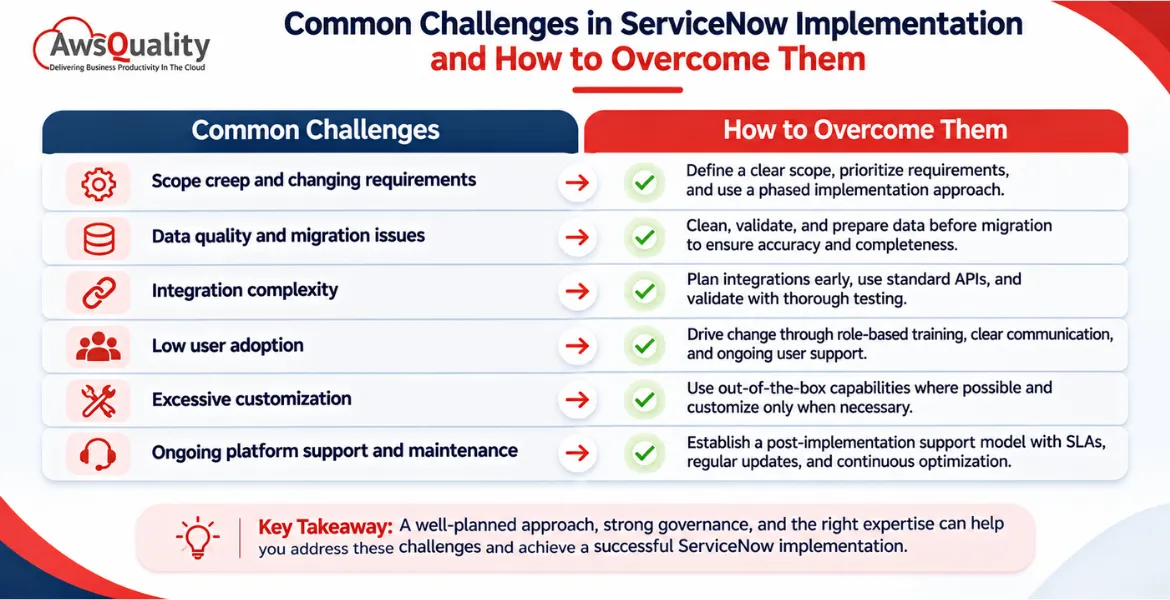
Understanding these issues early can help project teams prepare appropriate solutions.
| Implementation challenge | Potential impact | Recommended solution |
|---|---|---|
| Unclear requirements | Scope changes and project delays | Conduct structured discovery workshops |
| Excessive customization | Higher maintenance and upgrade complexity | Prioritize out-of-the-box functionality |
| Poor data quality | Inaccurate reporting and unreliable workflows | Clean and validate data before migration |
| Integration complexity | Data synchronization issues | Define integration architecture early |
| Limited user adoption | Data synchronization issues | Define integration architecture early |
| Weak governance | Inconsistent configurations | Establish clear platform ownership |
| Insufficient testing | Production issues and workflow failures | Implement comprehensive testing |
| Lack of post-launch support | Unresolved issues and declining performance | Establish ongoing platform support |
One common mistake is treating ServiceNow implementation as a purely technical project.
In reality, it requires coordination between business stakeholders, IT teams, administrators, developers, security professionals, and end users.
Organizations that address people, processes, and technology together are better positioned to achieve sustainable results.
Choosing the Right ServiceNow Implementation Partner
For organizations with complex requirements or limited in-house expertise, working with an experienced ServiceNow implementation partner can help simplify the implementation journey.
The right partner should understand both the ServiceNow platform and the business processes the organization wants to improve.
Before selecting a partner, evaluate the following factors.
1. ServiceNow expertise: Assess the partner’s experience with the specific ServiceNow products and capabilities required for your project.
2. Industry experience: Look for experience working with organizations that have similar operational requirements, compliance needs, or technology environments.
3. Implementation methodology: Understand how the partner approaches discovery, architecture, configuration, testing, deployment, and post-implementation support.
4. Integration capabilities: Evaluate experience connecting ServiceNow with enterprise applications, databases, APIs, and third-party platforms.
5. Customization and development expertise: Ensure the partner can extend platform functionality when necessary without introducing avoidable technical debt.
6. Security and governance: Assess how the partner addresses access management, data protection, compliance, and platform governance.
7. Long-term support: Confirm whether the partner can support upgrades, troubleshooting, platform optimization, and future expansion.
A good implementation partner should not simply configure the platform according to a list of requirements. It should also help identify opportunities to simplify processes and achieve measurable business outcomes.
ServiceNow Implementation Methodology: A Practical Project Framework
To organize implementation activities, businesses can use a structured delivery methodology with defined phases and approval checkpoints.
ServiceNow’s established Now Create methodology describes five major project phases: Initiate, Plan, Execute, Deliver, and Close. The implementation guidance previously hosted through the Now Create portal has been consolidated into ServiceNow’s Best Practices destination.
These phases can be understood as follows:
5 phases of a ServiceNow implementation
1. Initiate
Define business objectives, establish project governance, identify stakeholders, and assemble the implementation team.
Outcome: Project charter and agreed objectives
2. Plan
Conduct discovery workshops, gather requirements, design architecture, prioritize functionality, and prepare the implementation roadmap.
Outcome: Approved project plan and solution design
3. Execute
Configure the platform, develop workflows, implement integrations, migrate data, and perform iterative testing.
Outcome: Configured and validated solution
4. Deliver
Complete user acceptance testing, prepare users, finalize deployment activities, and move the solution into production.
Outcome: Production-ready platform
5. Close
Complete operational handover, provide post-launch support, document lessons learned, and evaluate business outcomes.
Outcome: Operational ownership and improvement roadmap
This framework provides a useful structure for managing implementation activities, although the actual project plan should be adapted to the organization’s size, selected products, and technical requirements.
What Does a Successful ServiceNow Implementation Look Like?
A successful implementation should deliver measurable improvements rather than simply introduce new software.
Consider a hypothetical mid-sized organization with a 20-member IT support team.
Before implementation, the company manages employee IT requests through email and spreadsheets. Tickets are assigned manually, approvals are handled through separate communication channels, and managers struggle to track SLA performance.
After implementing ServiceNow ITSM, the organization introduces:
- A centralized employee service portal.
- Automated incident categorization and assignment.
- Standardized service request workflows.
- Approval automation.
- SLA tracking and notifications.
- Knowledge management.
- Performance dashboards.
As a result, the company has a more structured service management environment, improved visibility into pending requests, and fewer manual coordination activities.
The organization can then evaluate its progress using metrics such as average resolution time, SLA compliance, ticket backlog, and employee satisfaction.
This is an illustrative example rather than a measured customer case study. Actual results depend on the organization’s starting point, implementation quality, and adoption levels.
How AwsQuality Approaches ServiceNow Implementation
AwsQuality Technologies brings certified ServiceNow expertise across ITSM, HRSD, CSM, and ITOM to enterprise clients across the UAE, India, and global markets. The AwsQuality implementation methodology is built around the nine phases described in this guide, with structured discovery before every engagement, named certified resources assigned pre-contract, and a formal hypercare period included in every project.
AwsQuality’s implementation team holds active Certified Implementation Specialist (CIS) credentials across core ServiceNow modules, and the firm’s hybrid onshore/offshore delivery model provides enterprise-grade implementation capacity with the cost efficiency that mid-market organizations require.
For organizations already on ServiceNow who have experienced implementation challenges, AwsQuality also offers platform health assessments — a structured evaluation of instance configuration, technical debt, CMDB accuracy, upgrade readiness, and adoption metrics that produces a prioritized remediation roadmap.
Whether an organization is starting fresh, expanding an existing deployment, or rescuing a troubled implementation, AwsQuality provides the certified expertise and disciplined methodology to deliver outcomes that justify the investment.
Frequently Asked Questions (FAQs)
1. What are the main steps involved in ServiceNow implementation?
The main steps include defining business objectives, gathering requirements, selecting appropriate ServiceNow modules, designing the platform architecture, configuring workflows, integrating external applications, migrating data, testing, deploying, training users, and continuously optimizing the platform.
2. How long does it take to implement ServiceNow?
ServiceNow implementation can take anywhere from a few weeks to several months, depending on project complexity. Basic implementations may take 4–8 weeks, while complex enterprise deployments involving multiple modules, integrations, and data migration can take 8–12 months or longer.
3. Which ServiceNow modules should a business implement first?
The right modules depend on business requirements. Many organizations begin with IT Service Management (ITSM) to streamline incident, problem, change, and service request management. Others may prioritize ITOM, CSM, HRSD, or SPM based on their operational needs.
4. Is ServiceNow implementation suitable for small and medium-sized businesses?
Yes. Small and medium-sized businesses can implement ServiceNow to automate service requests, improve IT operations, standardize workflows, and enhance employee experiences. The key is to select the capabilities that address immediate business needs rather than implementing unnecessary functionality.
5. What are the major challenges in ServiceNow implementation?
Common challenges include unclear business requirements, poor data quality, integration complexity, excessive customization, insufficient testing, limited employee adoption, and weak governance. A phased implementation strategy and experienced implementation resources can help address these challenges.
6. What is the difference between ServiceNow configuration and customization?
Configuration involves adapting existing platform capabilities through supported settings and tools. Customization involves extending or modifying application functionality through additional development.
Organizations should prioritize standard configuration options and use customization only when necessary to meet specific business requirements.
7. Can ServiceNow integrate with Salesforce and other enterprise applications?
Yes. ServiceNow supports integrations with enterprise applications such as Salesforce, SAP, Microsoft services, and other systems through APIs, Integration Hub, and additional integration mechanisms.
The integration approach depends on the applications involved, data requirements, authentication methods, and available platform capabilities.
8. What is the role of a ServiceNow implementation partner?
A ServiceNow implementation partner helps organizations plan, design, configure, integrate, test, and deploy the platform. Depending on the engagement, the partner may also provide data migration, employee training, technical support, upgrade assistance, and ongoing platform optimization.
9. How can businesses measure the success of ServiceNow implementation?
Businesses can measure implementation success through KPIs such as incident resolution time, SLA compliance, workflow automation rates, service request completion time, employee satisfaction, and operational efficiency.
The selected KPIs should be aligned with the business objectives established before implementation.
10. Does ServiceNow require ongoing maintenance after implementation?
Yes. Organizations should continuously monitor platform performance, maintain integrations, review access controls, manage upgrades, validate data quality, and optimize workflows. Ongoing maintenance helps keep the platform secure, reliable, and aligned with changing business requirements.
Conclusion: Build a More Connected Business With Successful ServiceNow Implementation
ServiceNow implementation is an important step toward creating more connected, automated, and efficient business operations. However, achieving meaningful results requires more than deploying the platform.
Organizations need a clear implementation strategy, well-defined business requirements, an appropriate technical architecture, reliable integrations, accurate data, and a strong focus on employee adoption.
By following a phased implementation approach and prioritizing long-term platform maintainability, businesses can streamline IT operations, automate repetitive activities, improve service delivery, and establish a foundation for continuous digital transformation.
Whether you are planning your first ServiceNow deployment or looking to modernize an existing implementation, investing in the right expertise and implementation strategy can help you maximize the platform’s business value.
Looking to explore ServiceNow implementation for your business?
Connect with the AwsQuality team to discuss your technology requirements, implementation objectives, and opportunities to improve enterprise workflows through digital transformation.
ServiceNow
Related Articles
How to Choose The Right ServiceNow Development Company for Your Business
ServiceNow has become an important platform for organizations looking to streamline IT operations, automate business workflows, improve service delivery, and connect enterprise…
How to Choose the Right ServiceNow Consulting Company: A Complete Guide
Choosing the right ServiceNow consulting company can make a significant difference in how effectively your business implements and manages the ServiceNow platform.…