
Salesforce Shopify Integration: Connecting Customer Data, Orders, and Inventory
 Mohammad Usman 25 min read
A successful eCommerce business depends on more than an attractive online store. It needs accurate customer information, reliable order processing, up-to-date inventory, and a clear understanding of customer behavior. When these operations are managed across disconnected platforms, businesses can face duplicate records, delayed updates, inventory discrepancies, and fragmented customer experiences.
This is where Salesforce Shopify integration becomes valuable.
Shopify provides the tools businesses need to manage online stores, products, and orders, while Salesforce helps organizations manage customer relationships, sales activities, and service operations. Connecting the two platforms allows businesses to bring important eCommerce and customer information together, giving sales, marketing, and support teams a more complete view of their customers.
In this guide, we explain how Salesforce Shopify integration works, which data can be synchronized, the benefits it offers, common integration methods, implementation steps, and best practices for building a reliable connection.
What is Salesforce Shopify Integration?
Salesforce Shopify integration is the process of connecting a Shopify eCommerce store with Salesforce to exchange customer, product, order, inventory, and other business data between the platforms.
Shopify manages online store operations, including product listings, shopping carts, checkout, and order processing. Salesforce supports customer relationship management, sales processes, marketing activities, and customer service.
When these systems are integrated, information from Shopify can be made available in Salesforce, and selected information from Salesforce can be sent back to Shopify or other connected systems.
For example, when a customer places an order through a Shopify store, the integration can create or update the customer’s record in Salesforce and associate the order with that customer. Customer service representatives can then access relevant purchase information without switching between multiple applications.
Depending on the business requirements, the integration can support:
- Customer and contact synchronization
- Order and transaction synchronization
- Product catalog synchronization
- Inventory updates
- Customer service workflows
- Marketing and customer segmentation
- Returns, refunds, and fulfillment updates
- Sales and eCommerce reporting
The exact data exchanged depends on the integration architecture, available APIs, permissions, and the Salesforce products being used.
Why Integrate Salesforce with Shopify?
Shopify and Salesforce serve different but complementary business functions. Shopify focuses on eCommerce operations, while Salesforce provides tools for managing customer relationships and business processes.
Using both platforms independently can create information gaps.
For instance, an eCommerce team may know what a customer purchased, but the sales team may not have access to that information in Salesforce. Similarly, a customer service representative may need to check Shopify manually to understand an order’s status.
Integrating the platforms helps reduce these gaps by connecting relevant information and automating selected workflows.
Consider an online retailer that receives hundreds of orders every day. Without integration, employees may need to export order reports, update CRM records manually, and reconcile customer information across systems. These activities consume time and increase the likelihood of errors.
With an appropriately designed integration, these processes can happen automatically or through controlled synchronization workflows.
What Data Flows Between Shopify and Salesforce?
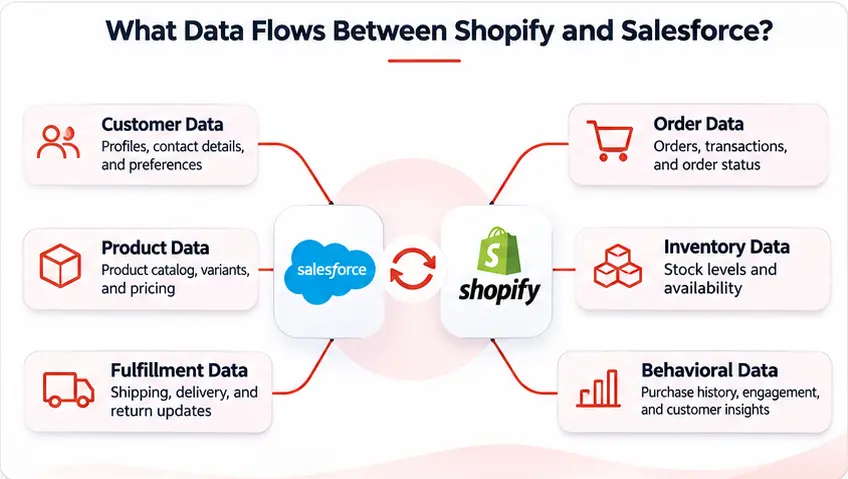
A Salesforce Shopify integration should focus on the information that supports business operations. Not every field or record needs to be exchanged between the systems.
The following data categories are commonly considered during implementation.
1. Customer Data
Customer synchronization is one of the most important parts of Salesforce Shopify integration.
Shopify stores customer information such as names, email addresses, phone numbers, shipping addresses, and billing addresses. Salesforce can use this information to create or update customer records, depending on the chosen data model.
A connected customer profile can help teams understand:
- Customer contact information
- Purchase history
- Previous interactions
- Customer preferences, where collected appropriately
- Support requests and service history
- Customer lifetime value, when calculated from available data
For example, when an existing customer makes a purchase through Shopify, the integration can identify the corresponding Salesforce record using a defined matching rule, such as a verified email address or an external customer ID.
This helps reduce duplicate records and gives teams a more consistent view of customer activity.
2. Order Data
Order synchronization allows Salesforce users to access relevant information about purchases made through Shopify.
Depending on the business requirements, order information may include:
- Shopify order ID
- Customer reference
- Order date
- Products purchased
- Quantities
- Discounts
- Taxes
- Shipping charges
- Payment status
- Fulfillment status
- Refund or cancellation details
For example, a customer service representative can use Salesforce to review a customer’s recent orders before responding to a question about a delayed delivery.
Order information can also support sales analysis, customer segmentation, and follow-up campaigns.
A key implementation decision is determining whether Salesforce needs the complete order details, a summarized order record, or a link to the original Shopify order. The right approach depends on reporting, service, and operational requirements.
3. Product Catalog Data
Product synchronization helps businesses maintain consistent product information across their eCommerce and CRM environments.
Product information may include:
- Product name
- Product ID or SKU
- Description
- Product category
- Variants
- Price
- Product status
- Images or product URLs
For example, a business may use Shopify to manage its online product catalog while Salesforce stores selected product information for sales and customer service workflows.
A clearly defined source of truth is important. If Shopify manages product descriptions and online pricing, the integration should avoid allowing unrelated Salesforce updates to overwrite those values unintentionally.
4. Inventory Data
Inventory synchronization helps businesses maintain more accurate stock information across their systems.
When inventory changes in Shopify, the integration can send relevant updates to Salesforce or another connected inventory management platform. Similarly, businesses with an external ERP or warehouse management system may use that system as the primary source of inventory information.
Inventory data may include:
- SKU or inventory item ID
- Available quantity
- Location
- Stock status
- Inventory adjustments
- Incoming stock information, where supported
For example, if a product’s available inventory changes after a sale, the integration can update the relevant records in connected systems.
However, inventory synchronization requires careful planning. Businesses should define whether they are synchronizing available, committed, or on-hand quantities and how inventory across multiple locations should be represented.
5. Fulfillment, Returns, and Refund Data
Customer experience does not end when an order is placed. Businesses also need visibility into shipping, fulfillment, returns, and refunds.
Integrating these events with Salesforce can help service teams respond to customer questions more efficiently.
Depending on the implementation, businesses may synchronize:
- Fulfillment status
- Shipment and tracking information
- Partial fulfillment details
- Order cancellations
- Return requests
- Refund status
- Delivery updates
For example, when an order is fulfilled in Shopify, a corresponding status update can be made available in Salesforce. A service representative can then see whether the order is still being processed, has shipped, or has been delivered.
6. Event and Behavioral Data
Beyond customer and transaction records, businesses may also want to connect eCommerce behavioral data with their Salesforce environment.
Depending on the implementation, relevant Shopify activity—such as product views, add-to-cart events, abandoned checkouts, and purchase behavior—can be collected and integrated with Salesforce Data Cloud.
When this information is properly ingested, mapped, and unified with customer profiles, businesses can use it to build customer segments, understand buying behavior, and support more personalized marketing and service experiences.
With the appropriate data foundation and Salesforce AI capabilities, these insights can also support use cases such as product recommendations, customer engagement analysis, and next-best-action workflows.
How Does Salesforce Shopify Integration Work?
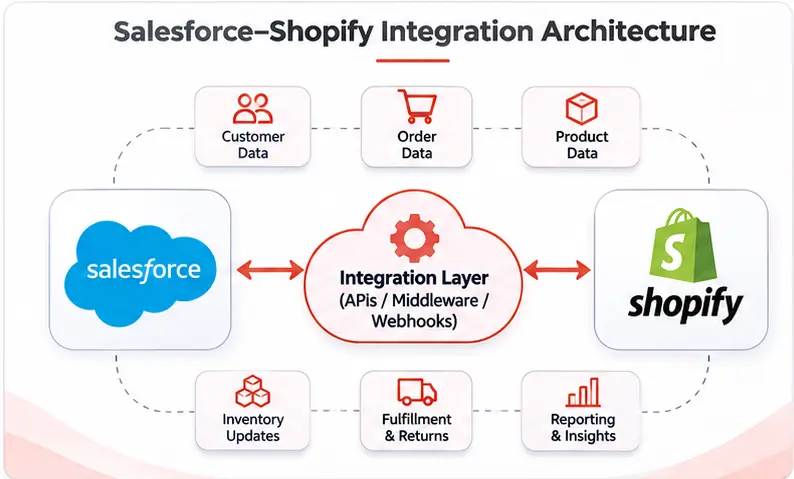
Salesforce Shopify integration typically uses APIs, webhooks, middleware, or custom integration services to exchange information between the platforms.
The exact architecture depends on the data volume, synchronization frequency, complexity of business processes, and the systems involved.
A typical integration workflow looks like this:
- A customer places an order through the Shopify storefront.
- Shopify records the order and associated customer information.
- An API request or webhook event triggers the integration workflow.
- The integration layer validates and transforms the information.
- Salesforce identifies the corresponding customer record or creates a new one.
- The order and related details are created or updated in Salesforce.
- Any required updates are sent to other connected systems.
- The integration monitors the transaction and records errors for troubleshooting.
Not every integration follows this exact sequence. Some businesses use scheduled synchronization, while others use event-driven workflows or a combination of approaches.
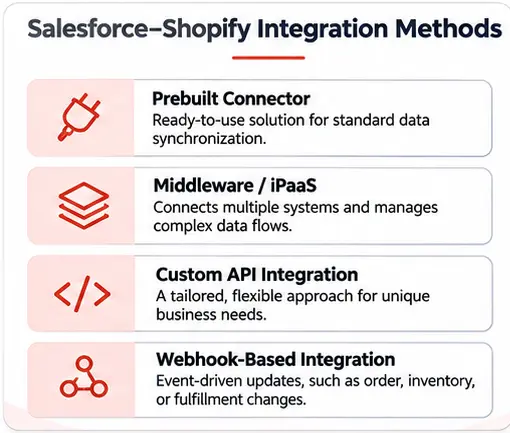
Common Methods for Salesforce Shopify Integration
There are several ways to connect Salesforce and Shopify. The best option depends on the organization’s technical requirements, budget, scalability needs, and existing technology environment.
1. Prebuilt Integration Connectors
Prebuilt connectors are applications or integration solutions designed to connect Shopify with Salesforce.
They can simplify implementation by providing ready-made data mappings and workflows for common scenarios, such as synchronizing customers, orders, and products.
Advantages:
- Faster implementation for standard requirements
- Less custom development
- Preconfigured synchronization workflows
- Useful for businesses with straightforward integration needs
Limitations:
- Custom business processes may not be supported
- Advanced data transformations may require additional configuration
- Pricing and supported features vary by provider
- Businesses may have less control over the integration architecture
A prebuilt connector can be a practical choice when the business needs standard data synchronization without extensive customization.
2. Middleware and Integration Platforms
Middleware provides a layer between Salesforce and Shopify to manage data exchange, transformation, routing, and error handling.
Integration platforms such as MuleSoft and other iPaaS solutions can help connect multiple applications through a centralized integration architecture.
For example, a business may use middleware to connect:
- Shopify with Salesforce
- Salesforce with an ERP system
- Shopify with an inventory management platform
- Salesforce with a marketing automation solution
- Multiple warehouses or fulfillment applications
Advantages:
- Supports complex integration workflows
- Centralizes integration management
- Helps connect multiple enterprise systems
- Provides reusable integration components
- Can support monitoring and error handling
- Limitations:
- May involve additional licensing costs
- Requires integration design and configuration
- Complex workflows can require specialist expertise
Middleware is often suitable for growing and enterprise businesses that need Shopify and Salesforce to work alongside several other business applications.
3. Custom API Integration
Custom API integration connects Shopify and Salesforce through purpose-built integration logic.
Shopify provides APIs for accessing store data. Its GraphQL Admin API is the primary API for most new app development and supports reading and writing data such as products, orders, customers, and inventory, subject to the permissions granted to the app.
Developers should also account for Shopify API versioning, access scopes, and platform-specific rate limits when designing the integration. Using supported API versions and reviewing changes during maintenance helps keep the connection reliable as both platforms evolve.
Salesforce provides APIs that allow external applications to access and work with Salesforce data.
Developers can use these APIs to build workflows that match specific business requirements.
For example, a custom integration can:
- Match Shopify customers with Salesforce records using business-specific rules.
- Create Salesforce records when qualifying Shopify orders are placed.
- Apply custom pricing or product mapping logic.
- Handle partial refunds and cancellations.
- Synchronize inventory across multiple systems.
- Trigger Salesforce workflows based on Shopify events.
Advantages:
- Greater flexibility and control
- Support for unique business requirements
- Custom data mapping and transformation
- Ability to design around existing enterprise architecture
Limitations:
- Requires development and testing
- Needs ongoing maintenance
- API limits and version changes must be managed
- Error handling and monitoring must be designed carefully
Custom API integration is a strong option when standard connectors cannot support the required workflows or data model.
4. Webhook-Based Integration
Webhooks allow Shopify to notify an external application when specific events occur.
For example, Shopify can send an event notification when an order is created or inventory is updated. An integration service can receive that notification, retrieve any additional required information, and process the corresponding update in Salesforce.
Webhooks can reduce the need for frequent polling because the integration responds to events rather than repeatedly checking for changes.
Common examples include:
- New order notifications
- Customer updates
- Product changes
- Inventory level changes
- Fulfillment updates
- Refund and cancellation events
Webhook-based integration is particularly useful when businesses need event-driven updates. It should still include delivery verification, duplicate-event protection, retry handling, and monitoring.
In many implementations, webhooks work alongside APIs rather than replacing them.
Salesforce Shopify Integration Methods: Comparison
| Integration method | Best suited for | Flexibility | Implementation effort |
|---|---|---|---|
| Prebuilt connector | Standard synchronization | Low to medium | Low to medium |
| Middleware/iPaaS | Multiple connected systems | High | Medium to high |
| Custom API integration | Complex or unique workflows | Very high | High |
| Webhook-based integration | Event-driven updates | High | Medium to high |
These methods are not always mutually exclusive. A business may use middleware to manage API calls, webhooks to detect Shopify events, and custom code to handle specific transformations.
Step-by-Step Process to Integrate Salesforce with Shopify
A successful integration requires more than connecting two applications. Businesses need to understand their processes, define data ownership, plan synchronization rules, and test the workflows before going live.
Here is a practical implementation approach.
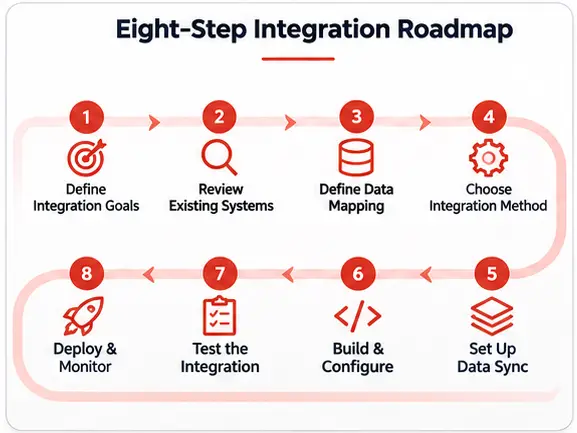
Step 1: Define Integration Goals
Start by identifying what the business wants to achieve.
Does the organization need to synchronize customer records? Should sales representatives see Shopify order history? Does customer service need fulfillment updates? Is inventory synchronization required?
Create a clear list of business requirements before selecting an integration method.
For example:
| Business requirement | Integration objective |
|---|---|
| Customer visibility | Make Shopify customer information available in Salesforce |
| Order tracking | Synchronize order details and statuses |
| Inventory management | Share relevant stock information |
| Customer service | Give service teams access to purchase history |
| Marketing segmentation | Use appropriate purchase data for customer segments |
| Reporting | Combine relevant CRM and eCommerce information |
Clear requirements help prevent unnecessary data exchange and reduce implementation complexity.
Step 2: Review the Existing Systems
Examine the current Salesforce and Shopify environments.
Important questions include:
- Which Salesforce products and editions are in use?
- How is customer information currently stored?
- Which system owns product and pricing information?
- Is inventory managed in Shopify, an ERP, or a warehouse management system?
- Are other applications already connected to either platform?
- What are the expected order and data volumes?
- Are there existing integration tools or custom applications?
This assessment helps determine the appropriate integration architecture.
Step 3: Define Data Mapping and Ownership
Data mapping determines how information from one platform corresponds to records and fields in another.
For example:
| Shopify data | Possible Salesforce destination |
|---|---|
| Customer name | Contact or Person Account |
| Customer email | Contact email |
| Customer ID | External customer ID field |
| Order ID | External order ID field |
| Order total | Order or custom order record |
| Product SKU | Product reference |
| Fulfillment status | Order fulfillment status field |
| Inventory quantity | Inventory-related record or custom object |
The exact Salesforce destination depends on the organization’s data model and whether it uses standard objects, custom objects, or Salesforce products with specialized data structures.
Businesses should also define a source of truth for each data category.
For example:
- Shopify may own online order details.
- Salesforce may own CRM activities and customer relationship information.
- An ERP may own financial records.
- A warehouse management system may own warehouse-level stock movements.
Defining ownership prevents conflicting updates and inconsistent records.
Step 4: Choose the Integration Architecture
Select the method that best supports the requirements.
A business with straightforward customer and order synchronization may be able to use a prebuilt connector. An organization connecting Shopify, Salesforce, ERP, and warehouse applications may benefit from middleware.
Businesses with specialized workflows may require custom APIs or a hybrid approach.
The architecture should consider:
- Data volume
- Real-time versus scheduled updates
- API limits
- Authentication
- Data transformation
- Error handling
- Scalability
- Monitoring and support
Step 5: Configure Authentication and Permissions
Secure communication between Shopify and Salesforce is essential.
The integration should use approved authentication mechanisms and only the permissions required for its functions.
For example, a Shopify app should request the access scopes needed to read or update the relevant customer, order, product, and inventory information. Salesforce should use an appropriately configured integration user and permissions.
Avoid using broad administrator access for routine integration activities.
Step 6: Develop and Configure Data Synchronization
Once the architecture and access permissions are ready, configure the synchronization workflows.
This may involve:
- Creating customer matching rules
- Mapping Shopify fields to Salesforce fields
- Configuring API requests
- Setting up webhook subscriptions
- Transforming data formats
- Handling product variants and SKUs
- Defining order and fulfillment workflows
- Configuring scheduled synchronization where needed
For example, when Shopify reports a new order, the integration can check whether the customer already exists in Salesforce. If a matching record is found, the workflow associates the order with that customer. Otherwise, it can create a new record according to the agreed business rules.
Step 7: Test the Integration
Testing is essential before deploying the integration to production.
Test scenarios should cover both successful transactions and potential failures.
Examples include:
- Creating a new Shopify customer
- Updating an existing customer
- Placing a new order
- Updating an order
- Processing a cancellation
- Issuing a refund
- Updating product information
- Changing inventory quantities
- Handling duplicate events
- Recovering from API errors
Testing should also verify that customer information is mapped correctly, records are not duplicated, and updates reach the appropriate systems.
Step 8: Deploy, Monitor, and Optimize
After testing, deploy the integration and monitor its performance.
Track important indicators such as:
- Successful and failed synchronization events
- Delayed updates
- Duplicate records
- API usage
- Processing time
- Data mismatches
- Failed webhook deliveries
Monitoring helps identify issues before they affect business operations.
Integration requirements may also change as the business adds new products, sales channels, warehouses, or customer service workflows. Regular reviews help keep the architecture reliable and scalable.
Common Challenges in Salesforce Shopify Integration
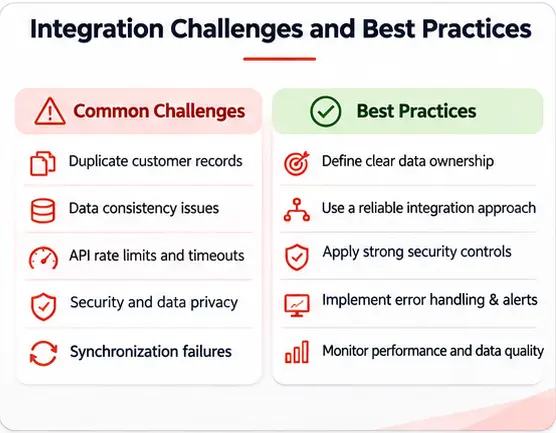
Although integrating Salesforce with Shopify can improve business operations, implementation requires careful planning. The following challenges are worth considering.
1. Duplicate Customer Records
A customer may use different email addresses, contact details, or checkout information across purchases.
Without appropriate matching rules, the integration may create multiple Salesforce records for the same customer.
How to address it: Define unique identifiers and record-matching rules. Use external IDs where appropriate and establish procedures for reviewing potential duplicates.
2. Inconsistent Data Across Platforms
Shopify and Salesforce may use different field structures, naming conventions, or data formats.
For example, a product variant in Shopify may need to map to a particular product and SKU structure in Salesforce.
How to address it: Create a detailed data mapping document, standardize formats, and validate incoming records before updating the destination system.
3. Inventory Synchronization Delays
Inventory can change quickly, especially when a business sells through multiple channels or manages several warehouses.
A delayed update may cause a product to appear available when it is no longer in stock.
How to address it: Determine the system that owns inventory availability, choose an appropriate synchronization frequency, and define how stock from multiple locations should be handled.
4. API Limits and Performance
Both platforms have API usage limits and operational constraints. High-volume stores may generate a large number of events and synchronization requests.
How to address it: Design efficient API calls, use pagination and bulk processing where appropriate, apply retry and backoff strategies, and monitor API usage.
5. Failed Synchronization and Data Loss
Network interruptions, invalid records, authentication problems, or unexpected API responses can cause synchronization failures.
How to address it: Maintain structured error logs, use retry mechanisms, track failed transactions, and establish a process for replaying or reconciling failed updates.
6. Security and Customer Data Privacy
Customer information exchanged between platforms must be handled responsibly.
Businesses need to consider access permissions, data protection requirements, customer consent, and applicable privacy regulations.
How to address it: Use secure authentication, least-privilege permissions, encrypted communication, appropriate data retention policies, and regular access reviews.
7. Managing Complex Product and Order Structures
Products may have multiple variants, bundles, discounts, taxes, shipping charges, and partial fulfillment records.
A basic field-to-field mapping may not capture the full business context.
How to address it: Design the data model around actual order and product structures. Test edge cases such as partial refunds, split shipments, and multiple product variants.
Best Practices for a Successful Salesforce Shopify Integration
To build an integration that supports business growth, organizations should follow these practices.
Establish a Clear Source of Truth
Decide which platform owns each type of information. Avoid allowing multiple systems to update the same fields without clearly defined rules.
Synchronize Only Necessary Data
Not every Shopify record needs to be copied into Salesforce. Exchange the information required for sales, service, marketing, reporting, and other approved business processes.
Use External IDs and Matching Rules
Stable identifiers make it easier to match records across systems and prevent duplicate customer, product, and order records.
Choose the Right Synchronization Frequency
Some workflows need near-real-time updates, while others can run on a schedule. For example, a new order may need to reach Salesforce quickly, while certain reporting data can be synchronized periodically.
Design for Errors and Recovery
Assume that API requests and webhook deliveries can fail. Build retry mechanisms, logging, alerts, and reconciliation processes into the integration.
Secure APIs and Integration Users
Use approved authentication methods, protect credentials, restrict access, and avoid unnecessary permissions.
Monitor Integration Performance
Track failures, delays, API usage, and data consistency. Regular monitoring helps maintain reliable operations as transaction volumes grow.
Plan for Future Business Growth
The integration should support future requirements, such as additional storefronts, new warehouses, ERP connections, and more advanced customer service workflows.
Salesforce Shopify Integration Use Cases
Different businesses can use Salesforce Shopify integration in different ways. Here are some practical examples.
Use Case 1: A Unified Customer View
An online retailer connects Shopify customer records and purchase history with Salesforce.
When a customer contacts support, the service team can access relevant customer and order information from Salesforce. This reduces the need to switch between applications and helps representatives respond with better context.
Use Case 2: Automated Order Visibility for Sales Teams
A business synchronizes Shopify orders with Salesforce.
Sales representatives can review customer purchases and use that information to understand buying patterns, identify repeat customers, and plan relevant follow-ups.
Use Case 3: Better Inventory Visibility
A retailer connects Shopify, Salesforce, and an external inventory management system.
When inventory changes, the integration updates the relevant systems according to defined ownership and synchronization rules. This helps teams work with more consistent stock information.
Use Case 4: Customer Segmentation and Marketing
A business makes selected purchase information available to its Salesforce marketing workflows.
Marketing teams can use appropriate customer and purchase attributes to build segments, personalize campaigns, and plan follow-up communication.
Any marketing activation should follow the organization’s consent, privacy, and communication preferences.
Use Case 5: Improved Returns and Refund Management
A retailer connects Shopify return and refund events with Salesforce service processes.
Support representatives can access relevant transaction updates and manage customer communication with better visibility into the status of a return or refund.
How to Choose the Right Salesforce Shopify Integration Partner
Selecting the right implementation partner can make a significant difference to integration quality and long-term maintenance.
A suitable partner should understand both the technical requirements and the business processes behind the integration.
Consider the following factors:
- Salesforce integration experience: Look for experience connecting Salesforce with external platforms through APIs, middleware, and custom development.
- Shopify API knowledge: The team should understand Shopify’s APIs, webhooks, authentication, data structures, and relevant platform constraints.
- Data architecture expertise: The partner should be able to design customer, product, order, and inventory mappings that fit your Salesforce data model.
- Security and governance: Ask how the team manages credentials, permissions, data privacy, and integration access.
- Error handling and monitoring: A reliable solution should include logging, retry mechanisms, alerts, and recovery procedures.
- Scalability: The architecture should support higher order volumes, additional sales channels, and future enterprise applications.
- Ongoing support: Integration work does not end at launch. Ask about maintenance, API version updates, troubleshooting, and performance optimization.
Before choosing a partner, discuss your existing systems, expected data volume, synchronization requirements, and future roadmap.
AwsQuality’s Approach to Salesforce Shopify Integration
AwsQuality provides Salesforce consulting and integration services, helping businesses connect eCommerce platforms with Salesforce and other enterprise applications. Our team focuses on designing integration architectures that support customer data synchronization, order management, inventory visibility, and connected business workflows across B2C, DTC, and B2B environments. The AwsQuality integration engagement follows a proven six-phase delivery model:
Phase 1 — Discovery and Assessment
AwsQuality begins with a comprehensive audit of the client’s existing Shopify configuration (stores, apps, data volume, order types) and their Salesforce environment (edition, installed packages, existing integrations, custom objects). This discovery produces an Integration Design Document that defines all data flows, sync frequencies, master system rules, and object mappings before a line of integration code is written.
Phase 2 — Architecture and Method Selection
Based on the discovery, AwsQuality recommends the appropriate integration method — native connector, MuleSoft iPaaS, third-party iPaaS, or custom API — and presents a detailed architecture diagram, technology recommendation, and cost-benefit analysis. Clients understand precisely what they are building and why before the build begins.
Phase 3 — Integration Build and Configuration
The AwsQuality technical team builds and configures the selected integration architecture, including Salesforce object model design, Shopify webhook configuration, middleware setup, data transformation logic, and bi-directional sync rules. All integration components are built in a sandbox environment and subjected to unit testing before promotion.
Phase 4 — Data Migration and Reconciliation
Historical Shopify order data, customer records, and product catalogs are migrated into Salesforce, with deduplication, data cleansing, and reconciliation applied. This ensures that Customer 360 profiles include historical purchase context, not just data generated after go-live.
Phase 5 — User Acceptance Testing and Load Testing
The integrated system undergoes rigorous UAT with the client’s sales, service, marketing, and operations teams. Load testing simulates peak-season order volumes to validate middleware throughput and Salesforce API governor limit compliance.
Phase 6 — Go-Live and Hypercare
AwsQuality supports production deployment and post-launch stabilization, including integration monitoring, issue resolution, and configuration improvements based on the agreed project scope.
Looking to connect your Shopify store with Salesforce? Contact AwsQuality to discuss your integration requirements.
Conclusion
Salesforce Shopify integration helps businesses connect eCommerce operations with customer relationship management. By synchronizing relevant customer, order, product, inventory, and fulfillment information, organizations can reduce manual work, improve data visibility, and support more informed business decisions.
The right integration approach depends on the complexity of the business, the number of connected systems, data volumes, and the need for real-time updates. Whether using a prebuilt connector, middleware, custom APIs, or a combination of methods, businesses should prioritize accurate data mapping, clear system ownership, security, error handling, and ongoing monitoring.
With a well-planned integration strategy, Salesforce and Shopify can work together as part of a more connected and scalable eCommerce technology ecosystem.
FAQs
Frequently Asked Questions
What is Salesforce Shopify integration?
Salesforce Shopify integration connects a Shopify eCommerce store with Salesforce so that relevant customer, order, product, inventory, and fulfillment information can be exchanged between the platforms. It helps businesses improve customer visibility and connect eCommerce operations with sales and service workflows.
Can Shopify integrate with Salesforce?
Yes. Shopify and Salesforce can be connected using third-party integration apps, middleware platforms, custom APIs, or webhook-based workflows. The appropriate method depends on the business requirements and the systems involved.
What data can be synchronized between Salesforce and Shopify?
Common data includes customer records, orders, product information, SKUs, inventory levels, fulfillment statuses, cancellations, and refunds. The exact data depends on the integration design, API permissions, and business needs.
Can Salesforce Shopify integration synchronize orders automatically?
Yes. An integration can use Shopify APIs and webhooks to process order events and create or update corresponding Salesforce records. The workflow may also synchronize payment, fulfillment, cancellation, and refund information where required.
Can Salesforce Shopify integration update inventory in real time?
It can support near-real-time inventory updates using event-driven workflows and APIs. However, the actual update speed depends on the architecture, event processing, API constraints, and the system responsible for managing inventory.
What is the best way to integrate Shopify with Salesforce?
There is no single best method for every business. Prebuilt connectors can work well for standard requirements, middleware is useful for multi-system integrations, and custom API development provides more control over complex workflows. A requirements assessment helps determine the right approach.
Is MuleSoft required for Salesforce Shopify integration?
No. MuleSoft is one possible integration platform, but it is not mandatory. Businesses can also use third-party connectors, other iPaaS solutions, or custom API integrations depending on their technical and operational requirements.
How long does Salesforce Shopify integration take?
The implementation timeline depends on the number of data objects, complexity of workflows, existing systems, data quality, and integration method. A basic connector-based setup may take less time than a custom integration involving multiple systems, complex transformations, and extensive testing.
Is Salesforce Shopify integration secure?
It can be designed securely by using approved authentication methods, least-privilege permissions, encrypted communication, secure credential management, and appropriate data access controls. Security should be considered throughout implementation and ongoing maintenance.
Can Shopify connect with Salesforce and an ERP system at the same time?
Yes. Businesses can use middleware or a custom integration architecture to connect Shopify, Salesforce, and an ERP system. The design should define which platform owns customer, product, order, inventory, and financial information to avoid conflicting updates.
Can Shopify order history be viewed in Salesforce?
Yes. An integration can synchronize order records or selected order details with Salesforce. The implementation should determine whether Salesforce needs complete order information, a summary, or a reference to the original Shopify order.
Why should businesses work with a Salesforce integration partner?
An experienced integration partner can help assess requirements, design the data architecture, configure APIs, implement synchronization workflows, address security, and establish monitoring and recovery processes. This can reduce implementation risks and make the integration easier to maintain.
Salesforce
Related Articles

15 Salesforce Consulting Partner Tips: Guide to Smart Integration
Salesforce has become an important part of how businesses manage customer relationships, streamline operations, and make data-driven decisions. However, its real business…
Salesforce DevSecOps Best Practices for Secure Development and Deployment
Salesforce has become an essential platform for managing customer relationships, automating business processes, and connecting enterprise applications. As businesses expand their Salesforce…
12 Cloud Tool Strategies from Top Salesforce Consulting Companies: A Complete Guide
Cloud technology has become an essential part of modern customer relationship management (CRM). Businesses use cloud platforms to connect sales, customer service,…