The Moment Salesforce Opened the Front Door
For years, the question every React developer asked when entering the Salesforce world was the same: “Do I have to learn Lightning Web Components?” The answer was always yes. Until now.
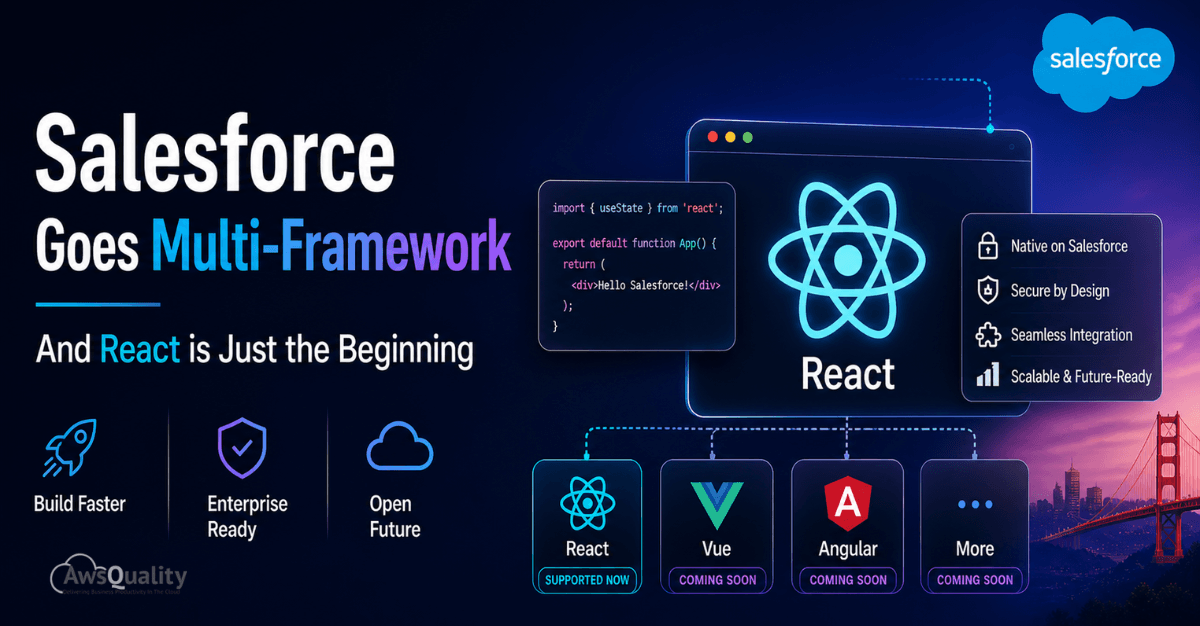
At TrailblazerDX 2026 (TDX 2026), held April 15–16 in San Francisco, Salesforce announced Salesforce Multi-Framework — a new runtime on the Agentforce 360 Platform that officially brings React to the Salesforce development stack. The announcement was one of the most anticipated by the developer community, described by Salesforce itself as “one of the most requested capabilities” they’ve ever shipped.
But here’s the important context that separates an informed article from a hype piece: as of May 2026, Multi-Framework is in Open Beta. It works only in scratch orgs and sandboxes. It cannot be deployed to production. React is the only supported framework today. And several key platform features — including Lightning App Builder drag-and-drop placement for React components — are not yet supported.
This article covers the full, honest picture: what’s real today, what’s coming soon, how it technically works, and why, even in beta, it represents one of the most significant platform architectural shifts Salesforce has made in years.
What Is Salesforce Multi-Framework?
Salesforce Multi-Framework is a framework-agnostic runtime on the Agentforce 360 Platform, announced at TrailblazerDX 2026, that lets developers build native Salesforce apps using React — with Salesforce’s enterprise authentication, security, and governance built in. As of May 2026, it is in Open Beta, available only in sandbox and scratch orgs (English default language only) and cannot yet be deployed to production orgs. React is the only supported framework right now; Vue, Angular, MCP UI, and A2UI are on the roadmap. LWC is not replaced — both run side by side.
1. The Historical Context: Why This Matters So Much
1.1 The LWC Wall
Salesforce’s front-end journey went from Visualforce (2008) to Aura/Lightning Components (2015) to Lightning Web Components (2019). With LWC, Salesforce built on modern web standards — Custom Elements, Shadow DOM, ES Modules — and even open-sourced the framework. It was a massive improvement.
But LWC remained a Salesforce-specific skill. React developers — who make up more than 40% of professional front-end developers worldwide per the Stack Overflow Developer Survey — couldn’t bring their existing expertise, component libraries, or toolchains to Salesforce projects. Every new Salesforce front-end hire meant weeks or months of ramp-up time learning yet another component model.
1.2 What Changed at TDX 2026
TDX 2026 didn’t just announce Multi-Framework in isolation. It was part of a broader, coordinated platform strategy Salesforce called Headless 360 — a shift toward making the entire Salesforce platform accessible via APIs, MCP tools, CLI commands, and now industry-standard UI frameworks, all without requiring a browser or Salesforce-specific tooling.
Multi-Framework is the front-end piece of Headless 360. It signals that Salesforce is no longer prescribing how you build your UI — it’s providing the enterprise backend (data, security, auth, governance) and letting developers bring their own tools.
TDX 2026 Context
TrailblazerDX 2026 was the event’s 10th anniversary. Major announcements included: Salesforce Multi-Framework (React, Open Beta), Headless 360, Agentforce Vibes 2.0 with multi-model support (Claude Sonnet + GPT-5), Agent Script (open-sourced), Agentforce Experience Layer (AXL), expanded AgentExchange (10,000+ apps), DevOps Center MCP, and the Salesforce Developer Edition upgrade with free Agentforce Vibes access.
Read: Salesforce Strategy for CTOs – Beyond Implementation
2. What Salesforce Multi-Framework Actually Is (Right Now)
2.1 The Official Definition
Salesforce Multi-Framework is a framework-agnostic runtime built into the Agentforce 360 Platform. It allows developers to build native Salesforce applications using industry-standard JavaScript UI frameworks — starting with React — while automatically inheriting Salesforce’s enterprise-grade authentication, security, governance, and data integration capabilities.
The critical phrase is “native Salesforce apps.” This is not an iframe embed, not an external site hosted elsewhere, not a Heroku app connecting via API. React apps built with Multi-Framework run directly on the Salesforce platform, deployed as part of a Salesforce DX project, and accessible from the Salesforce App Launcher like any other Salesforce application.
2.2 What “Open Beta” Means Today (May 2026)
⚠️ Current Beta Limitations — Know Before You Build
As of May 2026: (1) Multi-Framework is available only in sandbox and scratch orgs where English is the default language. (2) Beta apps CANNOT be deployed to production orgs. (3) Lightning App Builder drag-and-drop placement is NOT yet supported for React components. (4) Some platform APIs are not available in the beta runtime. (5) Once you enable Multi-Framework in an org, you CANNOT disable it — always test in a sandbox or scratch org, not a production org.
These are not minor footnotes — they define the realistic scope of what developers can do with Multi-Framework today. The beta is genuinely useful for learning, prototyping, and shaping the product roadmap with feedback. Production deployment requires waiting for General Availability.
2.3 The Architecture: How React Runs on Salesforce
React apps in Multi-Framework are packaged as UI Bundles — a new Salesforce metadata type that contains your React application alongside a configuration file (app meta XML) that registers it with the Salesforce platform. The Salesforce CLI handles building and deploying these bundles.
Data access is handled through the Salesforce Multi-Framework SDK, which provides:
- @salesforce/sdk-data — API client methods for GraphQL and Apex, handling record querying and mutation while automatically managing API limits and rate limiting.
- createDataSDK() utility — Handles Salesforce authentication automatically, removing the need for manual OAuth token management in your React code.
- GraphQL over Salesforce APIs — Data is retrieved and mutated via GraphQL queries rather than the @wire decorator pattern used in LWC. This is a significant architectural difference.
- Apex method imports — Salesforce Apex methods can be called from React using Promise-based or async/await patterns, similar to LWC.
- Agentforce Conversation Client (ACC) — Integrate conversational AI (Agentforce agents) directly into React apps for internal employee use cases.
| Aspect | How It Works in Multi-Framework React |
|---|---|
| Data Access | GraphQL via @salesforce/sdk-data (not @wire) |
| Authentication | Automatic via createDataSDK() — no manual token handling |
| Deployment | UI Bundles deployed via Salesforce CLI (sf project deploy) |
| App Entry | Accessible from Salesforce App Launcher |
| Local Dev | Local dev server at localhost:5173 (Vite-based) |
| Styling | Any CSS framework or component library — no SLDS required |
| AI Integration | Agentforce Conversation Client for in-app agent chat |
| LWC Coexistence | Runs alongside LWC; micro-frontend embedding in developer preview |
Also read: Is Agentforce Designed to Slowly Replace Einstein?
3. The Game-Changer: Agentforce Vibes 2.0 + Multi-Framework
You cannot discuss Salesforce Multi-Framework in 2026 without discussing Agentforce Vibes 2.0. The two are deeply integrated and, together, represent Salesforce’s answer to the vibe coding revolution that has swept the developer community.
3.1 What Is Agentforce Vibes 2.0?
Agentforce Vibes is Salesforce’s AI-powered development environment, now in its second major version. It transforms VS Code into an intent-driven IDE — you describe what you want to build in natural language, and Vibes generates the React code, GraphQL queries, and Salesforce metadata automatically.
Since its launch at Dreamforce 2025, Agentforce Vibes has seen a 22x surge in monthly usage and 100 million lines of code accepted by developers. Vibes 2.0, announced at TDX 2026, adds:
- Multi-model support — Choose between Claude Sonnet, GPT-5, and other models. Previously, the model was fixed. This was a major community request.
- Full org awareness — Vibes 2.0 understands your specific Salesforce org’s metadata, schema, objects, and existing code — not just generic Salesforce knowledge.
- Unified Catalog — 30+ preconfigured Skills and 60+ reusable components for enterprise-scale development.
- Live Preview for React — See your React app update in real time as you build, without deploying.
- Data Model Visualizer — A new tool that lets you visually explore your org’s data model (objects, fields, relationships) instead of navigating seven+ Setup menu clicks.
- Two-mode workflow — Plan mode for analysis and architecture decisions, Act mode for code generation and execution.
3.2 How Vibes 2.0 Accelerates Multi-Framework Development
The combination of Vibes 2.0 and Multi-Framework means the React-on-Salesforce development workflow looks like this:
- Open Agentforce Vibes in VS Code (or the browser-based cloud IDE, included free in Developer Edition orgs).
- Click the React App tile in the Vibes welcome screen, select Internal App or External App.
- Describe your app in natural language: “A dashboard showing open Opportunities by stage with filter by owner.”
- Vibes produces the React code, GraphQL queries, and Salesforce metadata — grounded in your org’s actual data model.
- Live Preview shows the app updating in real time as you iterate.
- Deploy to your sandbox with sf project deploy start.
Developer Reality Check
Even experienced React developers report that Vibes 2.0 dramatically reduces the Salesforce-specific boilerplate. The hardest part of React-on-Salesforce historically was knowing which GraphQL queries to write for which Salesforce objects. Vibes 2.0, with org awareness, largely solves this problem by generating those queries based on your actual org metadata.
Check out: How to Build AI-Powered Workflows in Salesforce?
4. React vs. LWC: The Honest Comparison
Multi-Framework does not replace LWC, and Salesforce is emphatic about this. LWC and React coexist on the platform, each with genuine strengths for different scenarios. Here is the honest comparison based on what Salesforce has documented and what developers are actually experiencing in the beta.
| Capability | React (Multi-Framework) | Lightning Web Components (LWC) |
|---|---|---|
| Current Status | Open Beta — sandbox/scratch orgs only | Generally Available — production ready |
| Data Access | GraphQL via SDK | @wire + Lightning Data Service |
| Component Library | Any npm library (React ecosystem) | Salesforce Base Components (SLDS) |
| App Builder | Not supported (beta limitation) | Fully supported drag-and-drop |
| Styling | Any CSS framework | SLDS-aligned styling |
| AI Code Gen | Vibes 2.0 React templates | Vibes LWC generation |
| Performance | Virtual DOM overhead | Fine-grained reactivity, lighter runtime |
| Sharing | Reuse across Salesforce + non-SF apps | Salesforce-only |
| Best For | Complex UIs, shared codebases, ecosystem | Performance-critical, App Builder pages |
4.1 When to Choose React
- Your team is already deeply invested in React and you want to avoid LWC ramp-up time.
- You need to share UI components between your Salesforce app and external applications.
- You have an existing React component library you want to bring into Salesforce.
- You’re building a full standalone internal app (not a component embedded in a record page).
- You want to use a specific npm package or React ecosystem library that doesn’t have an LWC equivalent.
4.2 When to Stick with LWC
- You need to deploy to production orgs today (Multi-Framework is not GA yet).
- You need Lightning App Builder drag-and-drop page composition.
- You’re building record page components, list view actions, or utility bar items.
- You have an existing LWC codebase and don’t need cross-platform sharing.
- Performance is critical — LWC’s lighter runtime outperforms React for simple, frequently-updated components.
Also check: External Services in Salesforce – Connect Any REST API Without Writing a Line of Apex
5. Micro-Frontend Support: Embedding React in Lightning (Developer Preview)
One of the most powerful — and most anticipated — capabilities of Multi-Framework is the ability to embed React components directly into Lightning Experience pages as micro-frontends. This bridges the gap between standalone React apps and the existing Lightning ecosystem.
5.1 Current Status
Developer Preview — Not Beta
Micro-frontend support (embedding React components into Lightning pages) is in closed Developer Preview as of TDX 2026. Full micro-frontend support — including drag-and-drop placement in Lightning App Builder — is targeted for Spring 2027 according to Salesforce’s roadmap. This is distinct from the Open Beta for standalone React apps.
5.2 How Micro-Frontends Will Work
When micro-frontend support reaches general availability, React components will be embeddable as islands within Lightning Experience pages — similar to how a web component from one framework can be embedded in a page built with another. The Salesforce platform provides the shared data and permissions layer between LWC and React micro-frontends on the same page.
This architecture means a single Lightning record page could simultaneously contain:
- Native LWC components for standard record fields and related lists.
- A React micro-frontend for a complex data visualization built with a React charting library.
- Base Lightning components (from the LWC base component library).
- An Agentforce conversational AI component via the Agentforce Conversation Client.
Read: Salesforce AI Agents – The Future of Enterprise Automation
6. Getting Started Today: The Real Developer Path
6.1 Prerequisites (Current, Verified)
- Salesforce CLI v2.130.7 or later (includes the UI Bundle plugin). Check with: sf –version
- Node.js 18 or later.
- VS Code with Salesforce Extension Pack (latest version for Agentforce Vibes 2.0 capabilities).
- A sandbox or scratch org with English as the default language. NOT a production org.
- Multi-Framework beta enabled in your org (Setup → search ‘Salesforce Multi-Framework’ → Enable Beta). Note: this cannot be undone.
6.2 Creating Your First React App via CLI
Generate a starter React app using the Salesforce CLI:
sf template generate ui-bundle
This creates the app in force-app/main/default/uiBundles. The template is preconfigured with the Salesforce Multi-Framework SDK, GraphQL client setup, TypeScript support, and Vite as the build tool.
Start the local development server:
cd force-app/main/react-recipes/uiBundles/reactRecipesnpm installnpm run graphql:schemanpm run graphql:codegen
Open your browser to localhost:5173 to see your app running locally against live Salesforce data.
When ready to deploy to your sandbox:
sf project deploy start --source-dir force-app/main/react-recipes/uiBundles/reactRecipes
After deployment, search for your app in the Salesforce App Launcher.
6.3 The Agentforce Vibes Path (Recommended for Faster Start)
If you prefer to start with AI assistance rather than manual scaffolding:
- Open VS Code with the Salesforce Extension Pack.
- In Agentforce Vibes, click the React App tile on the welcome screen.
- Choose Internal App (for employee-facing apps) or External App (for Experience Cloud/portal-facing apps).
- Describe your app in natural language — Vibes generates React code, GraphQL queries, and metadata.
- Use Live Preview to iterate in real time.
- Deploy with sf project deploy.
6.4 Official Code Samples
Salesforce has published 20+ ready-to-use code examples in the official Multi-Framework Recipes repository on GitHub (github.com/trailheadapps/multiframework-recipes). These cover common patterns including record querying via GraphQL, Apex method calls, authentication integration, and Agentforce Conversation Client setup.
Also read: Salesforce Service Cloud + AI ? Next-Gen Customer Experience
7. The Real Roadmap: What’s Coming and When
Salesforce has been transparent about the roadmap from TDX 2026. Here is the current picture as of May 2026, based on official announcements:
| Feature | Status (May 2026) | Timeline |
|---|---|---|
| React Support | Open Beta | Now (sandbox/scratch only) |
| Production Deployment | Not available | Post-GA (timeline TBD) |
| Lightning App Builder drag-and-drop | Not available | Future release |
| Micro-Frontend (React in Lightning) | Closed Developer Preview | Spring 2027 |
| Vue.js Support | On roadmap (coming soon) | TBD |
| Angular Support | On roadmap (coming soon) | TBD |
| MCP UI Framework | On roadmap (coming soon) | TBD |
| A2UI Framework | On roadmap (coming soon) | TBD |
| Developer Edition Support | Not yet available | Coming soon |
What “Coming Soon” Means Salesforce has confirmed Vue, Angular, MCP UI, and A2UI as planned framework additions, but has NOT committed to specific release dates for any of them. “Coming soon” in Salesforce roadmap language means announced as planned but not yet in preview or beta. Treat these as directional commitments, not delivery dates.
Also check: Apex vs Lightning Web Components – Choosing the Right Salesforce Development Approach
8. The Bigger Picture: Agentforce Experience Layer
Multi-Framework doesn’t exist in isolation. It’s part of a broader platform shift announced at TDX 2026 called the Agentforce Experience Layer (AXL). Understanding AXL helps explain why Multi-Framework matters beyond just “React on Salesforce.”
8.1 What Is AXL?
The Agentforce Experience Layer is a new UI service that separates what an agent does from how it appears. Developers define interactive components once — flight status cards, rebooking workflows, decision tiles, data layouts — and AXL renders them natively across surfaces: Slack, Mobile, ChatGPT, Claude, Gemini, Microsoft Teams, or any client that supports MCP apps.
The promise is “build once, render everywhere your people already work.” React, as a Multi-Framework-supported framework, becomes a natural authoring language for AXL components — especially for teams that want rich, interactive UI in agent-driven workflows.
8.2 How Multi-Framework Fits Into Headless 360
| Headless 360 Layer | What It Does |
|---|---|
| Data 360 | Unified real-time data from any source via Data Cloud |
| Customer 360 | CRM workflows, business logic, Apex, Flow automation |
| Agentforce | AI agents that reason, plan, and execute across workflows |
| Multi-Framework (AXL) | Industry-standard UI (React, Vue, etc.) rendered on any surface |
| MCP Tools (60+) | Programmatic access to every Salesforce capability via MCP |
| Agentforce Vibes 2.0 | AI coding assistant that generates code across all layers |
9. Real-World Developer Impact
9.1 For React Developers New to Salesforce
The barrier to entry for Salesforce development has dropped significantly. A React developer with no prior Salesforce experience can now:
- Enable Multi-Framework beta in a free Developer Edition org (Developer Edition support coming soon) or sandbox.
- Use Agentforce Vibes 2.0 (now free with Developer Edition, powered by Claude Sonnet 4.5 by default) to generate a working app from a text description.
- Use familiar React patterns, hooks, and libraries.
- Query Salesforce data via GraphQL — a technology most modern developers already know.
- Deploy and test without needing to understand Lightning App Builder or LWC’s @wire decorator.
9.2 For Existing Salesforce Developers
If you’re an LWC developer, Multi-Framework is additive to your skill set, not threatening. Key things to understand:
- LWC is not going away. It remains the recommended framework for record page components, App Builder pages, and performance-critical components.
- Multi-Framework React opens the door to collaborating with React developers on shared UI components.
- The GraphQL data access pattern in React is worth learning — it offers more flexibility than @wire for complex data shapes.
- Agentforce Vibes 2.0’s multi-model support (Claude Sonnet, GPT-5) makes AI-assisted development available in your preferred model.
9.3 For Engineering Leaders & Architects
The strategic calculus for technology leaders is significant. Multi-Framework changes three things:
- Talent Pool: React developers can contribute to Salesforce projects from day one, without months of LWC training. The global pool of React developers (40%+ of professional front-end developers) is now accessible for Salesforce work.
- Code Portability: Teams building both Salesforce and non-Salesforce applications can share React component logic, reducing duplicate development effort.
- ISV Opportunity: AppExchange partners and Salesforce ISVs can now hire from the React developer community and build richer, more innovative UIs on the platform.
Adoption Guidance for Leaders
Don’t rush production adoption. Multi-Framework is in beta for a reason — use this period to experiment, build prototypes, and upskill teams. Identify one or two internal apps that would benefit from React’s ecosystem and pilot them in a sandbox. Reserve production LWC for anything customer-facing or business-critical until Multi-Framework reaches GA.
Check: How SAP + Salesforce Integration Transforms Your Pipeline
10. Security, Governance & the “Integration Tax” Problem
10.1 What Salesforce Calls the “Integration Tax”
Before Multi-Framework, organizations that wanted to use React for Salesforce-adjacent UIs had to pay what Salesforce now calls the “Integration Tax” — the overhead of external hosting (Heroku, AWS, etc.), maintaining brittle API middleware between the external app and Salesforce data, managing separate authentication and session management, and maintaining separate deployment pipelines.
Multi-Framework eliminates this tax. React apps run natively on Salesforce infrastructure, automatically inherit Salesforce authentication, and are deployed through the same Salesforce DX pipeline as the rest of your org metadata.
10.2 Security Model
- Every Multi-Framework app is wrapped in Salesforce’s security and compliance protocols from day one.
- The Agentforce Trust Layer ensures AI-generated code (from Vibes 2.0) stays within your corporate perimeter and is not used to train external models.
- Authentication is handled automatically — React apps inherit the logged-in Salesforce user’s session and permissions.
- Data access respects Salesforce’s existing record-level security (sharing rules, profiles, permission sets) — your React app cannot access data the user isn’t already authorized to see.
- Salesforce’s Content Security Policy (CSP) applies to Multi-Framework apps, with configuration available through Trusted Sites in Setup.
10.3 Licensing
Salesforce Multi-Framework is a core capability of the Agentforce 360 Platform and is included with existing platform licenses — there is no additional per-framework licensing cost.
Conclusion: React Is the Door. The Platform Is the Prize.
Salesforce Multi-Framework is genuinely significant — not because React on Salesforce is technically impossible to do in other ways, but because Salesforce is now officially, architecturally, and strategically committed to an open-framework future. React is the first framework through the door. Vue, Angular, MCP UI, and A2UI are named on the roadmap.
But the real story is the platform underneath: enterprise authentication, data governance, Apex logic, agent orchestration, and security — all available to any framework that Salesforce certifies. The integration tax is being retired. The developer pool is being expanded. And the vibe coding revolution, powered by Agentforce Vibes 2.0 and models like Claude Sonnet and GPT-5, makes building on this platform faster than it has ever been.
The honest caveat: don’t build production systems on this today. Wait for GA. But do experiment now. Do upskill now. Do prototype now. Because when Multi-Framework reaches production readiness, the teams that already understand it will have a significant head start.
 Bio
Bio